> ## Documentation Index
> Fetch the complete documentation index at: https://www.dynamic.xyz/docs/llms.txt
> Use this file to discover all available pages before exploring further.
# Java SDK Quickstart
> Create server-side embedded wallets and sign on EVM and Solana with the Dynamic Java SDK.
**The Java SDK is in beta.** The API surface is still settling — `0.x` releases may include breaking changes until we ship `1.0`. Pin to an exact version in your `pom.xml` (e.g. `0.1.0`) so a transitive bump doesn't move you onto a new shape. Not recommended for production traffic yet; great for prototypes, internal services, and design feedback.
Found a rough edge? Email [support@dynamic.xyz](mailto:support@dynamic.xyz).
## Prerequisites
* **JDK 21 LTS** or higher — install via [Adoptium](https://adoptium.net/) or your distribution's package manager
* **Dynamic Account** — set up your project and get credentials from the [Dynamic Dashboard](https://app.dynamic.xyz/dashboard/overview)
* **A supported `(os, arch)` host** — v0.1.0 ships native binaries for `linux-x86_64` and `osx-aarch_64`. The other classifiers (`linux-aarch_64`, `osx-x86_64`, `windows-x86_64`) are not yet supported and will throw `UnsatisfiedLinkError` at runtime — contact your Dynamic representative if you need one of those platforms.
The Java SDK runs on your server so you can create **embedded wallets**, sign messages, send transactions, and export keys across EVM and Solana without putting full keys on the client. Signing uses Multi-Party Computation (MPC): your server and Dynamic each hold part of the key material so neither side alone can sign.
## Install
### 1. Install the artifacts into your local Maven repo
After downloading `dynamic-waas-sdk-java-0.1.0.zip`:
```bash theme={"system"}
unzip dynamic-waas-sdk-java-0.1.0.zip
cp -r dynamic-waas-sdk-java-0.1.0/m2/xyz ~/.m2/repository/
```
Prefer not to copy into your shared `~/.m2`? Add a file-based repository to your `pom.xml` instead:
```xml theme={"system"}
dynamic-waas-local
file://${project.basedir}/path/to/dynamic-waas-sdk-java-0.1.0/m2
```
### 2. Add the chain modules you need to your `pom.xml`
Both pull in the core + MPC + native modules transitively:
```xml theme={"system"}
xyz.dynamic.waas
dynamic-waas-sdk-evm
0.1.0
xyz.dynamic.waas
dynamic-waas-sdk-svm
0.1.0
```
### 3. Add the `os-maven-plugin` build extension
The MPC native binary ships in classifier-suffixed JARs (`...-osx-aarch_64.jar`, `...-linux-x86_64.jar`, etc.). Add [`os-maven-plugin`](https://github.com/trustin/os-maven-plugin) so `${os.detected.classifier}` resolves to the right one at build time:
```xml theme={"system"}
kr.motd.maven
os-maven-plugin
1.7.1
```
**Alternative — pin the classifier explicitly.** If you can't add the build extension (e.g. you're producing portable CI artifacts where the build host's OS differs from the runtime target), depend on `dynamic-waas-sdk-mpc-natives` directly with a hard-coded classifier:
```xml theme={"system"}
xyz.dynamic.waas
dynamic-waas-sdk-mpc-natives
0.1.0
linux-x86_64
```
Gradle is also supported — the native classifier resolution works the same way via [`osdetector-gradle-plugin`](https://github.com/google/osdetector-gradle-plugin), which exposes `osdetector.classifier`.
## Get Your Credentials
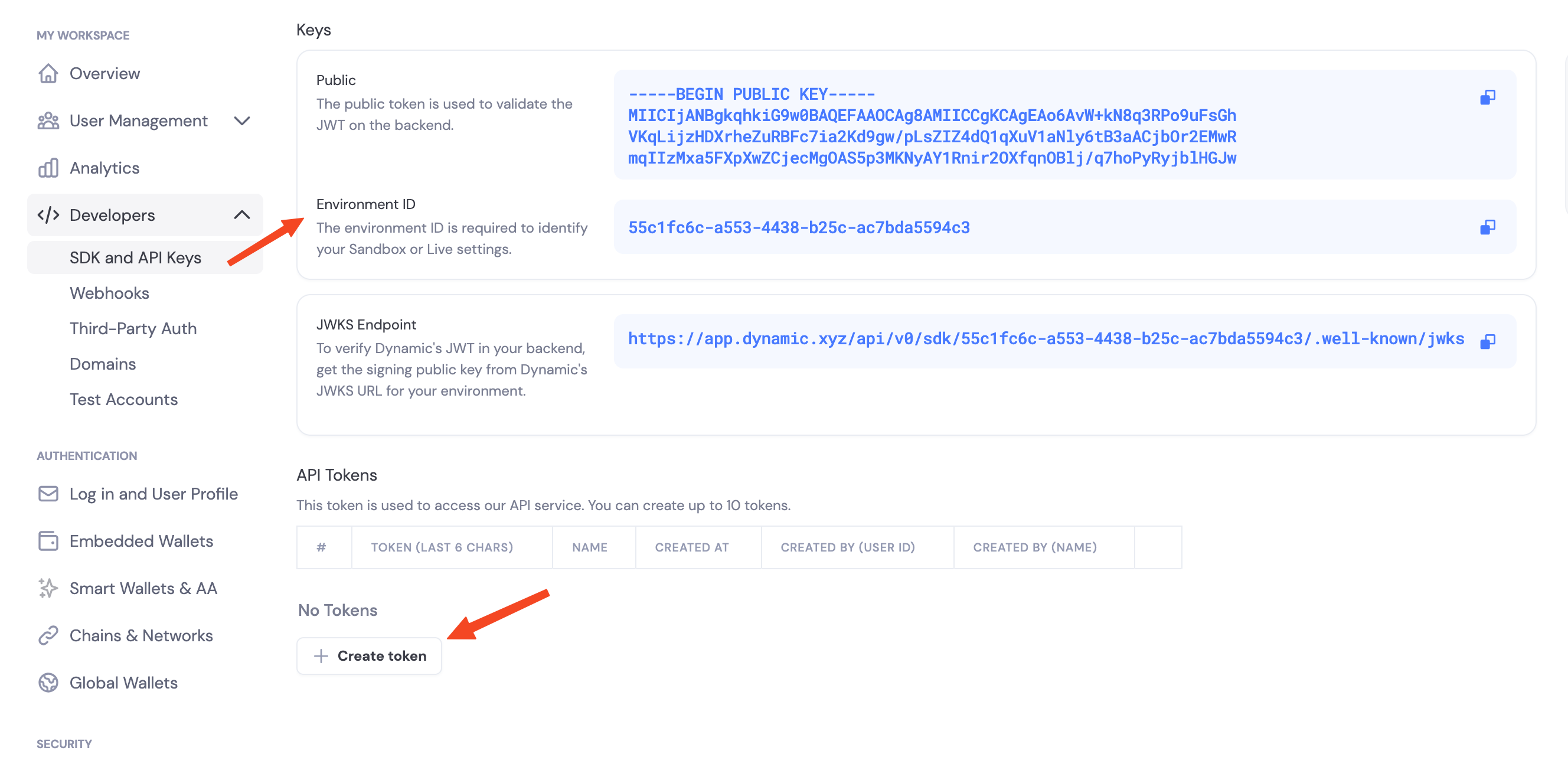
Navigate to the [Dynamic Dashboard](https://app.dynamic.xyz/dashboard/developer/api) and:
1. Copy your `Environment ID`
2. Create a new API token
 ## Enable Features in Dashboard
Before you can use wallet features, enable them in your Dynamic dashboard:
1. Go to your [Dynamic Dashboard](https://app.dynamic.xyz/dashboard/overview)
2. Select your project
3. Go to **Wallets** and enable embedded wallets
4. Go to **Chains** and enable the networks you want to support (Ethereum, Solana, etc.)
## Environment Variables
```bash theme={"system"}
# .env
export DYNAMIC_ENV_ID=your_environment_id_here
export DYNAMIC_API_TOKEN=your_api_token_here
```
These names are a convention — the SDK does not auto-read any environment variables. Pass the values directly to the client constructor and `authenticateApiToken`.
## Initialize the Client
The Java SDK is chain-first: construct `DynamicEvmWalletClient` for Ethereum / EVM chains and `DynamicSvmWalletClient` for Solana. Both are `AutoCloseable` and hold a pooled HTTP client + native MPC handles — **construct once at application startup and reuse across requests**; only `close()` at shutdown.
```java theme={"system"}
import xyz.dynamic.waas.DynamicWalletClientOpts;
import xyz.dynamic.waas.evm.DynamicEvmWalletClient;
String envId = System.getenv("DYNAMIC_ENV_ID");
String apiToken = System.getenv("DYNAMIC_API_TOKEN");
// Application-scoped: construct once, reuse, close on shutdown.
DynamicEvmWalletClient client = new DynamicEvmWalletClient(
DynamicWalletClientOpts.builder(envId).build());
client.authenticateApiToken(apiToken).join();
// ... wallet ops here, across many requests ...
// On shutdown (e.g. Spring `@PreDestroy`, manual hook):
client.close();
```
`try-with-resources` (`try (var client = ...) { ... }`) works for short-lived scripts and tests, but in a request handler it closes the client at the end of every request — defeating the connection-pool reuse and reinitializing the native MPC layer each call.
All methods return `CompletableFuture` — use `.join()` for blocking call sites, `.thenCompose(...)` to compose asynchronously.
## Stateless contract
The Java SDK is **stateless from day 1** — it does not hold wallet state between calls. `createWalletAccount()` returns a `KeygenResult` carrying two pieces of state you must persist:
* `WalletProperties` — non-sensitive identity + backup-pointer info. Cache it in Redis / Postgres. Pass it to every subsequent sign / export operation.
* `List` — sensitive MPC key material. Store in a secrets vault (HSM, KMS-wrapped column, AWS Secrets Manager, etc.).
See [Storage Best Practices](/java/storage-best-practices) for the recommended cache + vault split.
`WalletProperties` is the same concept as the Node SDK's `WalletMetadata` — same fields (`walletId`, `accountAddress`, `chainName`, `derivationPath`, `externalServerKeySharesBackupInfo`). `WalletProperties.toJson()` / `fromJson()` use snake\_case so it round-trips cleanly with the Python and Rust SDKs.
## Threshold signature schemes
When you configure signing, you choose how key shares combine to authorize a signature:
* **`TWO_OF_TWO`** — Default. Requires your server and Dynamic's infrastructure to sign together.
* **`TWO_OF_THREE`** — Requires two of three shares to sign. Tolerates one party being offline.
## Pointing at preprod or sandbox
The SDK defaults to production. To target a different environment, pass `baseApiUrl(...)` on `DynamicWalletClientOpts`:
```java theme={"system"}
var opts = DynamicWalletClientOpts.builder(envId)
.baseApiUrl("https://app.dynamic-preprod.xyz")
.build();
```
## SDK capabilities (v0.1.0)
* **Embedded wallets** — Create and use MPC wallets from your server (EVM + Solana)
* **EVM signing** — EIP-191 messages, EIP-712 typed data, EIP-1559 transaction signing + broadcast, off-chain signature verification
* **SVM signing** — Ed25519 messages, Solana transaction signing + broadcast, gas sponsorship, local address derivation
* **Key import** — Bring an external private key into MPC custody (EVM + Solana)
* **Key export** — Export raw private keys for migration / disaster recovery
* **Password & state queries** — Rotate the backup password locally, check whether an operation needs a password or restored shares
* **Delegated access** — Per-wallet API key flow with `RSA-OAEP-SHA256 + AES-256-GCM` webhook decryption, mirroring Node SDK v1 / Python / Rust
## Logging
The SDK uses [JDK Platform Logging](https://docs.oracle.com/en/java/javase/21/docs/api/java.base/java/lang/System.Logger.html) (`System.Logger`). Customers using SLF4J / Logback can route SDK logs by adding the [`slf4j-jdk-platform-logging`](https://www.slf4j.org/manual.html#jpl) adapter to their classpath.
## Next Steps
### EVM Support
* [Create EVM Wallets](/java/evm/create-wallet) — Create Ethereum wallets
* [Sign EVM Messages](/java/evm/sign-messages) — EIP-191 personal\_sign + off-chain verification
* [Sign Typed Data (EIP-712)](/java/evm/sign-typed-data)
* [Sign EVM Transactions](/java/evm/sign-transaction) — EIP-1559 transaction signing
* [Send EVM Transactions](/java/evm/send-transaction) — Sign + broadcast in one call
* [Export EVM Private Key](/java/evm/export-private-key)
* [EVM Delegated Access](/java/evm/delegated-access)
### Solana Support
* [Create SVM Wallets](/java/svm/create-wallet)
* [Sign SVM Messages](/java/svm/sign-messages) — Ed25519 raw-bytes signing
* [Sign SVM Transactions](/java/svm/sign-transaction)
* [Send SVM Transactions](/java/svm/send-transaction)
* [Sponsor Transactions](/java/svm/sponsor-transaction) — Gas sponsorship
* [Export SVM Private Key](/java/svm/export-private-key)
* [SVM Delegated Access](/java/svm/delegated-access)
### Cross-chain & lifecycle
* [Import a Private Key](/java/import-private-key) — Bring an external key into MPC
* [Password & State Queries](/java/password-and-state) — Rotate the backup password, check operation prerequisites
## Enable Features in Dashboard
Before you can use wallet features, enable them in your Dynamic dashboard:
1. Go to your [Dynamic Dashboard](https://app.dynamic.xyz/dashboard/overview)
2. Select your project
3. Go to **Wallets** and enable embedded wallets
4. Go to **Chains** and enable the networks you want to support (Ethereum, Solana, etc.)
## Environment Variables
```bash theme={"system"}
# .env
export DYNAMIC_ENV_ID=your_environment_id_here
export DYNAMIC_API_TOKEN=your_api_token_here
```
These names are a convention — the SDK does not auto-read any environment variables. Pass the values directly to the client constructor and `authenticateApiToken`.
## Initialize the Client
The Java SDK is chain-first: construct `DynamicEvmWalletClient` for Ethereum / EVM chains and `DynamicSvmWalletClient` for Solana. Both are `AutoCloseable` and hold a pooled HTTP client + native MPC handles — **construct once at application startup and reuse across requests**; only `close()` at shutdown.
```java theme={"system"}
import xyz.dynamic.waas.DynamicWalletClientOpts;
import xyz.dynamic.waas.evm.DynamicEvmWalletClient;
String envId = System.getenv("DYNAMIC_ENV_ID");
String apiToken = System.getenv("DYNAMIC_API_TOKEN");
// Application-scoped: construct once, reuse, close on shutdown.
DynamicEvmWalletClient client = new DynamicEvmWalletClient(
DynamicWalletClientOpts.builder(envId).build());
client.authenticateApiToken(apiToken).join();
// ... wallet ops here, across many requests ...
// On shutdown (e.g. Spring `@PreDestroy`, manual hook):
client.close();
```
`try-with-resources` (`try (var client = ...) { ... }`) works for short-lived scripts and tests, but in a request handler it closes the client at the end of every request — defeating the connection-pool reuse and reinitializing the native MPC layer each call.
All methods return `CompletableFuture` — use `.join()` for blocking call sites, `.thenCompose(...)` to compose asynchronously.
## Stateless contract
The Java SDK is **stateless from day 1** — it does not hold wallet state between calls. `createWalletAccount()` returns a `KeygenResult` carrying two pieces of state you must persist:
* `WalletProperties` — non-sensitive identity + backup-pointer info. Cache it in Redis / Postgres. Pass it to every subsequent sign / export operation.
* `List` — sensitive MPC key material. Store in a secrets vault (HSM, KMS-wrapped column, AWS Secrets Manager, etc.).
See [Storage Best Practices](/java/storage-best-practices) for the recommended cache + vault split.
`WalletProperties` is the same concept as the Node SDK's `WalletMetadata` — same fields (`walletId`, `accountAddress`, `chainName`, `derivationPath`, `externalServerKeySharesBackupInfo`). `WalletProperties.toJson()` / `fromJson()` use snake\_case so it round-trips cleanly with the Python and Rust SDKs.
## Threshold signature schemes
When you configure signing, you choose how key shares combine to authorize a signature:
* **`TWO_OF_TWO`** — Default. Requires your server and Dynamic's infrastructure to sign together.
* **`TWO_OF_THREE`** — Requires two of three shares to sign. Tolerates one party being offline.
## Pointing at preprod or sandbox
The SDK defaults to production. To target a different environment, pass `baseApiUrl(...)` on `DynamicWalletClientOpts`:
```java theme={"system"}
var opts = DynamicWalletClientOpts.builder(envId)
.baseApiUrl("https://app.dynamic-preprod.xyz")
.build();
```
## SDK capabilities (v0.1.0)
* **Embedded wallets** — Create and use MPC wallets from your server (EVM + Solana)
* **EVM signing** — EIP-191 messages, EIP-712 typed data, EIP-1559 transaction signing + broadcast, off-chain signature verification
* **SVM signing** — Ed25519 messages, Solana transaction signing + broadcast, gas sponsorship, local address derivation
* **Key import** — Bring an external private key into MPC custody (EVM + Solana)
* **Key export** — Export raw private keys for migration / disaster recovery
* **Password & state queries** — Rotate the backup password locally, check whether an operation needs a password or restored shares
* **Delegated access** — Per-wallet API key flow with `RSA-OAEP-SHA256 + AES-256-GCM` webhook decryption, mirroring Node SDK v1 / Python / Rust
## Logging
The SDK uses [JDK Platform Logging](https://docs.oracle.com/en/java/javase/21/docs/api/java.base/java/lang/System.Logger.html) (`System.Logger`). Customers using SLF4J / Logback can route SDK logs by adding the [`slf4j-jdk-platform-logging`](https://www.slf4j.org/manual.html#jpl) adapter to their classpath.
## Next Steps
### EVM Support
* [Create EVM Wallets](/java/evm/create-wallet) — Create Ethereum wallets
* [Sign EVM Messages](/java/evm/sign-messages) — EIP-191 personal\_sign + off-chain verification
* [Sign Typed Data (EIP-712)](/java/evm/sign-typed-data)
* [Sign EVM Transactions](/java/evm/sign-transaction) — EIP-1559 transaction signing
* [Send EVM Transactions](/java/evm/send-transaction) — Sign + broadcast in one call
* [Export EVM Private Key](/java/evm/export-private-key)
* [EVM Delegated Access](/java/evm/delegated-access)
### Solana Support
* [Create SVM Wallets](/java/svm/create-wallet)
* [Sign SVM Messages](/java/svm/sign-messages) — Ed25519 raw-bytes signing
* [Sign SVM Transactions](/java/svm/sign-transaction)
* [Send SVM Transactions](/java/svm/send-transaction)
* [Sponsor Transactions](/java/svm/sponsor-transaction) — Gas sponsorship
* [Export SVM Private Key](/java/svm/export-private-key)
* [SVM Delegated Access](/java/svm/delegated-access)
### Cross-chain & lifecycle
* [Import a Private Key](/java/import-private-key) — Bring an external key into MPC
* [Password & State Queries](/java/password-and-state) — Rotate the backup password, check operation prerequisites