> ## Documentation Index
> Fetch the complete documentation index at: https://www.dynamic.xyz/docs/llms.txt
> Use this file to discover all available pages before exploring further.
# Bring Your Own Auth
> Use your own authentication provider with Dynamic. Exchange your JWT for a Dynamic session to access wallets, user management, and SDK features.
### Enterprise feature
Please contact us [in Slack](https://dynamic.xyz/slack) or via email ([hello@dynamic.xyz](mailto:hello@dynamic.xyz)) to enable.
## Overview
If you have your own authentication system or use other auth providers outside Dynamic (e.g. Auth0, Firebase Auth, Supabase Auth), you can continue using those services while taking advantage of Dynamic's wallets, user management, and SDK features.
You do this by exchanging your JWT for a Dynamic session. Dynamic verifies your token, creates (or matches) a user record, and returns its standard sign-in artifacts (JWT and user object).
It is recommended to issue a Dynamic specific JWT token from your auth provider, separate from your applications normal access token that can not be used to access resources on your server.
## Architecture / Flow
### How authentication is performed (Client / end-user ↔ Dynamic)
With Bring Your Own Auth, your authentication system handles the initial login. The Dynamic SDK then exchanges your JWT for a Dynamic-issued session.
```mermaid theme={"system"}
sequenceDiagram
participant User as End User
participant App as Your App
participant Auth as Your Auth Provider
participant SDK as Dynamic SDK
participant Dynamic as Dynamic Backend
User->>App: Signs in with your auth flow
App->>Auth: Authenticates user
Auth->>App: Returns your JWT
App->>SDK: Passes your JWT to Dynamic SDK
SDK->>Dynamic: Sends your JWT for verification
Dynamic->>Dynamic: Fetches public key from your JWKS endpoint
Dynamic->>Dynamic: Verifies JWT signature, iss, sub, exp
Dynamic->>SDK: Returns Dynamic JWT + user object
SDK->>SDK: Stores Dynamic JWT, establishes session
```
At a high level:
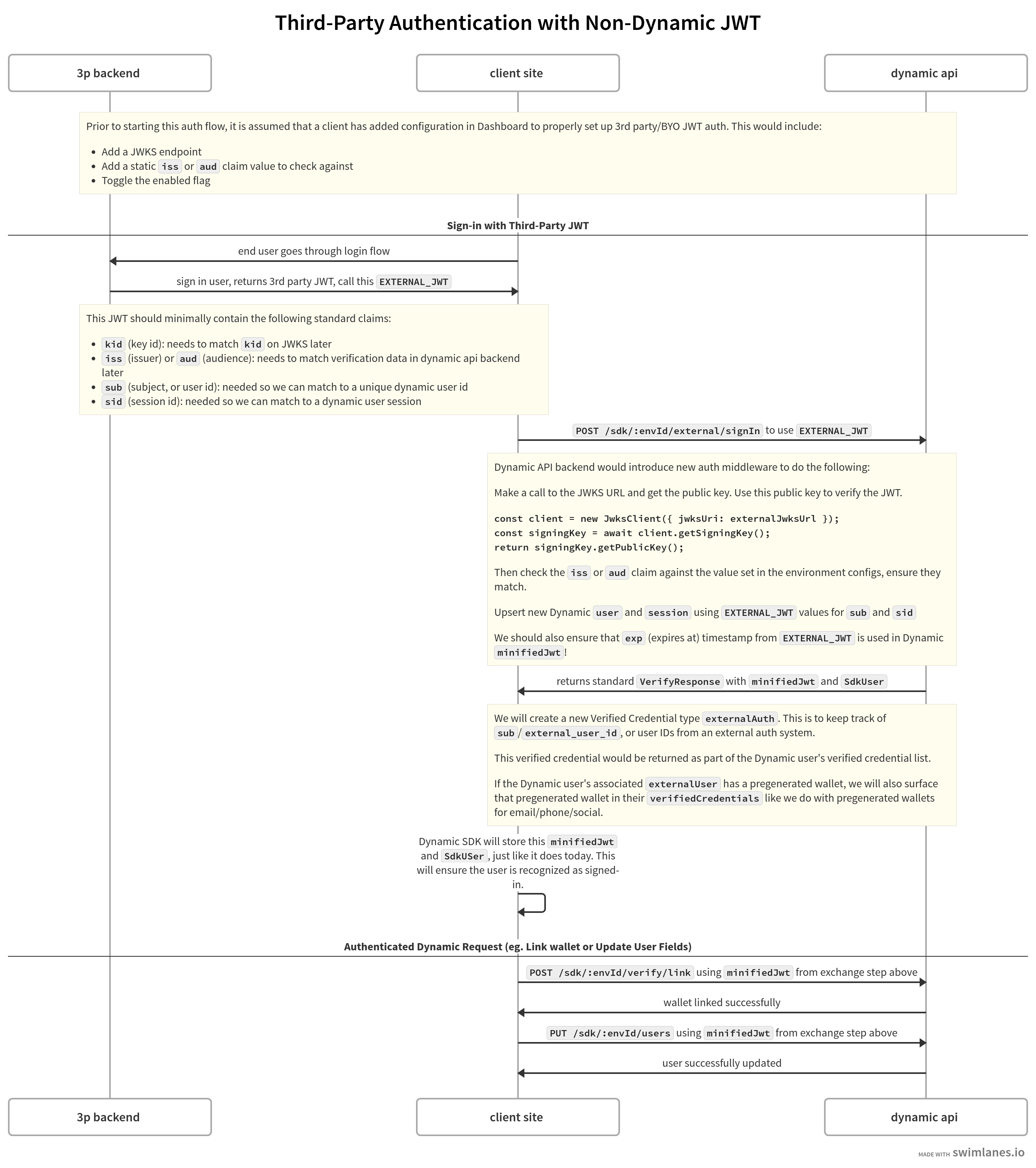
1. Your auth system authenticates the user and issues a JWT.
2. Your app passes that JWT to the Dynamic SDK.
3. Dynamic verifies the authenticity of the JWT by fetching the public key from a JWKS endpoint you provide and verifying the JWT signature.
4. Dynamic validates the `iss` (issuer) claim matches your configured value, requires `sub` (subject/user ID) and `exp` (expiration), and rejects the JWT if any check fails.
5. Once verified, Dynamic creates a verified credential of type `externalAuth` with `externalUserId` set to the JWT's `sub`.
6. Dynamic issues its own JWT and session. The SDK stores it and the user is authenticated in Dynamic.
Optional: Include `email` in your JWT. If the email has been verified, set `"emailVerified": true` so Dynamic creates an email verified credential for the user.
## Workflow
 ## Configuration
1. Visit the [External Authentication](https://app.dynamic.xyz/dashboard/developer/third-party-auth) page in your Dynamic dashboard.
## Configuration
1. Visit the [External Authentication](https://app.dynamic.xyz/dashboard/developer/third-party-auth) page in your Dynamic dashboard.
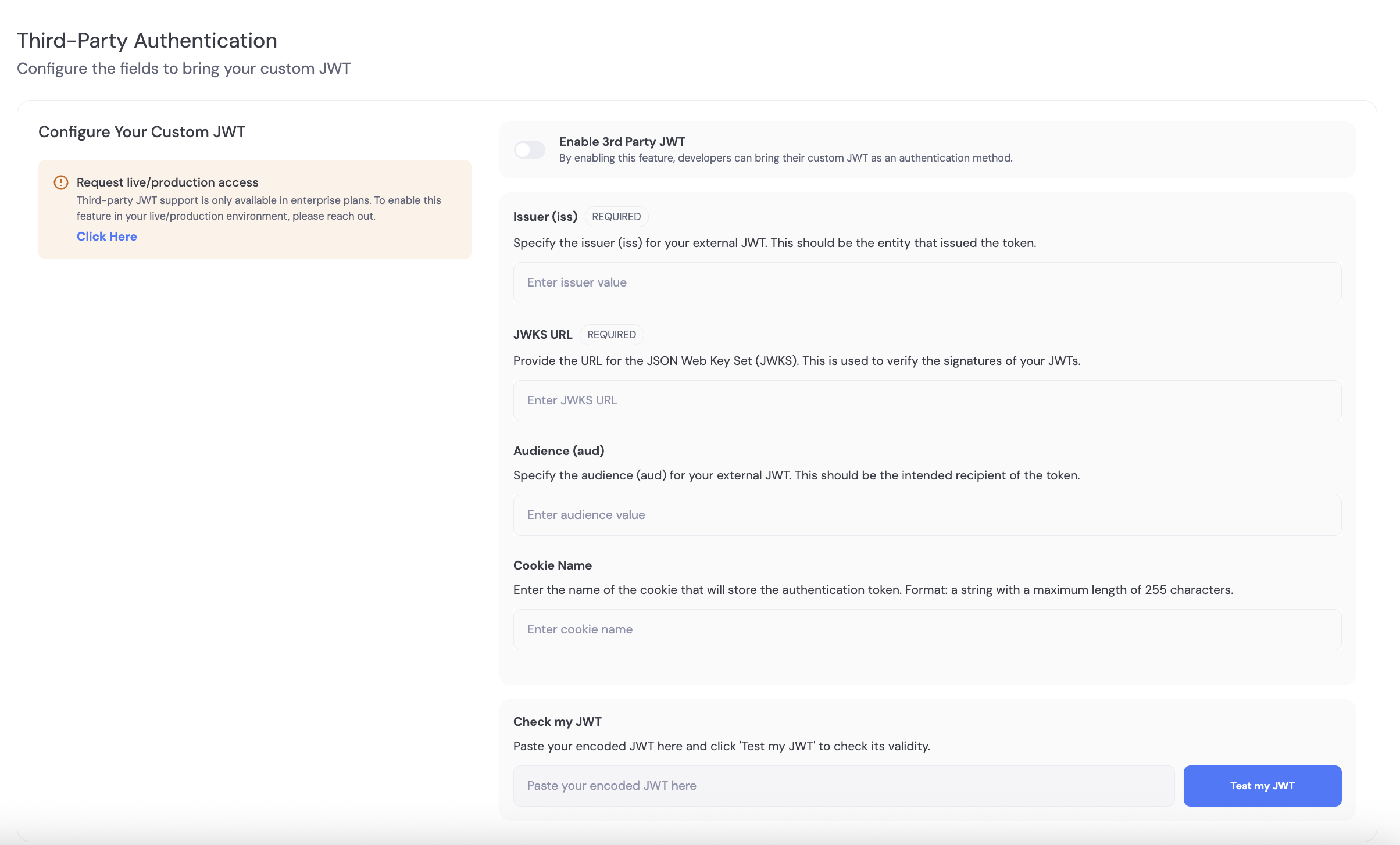 2. Provide values for the following fields:
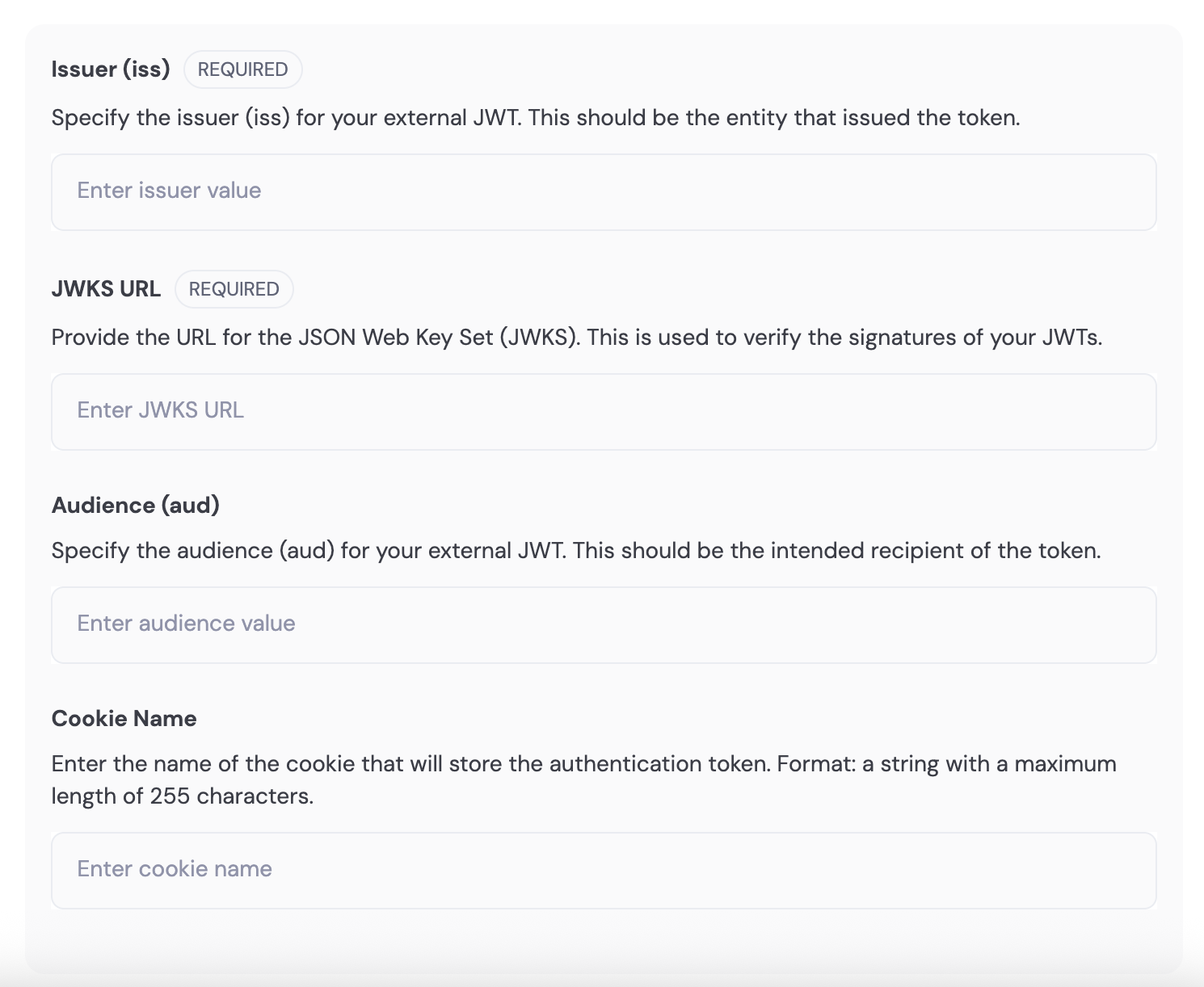 * **iss** (required): Standard JWT claim for the "issuer" of the JWT. This should be the entity that issued the token. Typically a URL or a valid constant string.
* **jwksUrl** (required): A publicly accessible URL that returns the JWT signer's public key in the standard [JWKS format](https://datatracker.ietf.org/doc/html/rfc7517). Used to verify the signatures of your JWTs.
* **aud** (optional): Standard JWT claim for the "audience" of the JWT. The intended recipient of the token. Typically a URL or a valid constant string.
* **cookieName** (optional): For clients that use cookie-based authentication for third-party auth and who have no access to the raw JWT on the frontend, specify the cookie name where the JWT is stored.
3. Enable the feature using the toggle when ready.
* **iss** (required): Standard JWT claim for the "issuer" of the JWT. This should be the entity that issued the token. Typically a URL or a valid constant string.
* **jwksUrl** (required): A publicly accessible URL that returns the JWT signer's public key in the standard [JWKS format](https://datatracker.ietf.org/doc/html/rfc7517). Used to verify the signatures of your JWTs.
* **aud** (optional): Standard JWT claim for the "audience" of the JWT. The intended recipient of the token. Typically a URL or a valid constant string.
* **cookieName** (optional): For clients that use cookie-based authentication for third-party auth and who have no access to the raw JWT on the frontend, specify the cookie name where the JWT is stored.
3. Enable the feature using the toggle when ready.
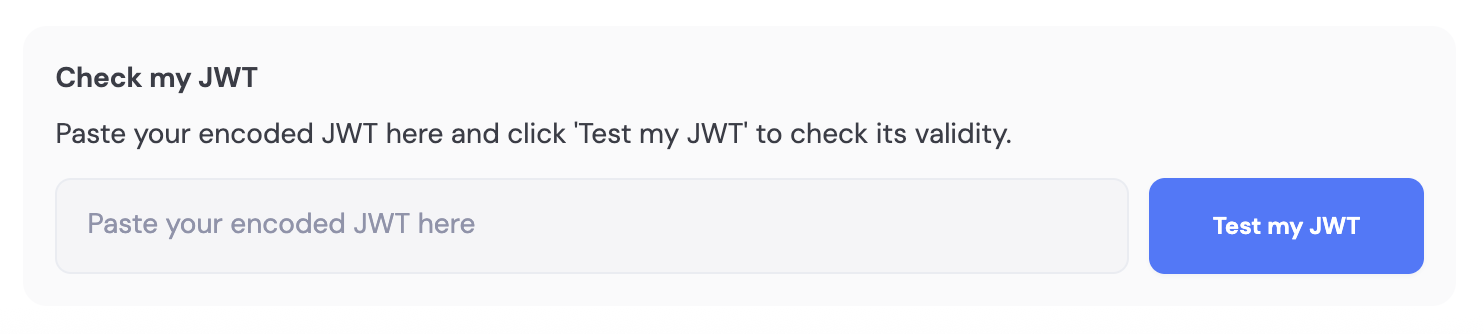
 4. You can also test a JWT against your saved settings; the dashboard returns any errors.
 ## Using it
After configuration, pass your JWT to your SDK's external auth method to sign users in or link them to Dynamic. Your SDK provides the method to call (e.g. sign in with external JWT); see your SDK's external auth or bring-your-own-authentication docs for the exact API.
## Using it
After configuration, pass your JWT to your SDK's external auth method to sign users in or link them to Dynamic. Your SDK provides the method to call (e.g. sign in with external JWT); see your SDK's external auth or bring-your-own-authentication docs for the exact API.