> ## Documentation Index
> Fetch the complete documentation index at: https://www.dynamic.xyz/docs/llms.txt
> Use this file to discover all available pages before exploring further.
# Creating & Managing Rules
> Create, update, and delete policy rules from the developer dashboard or the Dynamic API.
The dashboard and API steps below set **environment-wide** policy rules. For account, wallet, and signer layers, see [Managing layers](/docs/overview/wallets/embedded-wallets/mpc/policies/managing-layers) for API examples, or the [JavaScript SDK business accounts guide](/docs/javascript/reference/business-accounts/policies/overview) for SDK helpers.
Wallet and signer policy layers are in **early access**. [Talk to us](https://www.dynamic.xyz/talk-to-us) if you'd like to participate.
## Creating a Rule
### Step 1: Navigate to the Policies Tab
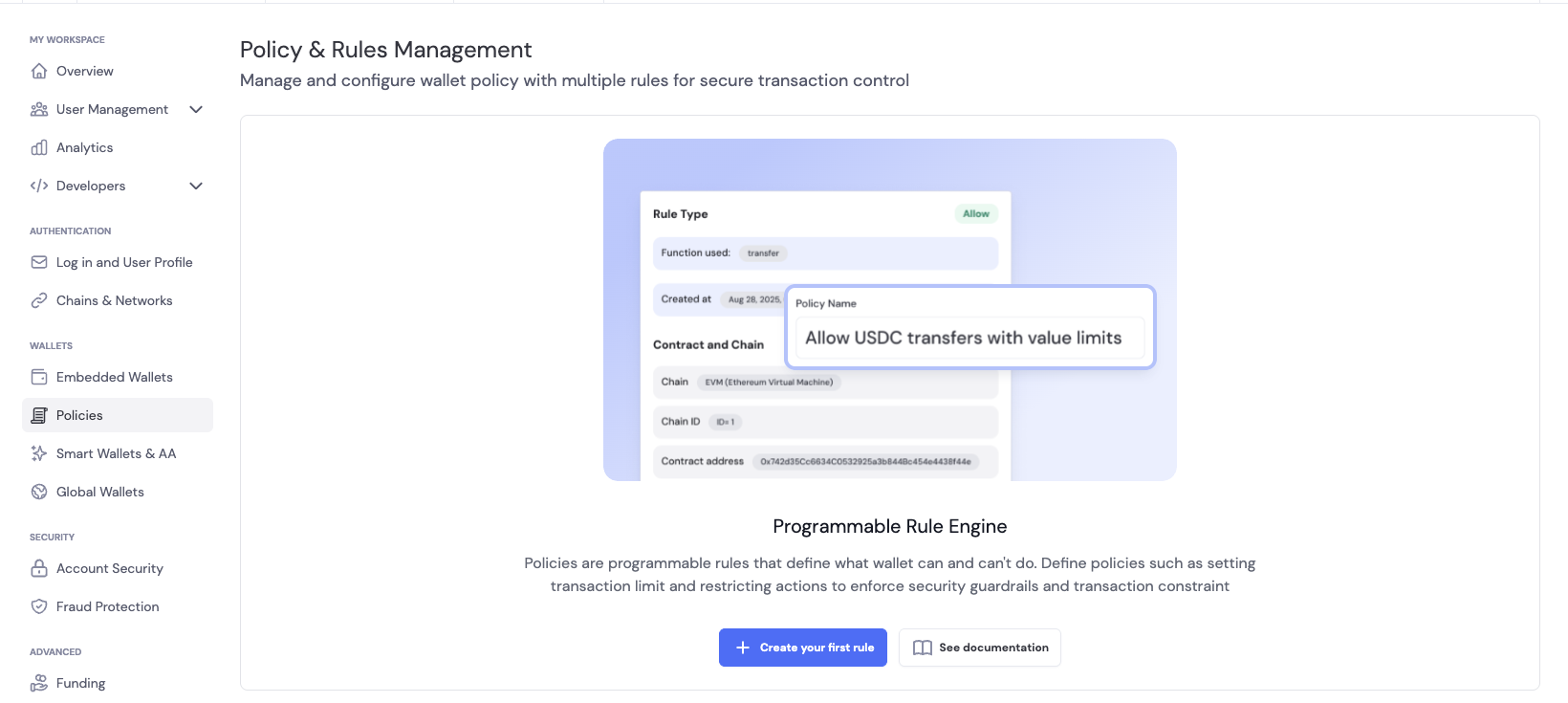
On the developer dashboard, navigate to the **Policies** tab under the **Wallets** section. Click on **Create your first rule** to get started.
 ### Step 2: Configure the Rule
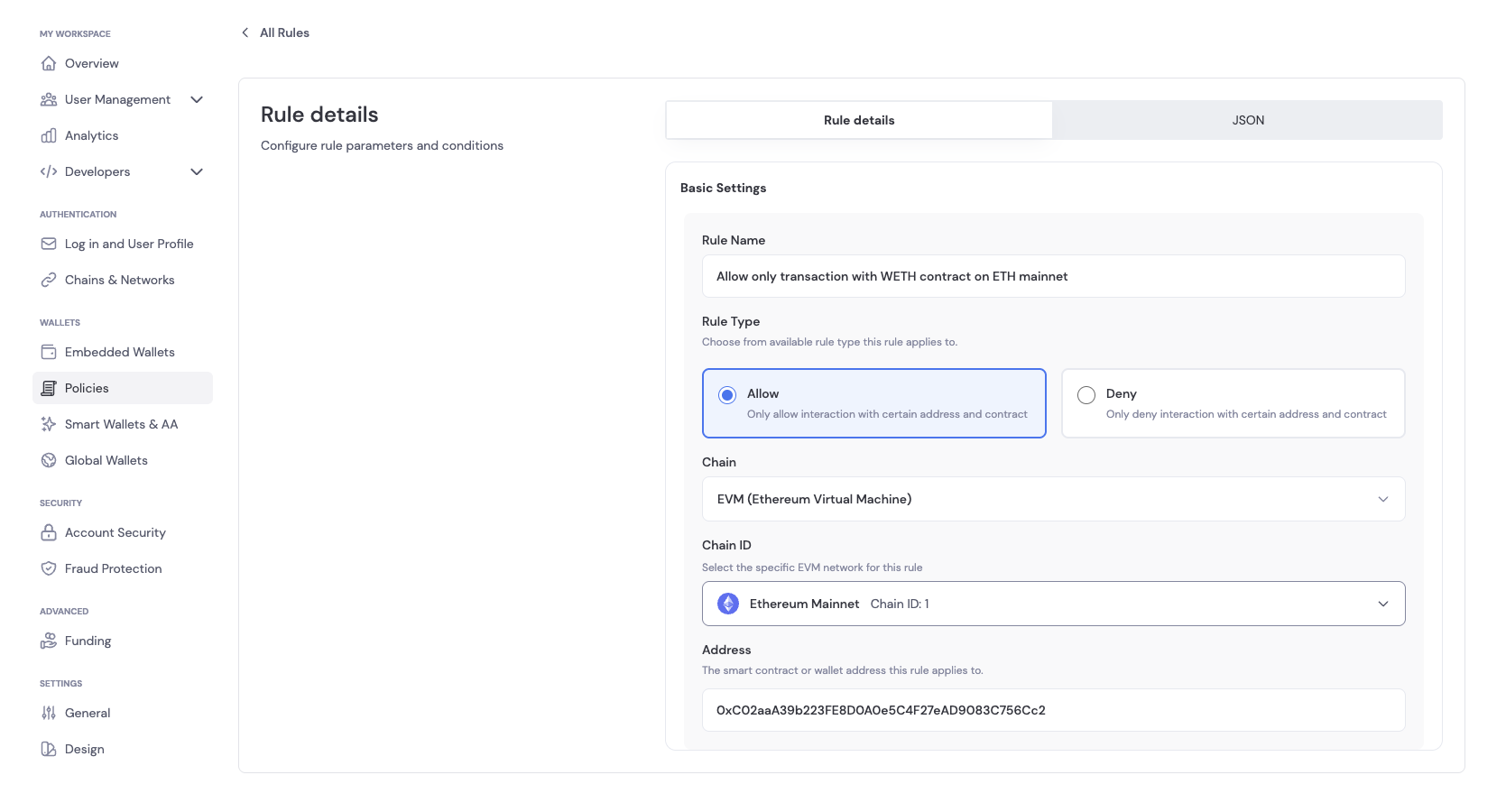
In **Basic Settings**, you can configure the following for the rule:
* **Rule Name**: A descriptive name for the rule
* **Rule Description**: A description of the rule
* **Rule Type**: The type of rule to create. You can choose between:
* **Allow**: This rule allows the operation to proceed
* **Deny**: This rule blocks the operation
* **Network/Environment**: The specific network or environment, such as Sepolia, Base Sepolia, etc.
* **Addresses**: The addresses the rule applies to
Below is an example of configuring a rule to only allow users interacting with the WETH contract on Ethereum mainnet.
### Step 2: Configure the Rule
In **Basic Settings**, you can configure the following for the rule:
* **Rule Name**: A descriptive name for the rule
* **Rule Description**: A description of the rule
* **Rule Type**: The type of rule to create. You can choose between:
* **Allow**: This rule allows the operation to proceed
* **Deny**: This rule blocks the operation
* **Network/Environment**: The specific network or environment, such as Sepolia, Base Sepolia, etc.
* **Addresses**: The addresses the rule applies to
Below is an example of configuring a rule to only allow users interacting with the WETH contract on Ethereum mainnet.
 ### Step 3: Add/Update a Rule
There are two ways to add/update a rule: you can either update using the dashboard or send an API request with your authorized token.
#### Creating a Rule
1. Click on **Save Rule** to create a rule by clicking on **Add Rule** in **Basic Settings** once you have configured the rule.
2. You can also send an API request with your authorized token to create/update a rule. The payload can be found in the JSON tab of the Rule creation page.
Below is an example of creating a rule via curl:
```bash theme={"system"}
curl -X POST \
"https://app.dynamicauth.com/api/v0/environments//waas/policies" \
-H "Content-Type: application/json" \
-H "Authorization: Bearer " \
-d '{
"rulesToAdd": [
{
"chain": "EVM",
"chainIds": [1],
"name": "Allow only transaction with WETH contract on ETH mainnet",
"ruleType": "allow",
"addresses": ["0xC02aaA39b223FE8D0A0e5C4F27eAD9083C756Cc2"]
}
]
}'
```
#### Update a Rule
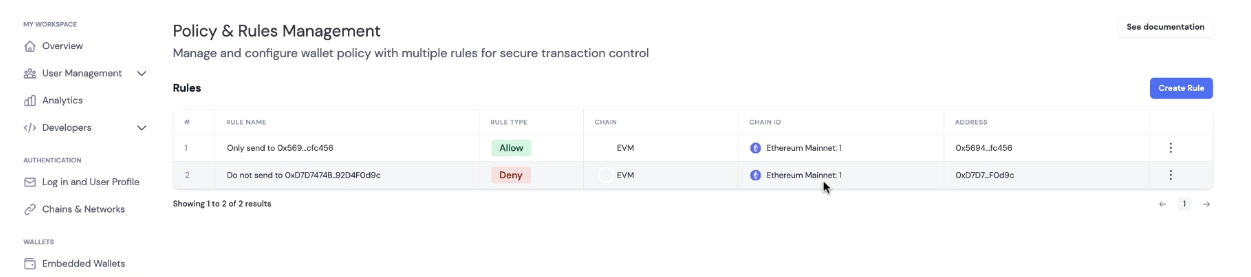
If you have active rules, you will see the **Policy & Rules Management** tab in the Policies tab.
1. Click on the rule you want to update, which will expand to the **Edit Rule** page
2. Update the rule configuration and click on **Save Rule** to update the rule
### Step 3: Add/Update a Rule
There are two ways to add/update a rule: you can either update using the dashboard or send an API request with your authorized token.
#### Creating a Rule
1. Click on **Save Rule** to create a rule by clicking on **Add Rule** in **Basic Settings** once you have configured the rule.
2. You can also send an API request with your authorized token to create/update a rule. The payload can be found in the JSON tab of the Rule creation page.
Below is an example of creating a rule via curl:
```bash theme={"system"}
curl -X POST \
"https://app.dynamicauth.com/api/v0/environments//waas/policies" \
-H "Content-Type: application/json" \
-H "Authorization: Bearer " \
-d '{
"rulesToAdd": [
{
"chain": "EVM",
"chainIds": [1],
"name": "Allow only transaction with WETH contract on ETH mainnet",
"ruleType": "allow",
"addresses": ["0xC02aaA39b223FE8D0A0e5C4F27eAD9083C756Cc2"]
}
]
}'
```
#### Update a Rule
If you have active rules, you will see the **Policy & Rules Management** tab in the Policies tab.
1. Click on the rule you want to update, which will expand to the **Edit Rule** page
2. Update the rule configuration and click on **Save Rule** to update the rule
 Below is an example of updating a rule via curl:
```bash theme={"system"}
curl -X PUT \
"https://app.dynamicauth.com/api/v0/environments//waas/policies" \
-H "Content-Type: application/json" \
-H "Authorization: Bearer " \
-d '{
"rulesToUpdate": [
{
"id": ,
"chain": "EVM",
"chainIds": [1],
"name": "Allow only transaction with WETH contract on ETH mainnet",
"ruleType": "allow",
"addresses": ["0xC02aaA39b223FE8D0A0e5C4F27eAD9083C756Cc2"]
}
]
}'
```
### Step 4: Verifying Policy
To confirm that your policy rule is enforced, attempt to send a transaction that matches or violates the rule you configured. We recommend performing these tests on a testnet within a sandbox environment.
**Expected Behavior:**
* If the transaction complies with the policy, it will be processed as normal.
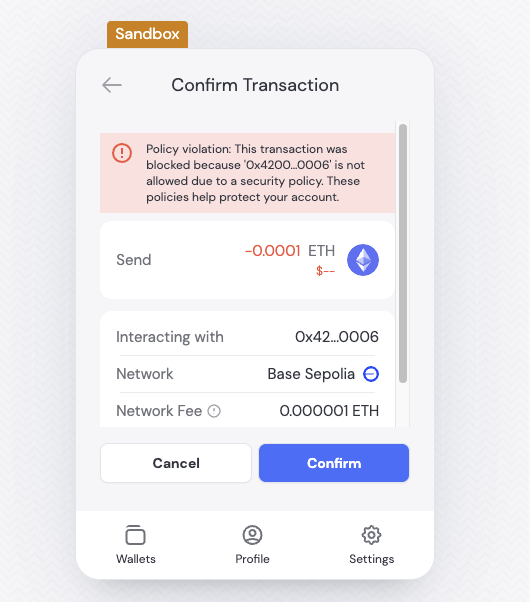
* If the transaction violates the policy, the SDK or wallet connector will return an error indicating that the operation is not permitted.
Below is an example of a policy violation error displayed when a transaction does not meet the configured rule criteria:
Below is an example of updating a rule via curl:
```bash theme={"system"}
curl -X PUT \
"https://app.dynamicauth.com/api/v0/environments//waas/policies" \
-H "Content-Type: application/json" \
-H "Authorization: Bearer " \
-d '{
"rulesToUpdate": [
{
"id": ,
"chain": "EVM",
"chainIds": [1],
"name": "Allow only transaction with WETH contract on ETH mainnet",
"ruleType": "allow",
"addresses": ["0xC02aaA39b223FE8D0A0e5C4F27eAD9083C756Cc2"]
}
]
}'
```
### Step 4: Verifying Policy
To confirm that your policy rule is enforced, attempt to send a transaction that matches or violates the rule you configured. We recommend performing these tests on a testnet within a sandbox environment.
**Expected Behavior:**
* If the transaction complies with the policy, it will be processed as normal.
* If the transaction violates the policy, the SDK or wallet connector will return an error indicating that the operation is not permitted.
Below is an example of a policy violation error displayed when a transaction does not meet the configured rule criteria:
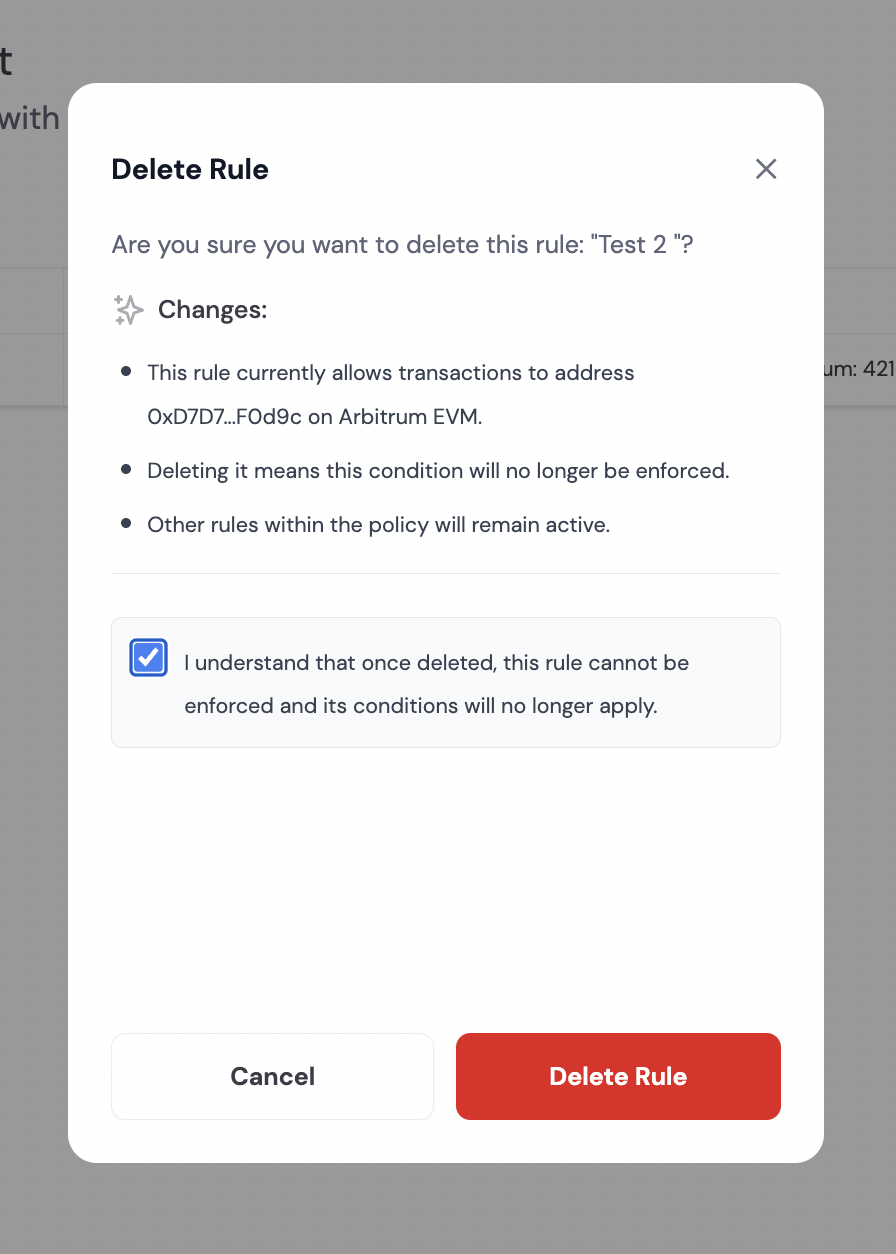
 ### Step 5: Deleting a Rule
If you have active rules, you will see the **Policy & Rules Management** tab in the Policies tab.
1. Click `...` next to the rule you want to delete, which will expand a dropdown menu with the option to delete the rule
2. Check the box to confirm you want to delete the rule and click on **Delete Rule** button
### Step 5: Deleting a Rule
If you have active rules, you will see the **Policy & Rules Management** tab in the Policies tab.
1. Click `...` next to the rule you want to delete, which will expand a dropdown menu with the option to delete the rule
2. Check the box to confirm you want to delete the rule and click on **Delete Rule** button
 Below is an example of deleting a rule via curl:
```bash theme={"system"}
curl -X DELETE \
"https://app.dynamicauth.com/api/v0/environments//waas/policies" \
-H "Authorization: Bearer " \
-H "Content-Type: application/json" \
-d '{
"ruleIdsToDelete": [""]
}'
```
## Creating, Updating, and Deleting Rules in Bulk
You can programmatically create or update multiple policy rules at once using the API. To do this, provide an array of rules in the `rulesToAdd`, `rulesToUpdate`, or `ruleIdsToDelete` fields of your request payload.
Here is an example of how to create multiple rules using a POST request (SDKs or HTTP clients):
```bash theme={"system"}
curl -X POST \
"https://app.dynamicauth.com/api/v0/environments//waas/policies" \
-H "Content-Type: application/json" \
-H "Authorization: Bearer " \
-d '{
"rulesToAdd": [
{
"chain": "EVM",
"chainIds": [1],
"name": "Allow only transaction with the WETH contract on ETH mainnet",
"ruleType": "allow",
"addresses": ["0xC02aaA39b223FE8D0A0e5C4F27eAD9083C756Cc2"]
},
{
"chain": "EVM",
"chainIds": [8453],
"name": "Allow only transaction with USDC contract on Base mainnet",
"ruleType": "allow",
"addresses": ["0x833589fCD6eDb6E08f4c7C32D4f71b54bdA02913"]
}
]
}'
```
Here is an example of how to update multiple rules using curl:
```bash theme={"system"}
curl -X PUT \
"https://app.dynamicauth.com/api/v0/environments//waas/policies" \
-H "Content-Type: application/json" \
-H "Authorization: Bearer " \
-d '{
"rulesToUpdate": [
{
"id": ,
"chain": "EVM",
"chainIds": [1],
"name": "Allow only transaction with the WETH contract on ETH mainnet",
"ruleType": "allow",
"addresses": ["0xC02aaA39b223FE8D0A0e5C4F27eAD9083C756Cc2"]
},
{
"id": ,
"chain": "EVM",
"chainIds": [8453],
"name": "Allow only transaction with USDC contract on Base mainnet",
"ruleType": "allow",
"addresses": ["0x833589fCD6eDb6E08f4c7C32D4f71b54bdA02913"]
}
]
}'
```
Here is an example of how to delete multiple rules using curl:
```bash theme={"system"}
curl -X DELETE \
"https://app.dynamicauth.com/api/v0/environments//waas/policies" \
-H "Authorization: Bearer " \
-H "Content-Type: application/json" \
-d '{
"ruleIdsToDelete": ["", ""]
}'
```
## USDC allowlist example (Ethereum mainnet, proxy + implementation) to a single address:
USDC on Ethereum mainnet uses a proxy pattern. To allow interactions, add both the proxy and the current implementation addresses to your allowlist, on this example we are allowing interactions to a single address (0x5f09B2caaafD345EaE7B711A32CcBdf59befB4bB):
```bash theme={"system"}
curl -X POST \
"https://app.dynamicauth.com/api/v0/environments//waas/policies" \
-H "Content-Type: application/json" \
-H "Authorization: Bearer " \
-d '{
"rulesToAdd": [
{
"chain": "EVM",
"chainIds": [1],
"name": "Allow USDC proxy (ETH mainnet)",
"ruleType": "allow",
"addresses": ["0xA0b86991c6218b36c1d19D4a2e9Eb0cE3606eB48","0x43506849d7c04f9138d1a2050bbf3a0c054402dd","0x5f09B2caaafD345EaE7B711A32CcBdf59befB4bB"]
}
]
}'
```
## Value Limit Example (Ethereum mainnet):
On this example we are allowing interactions to a single address (0x5f09B2caaafD345EaE7B711A32CcBdf59befB4bB) with a value limit of 100 USDC:
```bash theme={"system"}
curl -X POST \
"https://app.dynamicauth.com/api/v0/environments//waas/policies" \
-H "Content-Type: application/json" \
-H "Authorization: Bearer " \
-d '{
"rulesToAdd": [
{
"chain": "EVM",
"chainIds": [1],
"name": "Allow USDC (ETH mainnet) with value limit",
"ruleType": "allow",
"addresses": ["0x43506849d7c04f9138d1a2050bbf3a0c054402dd","0xA0b86991c6218b36c1d19D4a2e9Eb0cE3606eB48", "0x5f09B2caaafD345EaE7B711A32CcBdf59befB4bB"],
"valueLimit": {
"asset": "0xA0b86991c6218b36c1d19D4a2e9Eb0cE3606eB48", // USDC
"maxPerCall": "100000000000", // 100 USDC
}
}
]
}'
```
## Next steps
Understand how environment, account, wallet, and signer rules combine.
Receive and handle policy violation events.
Below is an example of deleting a rule via curl:
```bash theme={"system"}
curl -X DELETE \
"https://app.dynamicauth.com/api/v0/environments//waas/policies" \
-H "Authorization: Bearer " \
-H "Content-Type: application/json" \
-d '{
"ruleIdsToDelete": [""]
}'
```
## Creating, Updating, and Deleting Rules in Bulk
You can programmatically create or update multiple policy rules at once using the API. To do this, provide an array of rules in the `rulesToAdd`, `rulesToUpdate`, or `ruleIdsToDelete` fields of your request payload.
Here is an example of how to create multiple rules using a POST request (SDKs or HTTP clients):
```bash theme={"system"}
curl -X POST \
"https://app.dynamicauth.com/api/v0/environments//waas/policies" \
-H "Content-Type: application/json" \
-H "Authorization: Bearer " \
-d '{
"rulesToAdd": [
{
"chain": "EVM",
"chainIds": [1],
"name": "Allow only transaction with the WETH contract on ETH mainnet",
"ruleType": "allow",
"addresses": ["0xC02aaA39b223FE8D0A0e5C4F27eAD9083C756Cc2"]
},
{
"chain": "EVM",
"chainIds": [8453],
"name": "Allow only transaction with USDC contract on Base mainnet",
"ruleType": "allow",
"addresses": ["0x833589fCD6eDb6E08f4c7C32D4f71b54bdA02913"]
}
]
}'
```
Here is an example of how to update multiple rules using curl:
```bash theme={"system"}
curl -X PUT \
"https://app.dynamicauth.com/api/v0/environments//waas/policies" \
-H "Content-Type: application/json" \
-H "Authorization: Bearer " \
-d '{
"rulesToUpdate": [
{
"id": ,
"chain": "EVM",
"chainIds": [1],
"name": "Allow only transaction with the WETH contract on ETH mainnet",
"ruleType": "allow",
"addresses": ["0xC02aaA39b223FE8D0A0e5C4F27eAD9083C756Cc2"]
},
{
"id": ,
"chain": "EVM",
"chainIds": [8453],
"name": "Allow only transaction with USDC contract on Base mainnet",
"ruleType": "allow",
"addresses": ["0x833589fCD6eDb6E08f4c7C32D4f71b54bdA02913"]
}
]
}'
```
Here is an example of how to delete multiple rules using curl:
```bash theme={"system"}
curl -X DELETE \
"https://app.dynamicauth.com/api/v0/environments//waas/policies" \
-H "Authorization: Bearer " \
-H "Content-Type: application/json" \
-d '{
"ruleIdsToDelete": ["", ""]
}'
```
## USDC allowlist example (Ethereum mainnet, proxy + implementation) to a single address:
USDC on Ethereum mainnet uses a proxy pattern. To allow interactions, add both the proxy and the current implementation addresses to your allowlist, on this example we are allowing interactions to a single address (0x5f09B2caaafD345EaE7B711A32CcBdf59befB4bB):
```bash theme={"system"}
curl -X POST \
"https://app.dynamicauth.com/api/v0/environments//waas/policies" \
-H "Content-Type: application/json" \
-H "Authorization: Bearer " \
-d '{
"rulesToAdd": [
{
"chain": "EVM",
"chainIds": [1],
"name": "Allow USDC proxy (ETH mainnet)",
"ruleType": "allow",
"addresses": ["0xA0b86991c6218b36c1d19D4a2e9Eb0cE3606eB48","0x43506849d7c04f9138d1a2050bbf3a0c054402dd","0x5f09B2caaafD345EaE7B711A32CcBdf59befB4bB"]
}
]
}'
```
## Value Limit Example (Ethereum mainnet):
On this example we are allowing interactions to a single address (0x5f09B2caaafD345EaE7B711A32CcBdf59befB4bB) with a value limit of 100 USDC:
```bash theme={"system"}
curl -X POST \
"https://app.dynamicauth.com/api/v0/environments//waas/policies" \
-H "Content-Type: application/json" \
-H "Authorization: Bearer " \
-d '{
"rulesToAdd": [
{
"chain": "EVM",
"chainIds": [1],
"name": "Allow USDC (ETH mainnet) with value limit",
"ruleType": "allow",
"addresses": ["0x43506849d7c04f9138d1a2050bbf3a0c054402dd","0xA0b86991c6218b36c1d19D4a2e9Eb0cE3606eB48", "0x5f09B2caaafD345EaE7B711A32CcBdf59befB4bB"],
"valueLimit": {
"asset": "0xA0b86991c6218b36c1d19D4a2e9Eb0cE3606eB48", // USDC
"maxPerCall": "100000000000", // 100 USDC
}
}
]
}'
```
## Next steps
Understand how environment, account, wallet, and signer rules combine.
Receive and handle policy violation events.