> ## Documentation Index
> Fetch the complete documentation index at: https://www.dynamic.xyz/docs/llms.txt
> Use this file to discover all available pages before exploring further.
# Python SDK Quickstart
> Create server-side MPC wallets and sign transactions on EVM and Solana with the Dynamic Python SDK.
## Prerequisites
* **Python 3.11+**
* **Dynamic Account** — Set up your project and get credentials from the [Dynamic Dashboard](https://app.dynamic.xyz/dashboard/overview)
The Python SDK runs on your server so you can create **embedded wallets**, sign transactions, and work with EVM and Solana chains without putting full keys anywhere. Signing uses Multi-Party Computation (MPC): your server and Dynamic each hold part of the key material so neither side alone can sign.
## Install the SDK
```bash theme={"system"}
pip install dynamic-wallet-sdk
```
Pre-built wheels are provided for Linux (x86\_64, ARM64) and macOS (x86\_64, Apple Silicon). No Rust toolchain required.
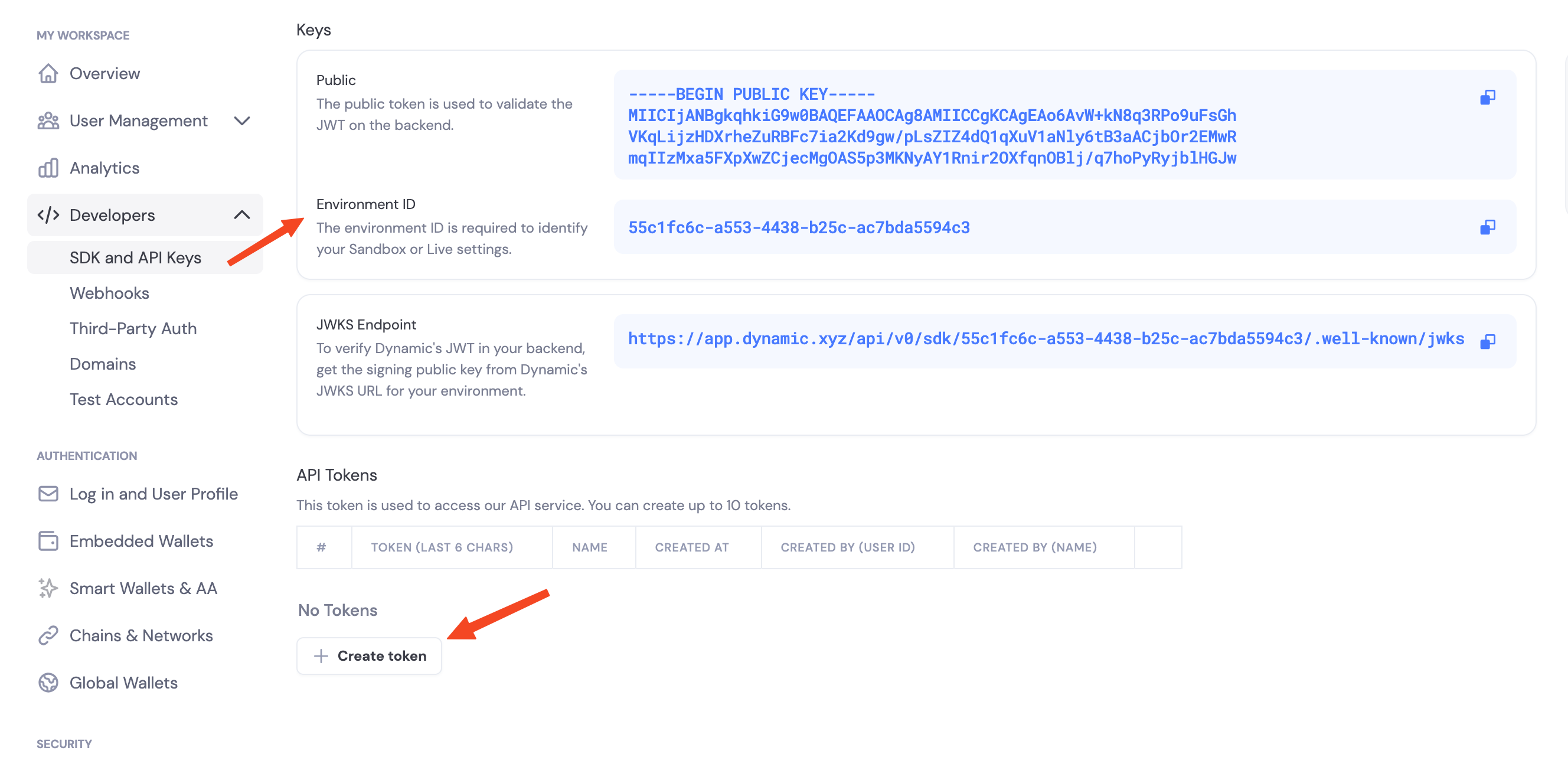
## Get Your Credentials
Navigate to the [Dynamic Dashboard](https://app.dynamic.xyz/dashboard/developer/api) and:
1. Copy your `Environment ID`
2. Create a new API token
 ## Enable Features in Dashboard
Before you can use wallet features, you need to enable them in your Dynamic dashboard:
1. Go to your [Dynamic Dashboard](https://app.dynamic.xyz/dashboard/overview)
2. Select your project
3. Go to **Wallets** and enable embedded wallets
4. Go to **Chains** and enable the networks you want to support (Ethereum, Solana, etc.)
## Environment Variables
```bash theme={"system"}
# .env
DYNAMIC_ENV_ID=your_environment_id_here
DYNAMIC_API_TOKEN=your_api_token_here
```
These names are a convention — the SDK does not auto-read any environment variables. You pass the values directly to the client constructor and `authenticate_api_token`.
## Hello, Wallet
```python theme={"system"}
import asyncio
import os
from dynamic_wallet_sdk import DynamicEvmWalletClient
async def main():
async with DynamicEvmWalletClient(os.environ["DYNAMIC_ENV_ID"]) as client:
await client.authenticate_api_token(os.environ["DYNAMIC_API_TOKEN"])
# ... wallet ops here
asyncio.run(main())
```
## SDK Capabilities
* **Embedded wallets** — Create and use MPC wallets from your server
* **Chains** — Ethereum (EVM) and Solana (SVM)
* **Async/await** — Fully async Python API with `asyncio`
* **Key backup** — Password-encrypted key share backup and recovery
## Threshold Signature Schemes
When you configure signing, you choose how key shares combine to authorize a signature:
* **TWO\_OF\_TWO** — Default. Requires your server and Dynamic's infrastructure to sign together. Most thoroughly tested.
* **TWO\_OF\_THREE** — Advanced. Requires two of three shares to sign. Tolerates one party being offline.
## Next Steps
### Ethereum (EVM)
* [Create EVM Wallets](/python/evm/create-wallet)
* [Sign EVM Messages](/python/evm/sign-messages)
* [Sign EVM Transactions](/python/evm/sign-transactions)
* [Sign Typed Data (EIP-712)](/python/evm/sign-typed-data)
* [Delegated Access](/python/evm/delegated-access)
### Solana (SVM)
* [Create SVM Wallets](/python/svm/create-wallet)
* [Sign SVM Messages](/python/svm/sign-messages)
* [Sign SVM Transactions](/python/svm/sign-transactions)
## Enable Features in Dashboard
Before you can use wallet features, you need to enable them in your Dynamic dashboard:
1. Go to your [Dynamic Dashboard](https://app.dynamic.xyz/dashboard/overview)
2. Select your project
3. Go to **Wallets** and enable embedded wallets
4. Go to **Chains** and enable the networks you want to support (Ethereum, Solana, etc.)
## Environment Variables
```bash theme={"system"}
# .env
DYNAMIC_ENV_ID=your_environment_id_here
DYNAMIC_API_TOKEN=your_api_token_here
```
These names are a convention — the SDK does not auto-read any environment variables. You pass the values directly to the client constructor and `authenticate_api_token`.
## Hello, Wallet
```python theme={"system"}
import asyncio
import os
from dynamic_wallet_sdk import DynamicEvmWalletClient
async def main():
async with DynamicEvmWalletClient(os.environ["DYNAMIC_ENV_ID"]) as client:
await client.authenticate_api_token(os.environ["DYNAMIC_API_TOKEN"])
# ... wallet ops here
asyncio.run(main())
```
## SDK Capabilities
* **Embedded wallets** — Create and use MPC wallets from your server
* **Chains** — Ethereum (EVM) and Solana (SVM)
* **Async/await** — Fully async Python API with `asyncio`
* **Key backup** — Password-encrypted key share backup and recovery
## Threshold Signature Schemes
When you configure signing, you choose how key shares combine to authorize a signature:
* **TWO\_OF\_TWO** — Default. Requires your server and Dynamic's infrastructure to sign together. Most thoroughly tested.
* **TWO\_OF\_THREE** — Advanced. Requires two of three shares to sign. Tolerates one party being offline.
## Next Steps
### Ethereum (EVM)
* [Create EVM Wallets](/python/evm/create-wallet)
* [Sign EVM Messages](/python/evm/sign-messages)
* [Sign EVM Transactions](/python/evm/sign-transactions)
* [Sign Typed Data (EIP-712)](/python/evm/sign-typed-data)
* [Delegated Access](/python/evm/delegated-access)
### Solana (SVM)
* [Create SVM Wallets](/python/svm/create-wallet)
* [Sign SVM Messages](/python/svm/sign-messages)
* [Sign SVM Transactions](/python/svm/sign-transactions)