> ## Documentation Index
> Fetch the complete documentation index at: https://www.dynamic.xyz/docs/llms.txt
> Use this file to discover all available pages before exploring further.

# Building Mini Apps with Dynamic

> Learn how to integrate wallet functionality into Farcaster mini apps using Dynamic

# Building Mini Apps with Dynamic

Mini apps are lightweight, purpose-built web applications that can be embedded within social platforms, and they're becoming increasingly popular. With the rise of Farcaster mini apps, developers can now create seamless wallet-connected experiences directly within these social platforms. **Dynamic** provides a powerful toolkit for integrating wallet functionality into your mini apps, allowing users to connect wallets, sign messages, and execute transactions without leaving the ecosystem.

In this guide, we'll walk through building a mini app using Dynamic's wallet infrastructure integrated with Farcaster mini apps to create a seamless wallet experience that works across multiple blockchain networks. If you want to take a quick look at the final code, check out the [GitHub repository](https://github.com/dynamic-labs/mini-app-farcaster).

<Info>
  This guide demonstrates how to build a mini app that supports both Ethereum
  and Solana wallets using Dynamic's multi-chain support.
</Info>

## Project Structure

Here's the file structure we'll be building:

```
my-dynamic-mini-app/
├── public/
│   └── .well-known/
│       └── farcaster.json
├── src/
│   ├── components/
│   │   ├── Methods.tsx
│   │   └── Methods.css
│   ├── wagmi.ts
│   ├── App.tsx
│   └── main.tsx
├── .env
└── package.json
```

## Overview

Our mini app will allow users to:

* Connect wallets via the Dynamic widget
* Support both Ethereum and Solana networks
* View wallet addresses and details
* Sign messages with their connected wallets
* Send transactions to other addresses

We'll implement this using:

* **Dynamic SDK**: For wallet connection and management
* **Farcaster Mini App SDK**: For mini app integration and detection
* **Wagmi**: For Ethereum blockchain interactions
* **Viem**: For transaction formatting and handling
* **Solana Web3.js**: For Solana blockchain interactions

## Setup

### 1. Create a new project

Follow the [React Quickstart](/react/reference/quickstart) and use the **Custom setup** path: enable **Ethereum (EVM)** and **Solana (SVM)**, with **Wagmi** and **viem** for EVM. Scaffold your app (this guide uses a **Vite + React** layout like the quickstart, or you can mirror the [GitHub repository](https://github.com/dynamic-labs/mini-app-farcaster) linked above).

<Info>
  **Dashboard:** Under **Chains & Networks**, enable **Ethereum** and **Solana**. Under **Sign-in Methods** and **Wallets**, enable what your flow needs (including **Embedded wallets** if you use them). Under **Security** → **Allowed Origins**, add the origin where the app runs (for example `http://localhost:5173` for Vite).
</Info>

### 2. Install Dependencies

Navigate to your project directory and install the additional Farcaster dependencies:

<CodeGroup>
  ```bash npm theme={"system"}
  npm install @farcaster/frame-sdk @farcaster/frame-wagmi-connector
  ```

  ```bash yarn theme={"system"}
  yarn add @farcaster/frame-sdk @farcaster/frame-wagmi-connector
  ```

  ```bash pnpm theme={"system"}
  pnpm add @farcaster/frame-sdk @farcaster/frame-wagmi-connector
  ```

  ```bash bun theme={"system"}
  bun add @farcaster/frame-sdk @farcaster/frame-wagmi-connector
  ```
</CodeGroup>

### 3. Configure Environment Variables

Create a `.env` file in the root of your project with your Dynamic environment ID:

```.env theme={"system"}
VITE_DYNAMIC_ENVIRONMENT_ID=your-environment-id-here
```

<Note>
  You can find your Environment ID in the Dynamic dashboard under Developer
  Settings > SDK & API Keys.
</Note>

### 4. Set Up Farcaster Mini App Configuration

First, create a directory structure for the Farcaster mini app configuration:

```bash theme={"system"}
mkdir -p public/.well-known
```

Then create a `farcaster.json` file in the `.well-known` directory:

```json theme={"system"}
{
  "frame": {
    "version": "1",
    "name": "Dynamic Mini App",
    "iconUrl": "https://your-domain.com/image-light.png",
    "homeUrl": "https://your-domain.com",
    "splashImageUrl": "https://your-domain.com/logo-light.png",
    "splashBackgroundColor": "#000000",
    "subtitle": "Connect with Dynamic",
    "description": "A mini app that demonstrates wallet connections and transactions with Dynamic and Wagmi",
    "primaryCategory": "finance",
    "tags": ["wallet", "connect", "ethereum", "dynamic"],
    "ogTitle": "Dynamic Mini App",
    "ogDescription": "Connect wallets and perform transactions with Dynamic",
    "ogImageUrl": "https://your-domain.com/logo-light.png",
    "tagline": "Easy wallet connections & transactions"
  }
}
```

This manifest is required for publishing your mini app to the Farcaster ecosystem. For more details about configuring your application, refer to the [Farcaster Mini App Publishing Guide](https://miniapps.farcaster.xyz/docs/guides/publishing#define-your-application-configuration).

<Note>
  Replace `https://your-domain.com` with your actual domain or hosting URL.
  The `iconUrl`, `splashImageUrl`, and `ogImageUrl` should point to images hosted on your server.
  Update the other fields as necessary to match your app's branding and functionality.
</Note>

### 5. Set Up Wagmi Configuration

Create a `wagmi.ts` file in your `src` directory:

```typescript src/wagmi.ts theme={"system"}
import { farcasterFrame } from "@farcaster/frame-wagmi-connector";
import { http } from "viem";
import { baseSepolia } from "viem/chains";
import { createConfig } from "wagmi";

export const config = createConfig({
  chains: [baseSepolia],
  connectors: [farcasterFrame()],
  multiInjectedProviderDiscovery: false,
  transports: {
    [baseSepolia.id]: http(),
  },
});

declare module "wagmi" {
  interface Register {
    config: typeof config;
  }
}
```

This configuration sets up the Wagmi library with the Farcaster frame connector, which enables wallet connections within the Farcaster mini app environment. We're using Base Sepolia as our example chain, so make sure to enable it in your Dynamic dashboard. If you prefer to use different chains, you can modify this configuration by adding them to the `chains` array and enabling them in your Dynamic dashboard.

### 6. Update HTML with Mini App Meta Tag

Add the Farcaster mini app meta tag to your `index.html` file:

```html index.html theme={"system"}
<!DOCTYPE html>
<html lang="en">
  <head>
    <meta charset="UTF-8" />
    <meta name="viewport" content="width=device-width, initial-scale=1.0" />
    <title>Dynamic Mini App</title>
    <meta
      name="fc:frame"
      content='{"version":"next","imageUrl":"https://your-domain.com/image-light.png","button":{"title":"Connect Wallet","action":{"type":"launch_frame","name":"Dynamic Mini App","url":"https://your-domain.com","splashImageUrl":"https://your-domain.com/logo-light.png","splashBackgroundColor":"#000000"}}}'
    />
  </head>
  <body>
    <div id="root"></div>
    <script type="module" src="/src/main.tsx"></script>
  </body>
</html>
```

This is basic information required for a Farcaster mini app. Feel free to update the information accordingly.

Now, let's get into the implementation of the mini app. We'll create a simple React application that integrates with Dynamic to manage wallet connections and transactions.

## Implementation

### Main App Component

Let's start by setting up the main `App.tsx` component that will integrate Dynamic with our mini app:

```tsx src/App.tsx theme={"system"}
import { EthereumWalletConnectors } from "@dynamic-labs/ethereum";
import {
  DynamicContextProvider,
  DynamicWidget,
} from "@dynamic-labs/sdk-react-core";
import { SolanaWalletConnectors } from "@dynamic-labs/solana";
import { DynamicWagmiConnector } from "@dynamic-labs/wagmi-connector";
import sdk from "@farcaster/frame-sdk";
import { QueryClient, QueryClientProvider } from "@tanstack/react-query";
import { useEffect } from "react";
import { useAccount, WagmiProvider } from "wagmi";
import { config } from "./wagmi";
import "./App.css";

const queryClient = new QueryClient();

function ConnectMenu() {
  const { isConnected, address } = useAccount();

  if (isConnected) {
    return (
      <div className="connect-menu">
        <div className="connect-label">Connected account:</div>
        <DynamicWidget />
        {address && <div className="wallet-address">{address}</div>}
      </div>
    );
  }

  return (
    <div className="connect-menu">
      <DynamicWidget />
    </div>
  );
}

function App() {
  useEffect(() => {
    const setupFarcaster = async () => {
      try {
        await sdk.actions.ready();
      } catch (error) {
        console.error("Error setting up Farcaster:", error);
      }
    };

    setupFarcaster();
  }, []);

  return (
    <DynamicContextProvider
      settings={{
        environmentId: import.meta.env.VITE_DYNAMIC_ENVIRONMENT_ID,
        walletConnectors: [EthereumWalletConnectors, SolanaWalletConnectors],
      }}
    >
      <WagmiProvider config={config}>
        <QueryClientProvider client={queryClient}>
          <DynamicWagmiConnector>
            <div className="app-container">
              <h1 className="app-title">Dynamic Mini App</h1>
              <div>
                <ConnectMenu />
              </div>
            </div>
          </DynamicWagmiConnector>
        </QueryClientProvider>
      </WagmiProvider>
    </DynamicContextProvider>
  );
}

export default App;
```

This App component sets up the foundation for our mini app by:

* Configuring the Dynamic context provider with support for both Ethereum and Solana wallet connectors
* Integrating Wagmi and React Query providers needed for blockchain interactions
* Setting up the Farcaster mini app integration with the `sdk.actions.ready()` call
* Creating a simple connect menu that shows the wallet address when connected
* Handling the UI state based on the authentication status

The component structure ensures that all blockchain interactions are properly initialized before allowing the user to interact with wallet functions.

### Adding Styles

For styling your mini app, you can either check out the [file on the GitHub repository](https://github.com/dynamic-labs/mini-app-farcaster/blob/main/src/Methods.css) or create your own styles according to your design preferences.

### Building Wallet Functionality

Now, let's create a component that will handle wallet interactions. First, create a `Methods.tsx` file in the `components` folder:

```tsx src/components/Methods.tsx theme={"system"}
import { isEthereumWallet } from "@dynamic-labs/ethereum";
import {
  useDynamicContext,
  useIsLoggedIn,
  useUserWallets,
} from "@dynamic-labs/sdk-react-core";
import { isSolanaWallet } from "@dynamic-labs/solana";
import { useEffect, useState } from "react";
import "./Methods.css";
import { sendTransaction, useWaitForTransactionReceipt } from "wagmi";

export default function DynamicMethods() {
  const isLoggedIn = useIsLoggedIn();
  const { sdkHasLoaded, primaryWallet, user } = useDynamicContext();
  const userWallets = useUserWallets();
  const [isLoading, setIsLoading] = useState(true);
  const [result, setResult] = useState<undefined | string>(undefined);
  const [error, setError] = useState<string | null>(null);
  const [recipientAddress, setRecipientAddress] = useState<string>("");
  const [amount, setAmount] = useState<string>("0.01");
  const [txHash, setTxHash] = useState<`0x${string}` | undefined>(undefined);
  const { data: receiptData } = useWaitForTransactionReceipt({
    hash: txHash,
  });

  const isEthereum = primaryWallet && isEthereumWallet(primaryWallet);
  const isSolana = primaryWallet && isSolanaWallet(primaryWallet);

  // Helper to safely stringify objects with circular references
  const safeStringify = (obj: unknown): string => {
    const seen = new WeakSet();
    return JSON.stringify(
      obj,
      (_, value) => {
        if (typeof value === "object" && value !== null) {
          if (seen.has(value)) return "[Circular]";
          seen.add(value);
        }
        return value;
      },
      2
    );
  };

  useEffect(() => {
    if (sdkHasLoaded && isLoggedIn && primaryWallet) {
      setIsLoading(false);
    } else {
      setIsLoading(true);
    }
  }, [sdkHasLoaded, isLoggedIn, primaryWallet]);

  useEffect(() => {
    if (receiptData) {
      setResult(
        `Transaction confirmed! Block number: ${receiptData.blockNumber}`
      );
      setIsLoading(false);
    }
  }, [receiptData]);

  function clearResult() {
    setResult(undefined);
    setError(null);
  }

  function showUser() {
    try {
      setError(null);
      setResult(safeStringify(user));
    } catch (err) {
      setError(
        err instanceof Error ? err.message : "Failed to stringify user data"
      );
      setResult(undefined);
    }
  }

  function showUserWallets() {
    try {
      setError(null);
      setResult(safeStringify(userWallets));
    } catch (err) {
      setError(
        err instanceof Error ? err.message : "Failed to stringify wallet data"
      );
      setResult(undefined);
    }
  }

  async function fetchEthereumPublicClient() {
    if (!isEthereum) return;
    try {
      setIsLoading(true);
      setError(null);
      const result = await primaryWallet.getPublicClient();
      setResult(safeStringify(result));
    } catch (error) {
      setError(error instanceof Error ? error.message : "Unknown error occurred");
      setResult(undefined);
    } finally {
      setIsLoading(false);
    }
  }

  async function fetchEthereumWalletClient() {
    if (!isEthereum) return;
    try {
      setIsLoading(true);
      setError(null);
      const result = await primaryWallet.getWalletClient();
      setResult(safeStringify(result));
    } catch (error) {
      setError(error instanceof Error ? error.message : "Unknown error occurred");
      setResult(undefined);
    } finally {
      setIsLoading(false);
    }
  }

  async function signEthereumMessage() {
    if (!isEthereum) return;
    try {
      setIsLoading(true);
      setError(null);
      const result = await primaryWallet.signMessage("Hello World");
      setResult(result);
    } catch (error) {
      setError(error instanceof Error ? error.message : "Unknown error occurred");
      setResult(undefined);
    } finally {
      setIsLoading(false);
    }
  }

  async function fetchSolanaConnection() {
    if (!isSolana) return;
    try {
      setIsLoading(true);
      setError(null);
      const result = await primaryWallet.getConnection();
      setResult(safeStringify(result));
    } catch (error) {
      setError(error instanceof Error ? error.message : "Unknown error occurred");
      setResult(undefined);
    } finally {
      setIsLoading(false);
    }
  }

  async function fetchSolanaSigner() {
    if (!isSolana) return;
    try {
      setIsLoading(true);
      setError(null);
      const result = await primaryWallet.getSigner();
      setResult(safeStringify(result));
    } catch (error) {
      setError(error instanceof Error ? error.message : "Unknown error occurred");
      setResult(undefined);
    } finally {
      setIsLoading(false);
    }
  }

  async function signSolanaMessage() {
    if (!isSolana) return;
    try {
      setIsLoading(true);
      setError(null);
      const result = await primaryWallet.signMessage("Hello World");
      setResult(safeStringify(result));
    } catch (error) {
      setError(error instanceof Error ? error.message : "Unknown error occurred");
      setResult(undefined);
    } finally {
      setIsLoading(false);
    }
  }

  async function handleEthereumTransaction() {
    if (!isEthereum) return;

    if (
      recipientAddress === "0x0000000000000000000000000000000000000000" ||
      !recipientAddress.startsWith("0x")
    ) {
      setError("Please enter a valid Ethereum recipient address");
      return;
    }

    try {
      setIsLoading(true);
      setError(null);
      setResult("Sending transaction...");

      sendTransaction(
        {
          to: recipientAddress as `0x${string}`,
          value: parseEther(amount),
        },
        {
          onSuccess: (data) => {
            setTxHash(data); // Store the transaction hash
            setResult(`Transaction submitted: ${data}`);
          },
          onError: (error) => {
            setError(`${error.message}`);
            setIsLoading(false);
          },
        }
      );
    } catch (error) {
      setError(error instanceof Error ? error.message : "Unknown error occurred");
      setResult(undefined);
      setIsLoading(false);
    }
  }

  async function handleSolanaTransaction() {
    if (!isSolana) return;

    if (!recipientAddress || recipientAddress.trim() === "") {
      setError("Please enter a valid Solana recipient address");
      return;
    }

    try {
      setIsLoading(true);
      setError(null);
      setResult("Preparing Solana transaction...");

      const connection = await primaryWallet.getConnection();
      const publicKey = primaryWallet.address;

      const fromKey = new PublicKey(publicKey);
      const toKey = new PublicKey(recipientAddress);
      const amountInLamports = LAMPORTS_PER_SOL * parseFloat(amount);
      const instructions = [
        SystemProgram.transfer({
          fromPubkey: fromKey,
          lamports: amountInLamports,
          toPubkey: toKey,
        }),
      ];

      const blockhash = await connection.getLatestBlockhash();
      const messageV0 = new TransactionMessage({
        instructions,
        payerKey: fromKey,
        recentBlockhash: blockhash.blockhash,
      }).compileToV0Message();

      const transferTransaction = new VersionedTransaction(messageV0);
      const signer = await primaryWallet.getSigner();
      setResult("Creating and signing transaction...");

      const result = await signer.signAndSendTransaction(
        transferTransaction as unknown as Parameters<
          typeof signer.signAndSendTransaction
        >[0]
      );

      setResult(`Solana transaction sent! Signature: ${result.signature}`);
    } catch (error) {
      setError(error instanceof Error ? error.message : "Unknown error occurred");
      setResult(undefined);
    } finally {
      setIsLoading(false);
    }
  }

  // Initialize recipient address with appropriate prefix based on wallet type
  useEffect(() => {
    if (isEthereum) {
      setRecipientAddress("0x");
    } else if (isSolana) {
      setRecipientAddress("");
    }
  }, [isEthereum, isSolana]);

  return (
    <>
      {!isLoading && (
        <div className="dynamic-methods">
          <div className="methods-container">
            <button className="btn btn-primary" onClick={showUser}>
              Fetch User
            </button>
            <button className="btn btn-primary" onClick={showUserWallets}>
              Fetch User Wallets
            </button>
            {isEthereum && (
              <>
                <button
                  type="button"
                  className="btn btn-primary"
                  onClick={fetchEthereumPublicClient}
                >
                  Fetch PublicClient
                </button>
                <button
                  type="button"
                  className="btn btn-primary"
                  onClick={fetchEthereumWalletClient}
                >
                  Fetch WalletClient
                </button>
                <button
                  type="button"
                  className="btn btn-primary"
                  onClick={signEthereumMessage}
                >
                  Sign Message
                </button>
              </>
            )}
            {isSolana && (
              <>
                <button
                  type="button"
                  className="btn btn-primary"
                  onClick={fetchSolanaConnection}
                >
                  Fetch Connection
                </button>
                <button
                  type="button"
                  className="btn btn-primary"
                  onClick={fetchSolanaSigner}
                >
                  Fetch Signer
                </button>
                <button
                  type="button"
                  className="btn btn-primary"
                  onClick={signSolanaMessage}
                >
                  Sign Message
                </button>
              </>
            )}
          </div>

          {(result || error) && (
            <div className="results-container">
              {error ? (
                <pre className="results-text error">{error}</pre>
              ) : (
                <pre className="results-text">
                  {result &&
                    (typeof result === "string" && result.startsWith("{")
                      ? JSON.stringify(JSON.parse(result), null, 2)
                      : result)}
                </pre>
              )}
            </div>
          )}

          {(result || error) && (
            <div className="clear-container">
              <button className="btn btn-primary" onClick={clearResult}>
                Clear
              </button>
            </div>
          )}

          {primaryWallet && (
            <div className="recipient-container">
              <h3>Send {isEthereum ? "Ethereum" : "Solana"} Transaction</h3>
              <div className="transaction-form">
                <div className="form-group">
                  <label htmlFor="recipient-address">Recipient Address</label>
                  <input
                    id="recipient-address"
                    type="text"
                    value={recipientAddress}
                    onChange={(e) => setRecipientAddress(e.target.value)}
                    placeholder={
                      isEthereum ? "Enter 0x... address" : "Enter SOL address..."
                    }
                    className="address-input"
                  />
                </div>
                <div className="form-group">
                  <label htmlFor="tx-amount">Amount</label>
                  <div className="input-group">
                    <input
                      id="tx-amount"
                      type="text"
                      value={amount}
                      onChange={(e) => setAmount(e.target.value)}
                      placeholder="0.01"
                      className="amount-input"
                    />
                    <span className="currency-label">
                      {isEthereum ? "ETH" : "SOL"}
                    </span>
                  </div>
                </div>
                <button
                  type="button"
                  className="send-btn"
                  onClick={
                    isEthereum ? handleEthereumTransaction : handleSolanaTransaction
                  }
                >
                  Send {isEthereum ? "ETH" : "SOL"}
                </button>
              </div>
            </div>
          )}
        </div>
      )}
    </>
  );
}
```

This `DynamicMethods` component handles the core wallet functionality for our mini app. It leverages several hooks from Dynamic's SDK to access wallet and user information, and provides a simple interface for users to interact with their wallets.

Key Functions:

* showUser: Displays the current user's information from the `useDynamicContext` hook, including their ID, auth method, and other profile details
* showUserWallets: Shows all connected wallets using the `useUserWallets` hook, providing details about addresses, networks, and wallet types
* clearResult: Resets the display after viewing data
* fetchEthereumPublicClient, fetchEthereumWalletClient, signEthereumMessage: Ethereum-specific functions to fetch public/wallet clients and sign messages
* fetchSolanaConnection, fetchSolanaSigner, signSolanaMessage: Solana-specific functions to fetch connection/signer and sign messages
* handleEthereumTransaction, handleSolanaTransaction: Functions to handle sending transactions on Ethereum and Solana, respectively

You can choose to style it as you like in `Methods.css` or if you want to use the same styles check out [this file on Github](https://github.com/dynamic-labs/mini-app-farcaster/blob/main/src/Methods.css).

```tsx App.tsx theme={"system"}
import DynamicMethods from "./components/Methods";

// ... in the App component
<ConnectMenu />
<DynamicMethods />
```

This code shows how to import and use the `DynamicMethods` component within your main App component, placing it after the `ConnectMenu` component to create a logical user flow: first connect a wallet, then interact with wallet methods.

For CSS styling, check out the [file in the GitHub repository](https://github.com/dynamic-labs/mini-app-farcaster/blob/main/src/Methods.css), or feel free to create your own styles as needed.

### Running the Mini App

You can now run your mini app locally:

<CodeGroup>
  ```bash npm theme={"system"}
  npm run dev
  ```

  ```bash yarn theme={"system"}
  yarn dev
  ```

  ```bash pnpm theme={"system"}
  pnpm dev
  ```

  ```bash bun theme={"system"}
  bun run dev
  ```
</CodeGroup>

The app will be available at `http://localhost:5173` by default.

To try out the app for testing, you'll need to expose your local server to the internet. You can use services like [cloudflared](https://developers.cloudflare.com/cloudflare-one/connections/connect-networks/downloads/) or [ngrok](https://ngrok.com/):

<CodeGroup>
  ```bash cloudflared theme={"system"}
  cloudflared tunnel --url http://localhost:5173
  ```

  ```bash ngrok theme={"system"}
  ngrok http 5173
  ```
</CodeGroup>

When using tools like Cloudflare Tunnel, you'll need to update your Vite configuration to allow requests from the domain. Add the following to your `vite.config.ts` file:

```typescript vite.config.ts theme={"system"}
import { defineConfig } from "vite";
import react from "@vitejs/plugin-react";
import { nodePolyfills } from "vite-plugin-node-polyfills";

export default defineConfig({
  plugins: [
    react(),
    nodePolyfills({
      exclude: [],
      globals: {
        Buffer: true,
        global: true,
        process: true,
      },
      protocolImports: true,
    }),
  ],
  resolve: {
    alias: {},
  },
  server: {
    // Update this with your Cloudflare/ngrok domain
    allowedHosts: ["your-tunnel-domain.trycloudflare.com", "localhost"],
  },
});
```

Replace `your-tunnel-domain.trycloudflare.com` with your actual tunnel domain. The `allowedHosts` setting enables requests from specified domains to your development server, which is essential for testing with tunneling tools.

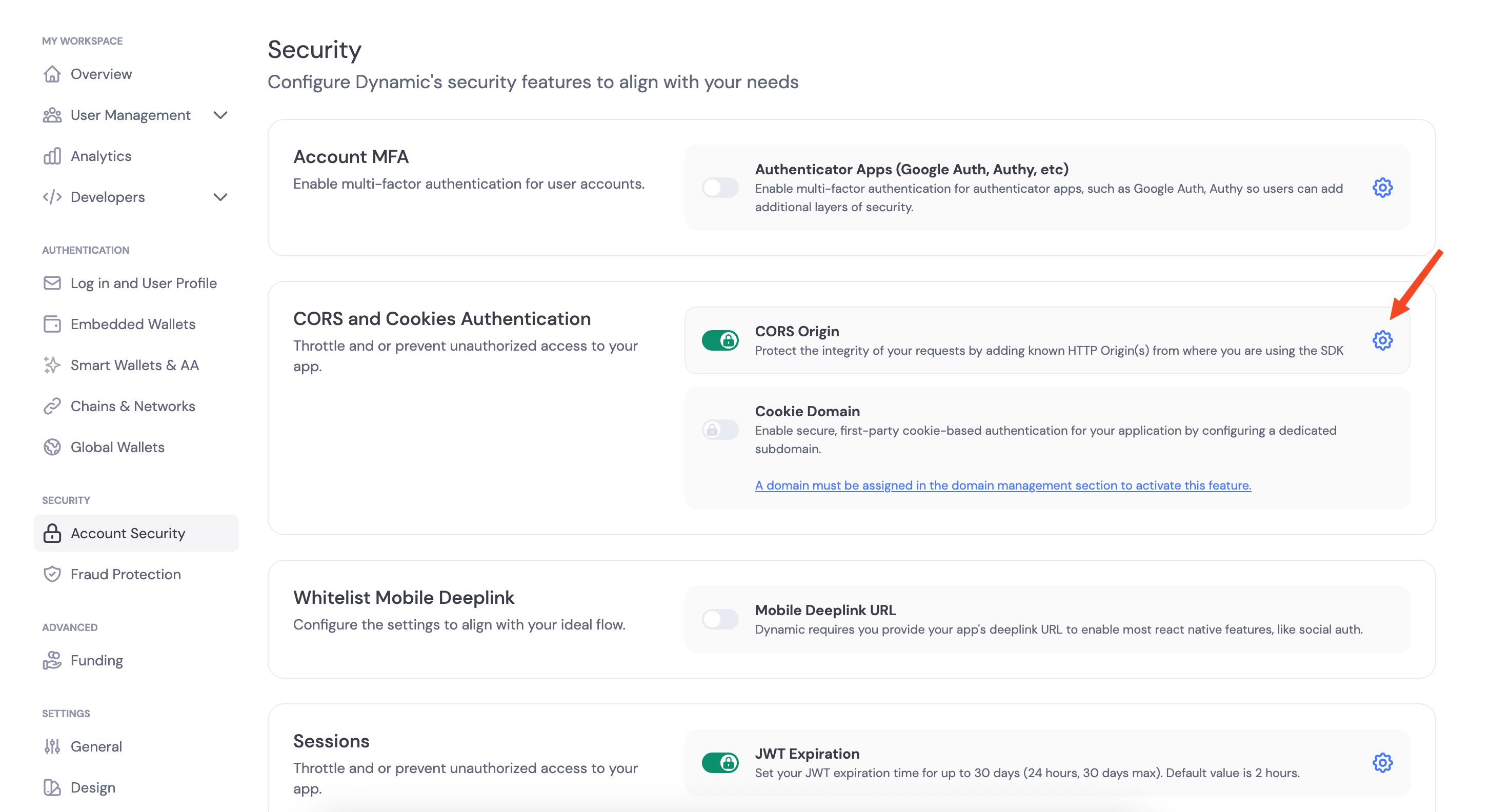
Once your app is running, copy the public URL provided by cloudflared or ngrok and add it in CORS Origins in your Dynamic dashboard under Developer Settings > CORS Origins. This step is crucial as it allows your mini app to communicate with the Dynamic backend.

<img src="https://mintcdn.com/dynamic-docs-testing/UE-XnPYRwgMqTMGV/images/dashboard/dashboard-cors-origin-settings.png?fit=max&auto=format&n=UE-XnPYRwgMqTMGV&q=85&s=7cd5b071adf2065b8e71980da025c319" alt="CORS settings in Dynamic dashboard" width="2906" height="1584" data-path="images/dashboard/dashboard-cors-origin-settings.png" />

## Testing the Mini App

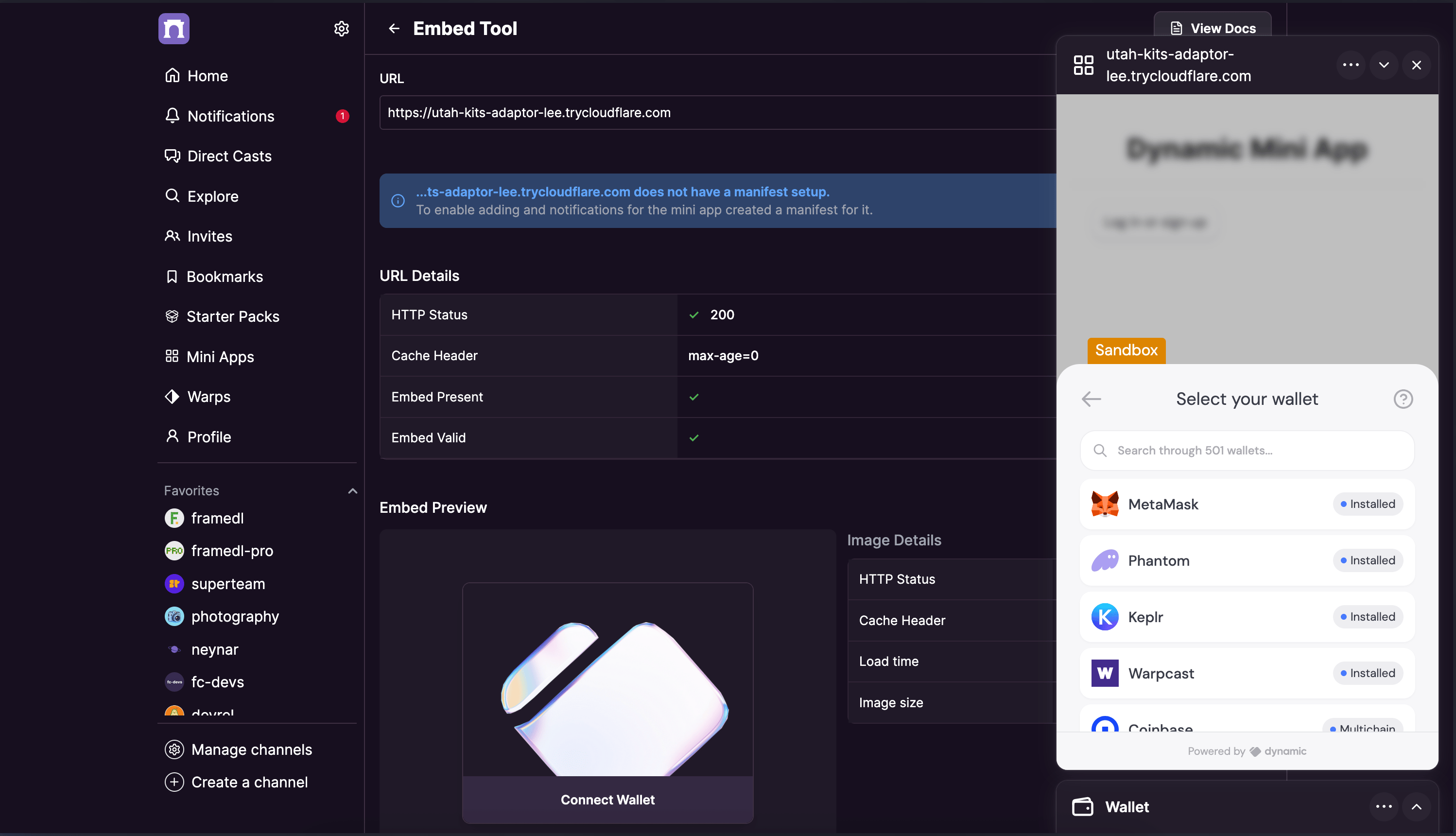
To test your mini app in the Farcaster ecosystem, you can use the [mini app embed tool](https://farcaster.xyz/~/developers/mini-apps/embed). This tool allows you to preview how your mini app would appear and function within Farcaster's interface.
<img src="https://mintcdn.com/dynamic-docs-testing/UE-XnPYRwgMqTMGV/images/farcaster/farcaster-embed-tool.png?fit=max&auto=format&n=UE-XnPYRwgMqTMGV&q=85&s=5da429406a6ce2d89d7b7a3a27d3729d" alt="Farcaster Embed tool" width="2996" height="1720" data-path="images/farcaster/farcaster-embed-tool.png" />

## Conclusion

You've now built a complete mini app with Dynamic that works seamlessly with Farcaster! This application enables users to connect different types of wallets, sign messages, and send transactions all within a unified interface.

By leveraging Dynamic's multi-chain support, your mini app works with both Ethereum and Solana wallets without requiring additional configuration. This flexibility allows your users to interact with their preferred wallets and networks, creating a more inclusive experience.

The mini app you've built demonstrates several key capabilities:

* Wallet connection with Dynamic's embedded widget
* User identification and wallet information retrieval
* Chain-specific functionality for both Ethereum and Solana
* Message signing for authentication purposes
* Transaction sending with appropriate validation

For additional help or to join the Dynamic community:

* Check out the complete [GitHub repository](https://github.com/dynamic-labs/mini-app-farcaster) for this project
* Join our [Discord community](https://discord.gg/dynamic)
* Check out [Dynamic's documentation](https://dynamic.xyz/docs)
* Follow us on [X](https://X.com/dynamic_xyz)