> ## Documentation Index
> Fetch the complete documentation index at: https://www.dynamic.xyz/docs/llms.txt
> Use this file to discover all available pages before exploring further.
# Aave lending markets
> Let users supply stablecoins to earn yield and borrow against their balance using Aave V3
## Overview
[Aave](https://aave.com/) is a lending protocol where users supply stablecoins to earn interest from borrowers, or borrow assets against their existing balance. This guide walks through integrating Aave V3 into a Next.js app with Dynamic embedded wallets.
For the final code, see the [GitHub repository](https://github.com/dynamic-labs-oss/examples/tree/main/examples/nextjs-stablecoin-yield-aave).
## How it works
Users **supply** a stablecoin to earn yield — deposit USDC, earn USDC. Interest paid by borrowers flows back to suppliers proportionally. Borrowers must maintain enough collateral to keep their position healthy; if it falls below a minimum ratio, the position can be liquidated. APY is variable and adjusts based on market demand.
## Setup
### Project setup
Follow the [JS SDK Quickstart](/javascript/reference/quickstart) to initialize a Next.js app with Dynamic. Scaffold a Next.js app with [`create-next-app`](https://nextjs.org/docs/app/api-reference/cli/create-next-app) and mirror the provider wiring from the quickstart or the [GitHub repository](https://github.com/dynamic-labs-oss/examples/tree/main/examples/nextjs-stablecoin-yield-aave).
In the Dynamic dashboard, enable **Ethereum** under **Chains & Networks**, enable **Embedded wallets** under **Wallets**, and add your app's origin under **Security → Allowed Origins**.
### Install dependencies
```bash npm theme={"system"}
npm install @dynamic-labs-sdk/client @dynamic-labs-sdk/evm @dynamic-labs-sdk/react-hooks @aave/react
```
```bash yarn theme={"system"}
yarn add @dynamic-labs-sdk/client @dynamic-labs-sdk/evm @dynamic-labs-sdk/react-hooks @aave/react
```
```bash pnpm theme={"system"}
pnpm add @dynamic-labs-sdk/client @dynamic-labs-sdk/evm @dynamic-labs-sdk/react-hooks @aave/react
```
```bash bun theme={"system"}
bun add @dynamic-labs-sdk/client @dynamic-labs-sdk/evm @dynamic-labs-sdk/react-hooks @aave/react
```
For more details on the Aave SDK, see the [Aave React SDK docs](https://docs.aave.com/developers/guides/aave-react-sdk).
### Environment variables
```env .env.local theme={"system"}
NEXT_PUBLIC_DYNAMIC_ENV_ID=your-environment-id-here
```
Your environment ID is in the Dynamic dashboard under **Developer Settings → SDK & API Keys**.
### Initialize Dynamic
Create `src/lib/dynamic.ts`:
```typescript src/lib/dynamic.ts theme={"system"}
import { createDynamicClient } from "@dynamic-labs-sdk/client";
import { addEvmExtension } from "@dynamic-labs-sdk/evm";
export const dynamicClient = createDynamicClient({
environmentId: process.env.NEXT_PUBLIC_DYNAMIC_ENV_ID!,
metadata: { name: "Aave Yield" },
});
addEvmExtension();
```
### Create the Aave client
```typescript src/lib/aave.ts theme={"system"}
import { AaveClient } from "@aave/react";
export const client = AaveClient.create();
```
### Configure providers
Create `src/lib/providers.tsx`. `DynamicProvider` owns the reactive auth state; `InnerProviders` accesses it via `useUser()` and `useGetWalletAccounts()` from `@dynamic-labs-sdk/react-hooks`, eliminating the need for manual `useState` and `onEvent` subscriptions:
```typescript src/lib/providers.tsx theme={"system"}
"use client";
import {
createContext, useContext, useState, useEffect, useCallback, type ReactNode,
} from "react";
import {
getWalletAccounts, onEvent, isSignedIn, logout,
detectOAuthRedirect, completeSocialAuthentication, getActiveNetworkId,
} from "@dynamic-labs-sdk/client";
import { createWaasWalletAccounts } from "@dynamic-labs-sdk/client/waas";
import { isEvmWalletAccount, type EvmWalletAccount } from "@dynamic-labs-sdk/evm";
import { QueryClient, QueryClientProvider } from "@tanstack/react-query";
import { DynamicProvider, useUser, useGetWalletAccounts } from "@dynamic-labs-sdk/react-hooks";
import { AaveProvider } from "@aave/react";
import { base } from "viem/chains";
import { client } from "./aave";
import { dynamicClient } from "./dynamic";
interface WalletContextValue {
evmAccount: EvmWalletAccount | null;
loggedIn: boolean;
chainId: number;
setChainId: (id: number) => void;
ensureEvmWallet: () => Promise;
disconnect: () => Promise;
}
const WalletContext = createContext({
evmAccount: null,
loggedIn: false,
chainId: base.id,
setChainId: () => {},
ensureEvmWallet: async () => {},
disconnect: async () => {},
});
export function useWallet() { return useContext(WalletContext); }
const queryClient = new QueryClient({
defaultOptions: { queries: { staleTime: 1000 * 60 * 5, refetchOnWindowFocus: false } },
});
function InnerProviders({ children }: { children: ReactNode }) {
const { data: user } = useUser();
const loggedIn = user !== null;
const { data: walletAccounts = [] } = useGetWalletAccounts();
const evmAccount = walletAccounts.find(isEvmWalletAccount) ?? null;
const [chainId, setChainId] = useState(base.id);
useEffect(() => {
if (!evmAccount) return;
getActiveNetworkId({ walletAccount: evmAccount }, dynamicClient)
.then(({ networkId }) => setChainId(Number(networkId)))
.catch(() => {});
}, [evmAccount]);
const disconnect = useCallback(async () => {
await logout(dynamicClient);
}, []);
const ensureEvmWallet = useCallback(async () => {
try {
const accounts = getWalletAccounts(dynamicClient);
if (!accounts.some(isEvmWalletAccount) && isSignedIn(dynamicClient)) {
await createWaasWalletAccounts({ chains: ["EVM"] }, dynamicClient);
}
} catch {}
}, []);
useEffect(() => {
const unsub = onEvent(
{ event: "walletAccountsChanged", listener: () => { void ensureEvmWallet(); } },
dynamicClient,
);
return () => unsub?.();
}, [ensureEvmWallet]);
useEffect(() => {
const handleOAuthRedirect = async () => {
if (typeof window === "undefined") return;
try {
const url = new URL(window.location.href);
if (await detectOAuthRedirect({ url }, dynamicClient)) {
await completeSocialAuthentication({ url }, dynamicClient);
await ensureEvmWallet();
window.history.replaceState({}, "", window.location.pathname);
}
} catch {}
};
handleOAuthRedirect();
}, [ensureEvmWallet]);
return (
{children}
);
}
export default function Providers({ children }: { children: ReactNode }) {
return (
{children}
);
}
```
## Enable transaction simulation
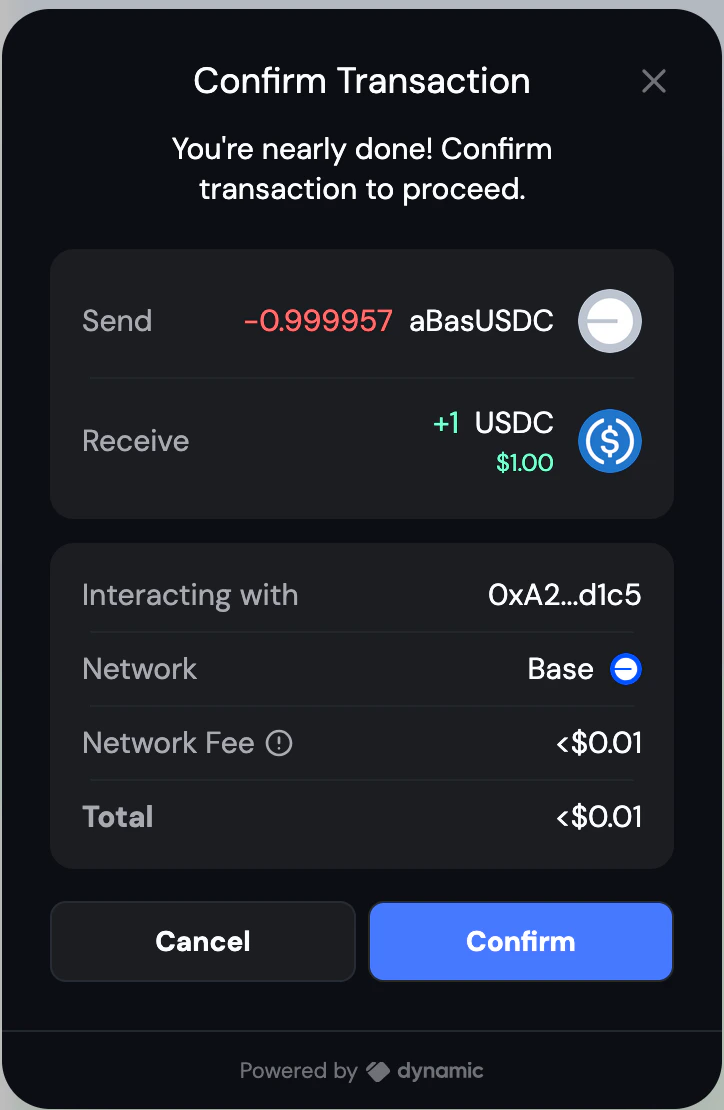
Dynamic's embedded wallets include built-in transaction previews. To enable, go to **Developer Settings → Embedded Wallets → Dynamic** in the dashboard and toggle on **Show Confirmation UI** and **Transaction Simulation**. Users will see a breakdown of assets transferred, estimated fees, and the contract address before confirming any Aave transaction.
 ## Get the wallet client
All Aave operations require a `WalletClient` from viem. Obtain it from the JS SDK EVM account:
```typescript theme={"system"}
import { createWalletClientForWalletAccount } from "@dynamic-labs-sdk/evm/viem";
import { base } from "viem/chains";
import { useWallet } from "@/lib/providers";
const { evmAccount } = useWallet();
const walletClient = evmAccount
? createWalletClientForWalletAccount({ walletAccount: evmAccount, chain: base })
: null;
```
Pass `walletClient` and the active chain ID into `useTransactionOperations`.
## Core operations
The Aave SDK uses a **plan-based** pattern. Each operation (`useSupply`, `useBorrow`, etc.) returns a function that resolves to a transaction plan. The plan tells you what kind of transaction to send — a direct transaction, one that first needs a token approval, or a failure due to insufficient balance. `useSendTransaction` handles submitting the plan to the wallet.
Create `src/lib/useTransactionOperations.ts`:
```typescript src/lib/useTransactionOperations.ts theme={"system"}
import { useSendTransaction } from "@aave/react/viem";
import { WalletClient, createPublicClient, http, parseAbiItem } from "viem";
import { base } from "viem/chains";
import {
bigDecimal,
chainId,
evmAddress,
useBorrow,
useRepay,
useSupply,
useWithdraw,
} from "@aave/react";
export function useTransactionOperations(
walletClient: WalletClient | null,
selectedChainId: number
) {
const [supply, supplying] = useSupply();
const [borrow, borrowing] = useBorrow();
const [repay, repaying] = useRepay();
const [withdraw, withdrawing] = useWithdraw();
const [sendTransaction, sending] = useSendTransaction(walletClient || undefined);
const isOperating =
supplying.loading || borrowing.loading || repaying.loading ||
withdrawing.loading || sending.loading;
const executeSupply = async (marketAddress: string, currencyAddress: string, amount: string) => {
if (!walletClient?.account?.address) return;
const result = await supply({
market: evmAddress(marketAddress),
amount: { erc20: { currency: evmAddress(currencyAddress), value: bigDecimal(parseFloat(amount)) } },
sender: evmAddress(walletClient.account.address),
chainId: chainId(selectedChainId),
}).andThen((plan) => {
switch (plan.__typename) {
case "TransactionRequest":
return sendTransaction(plan);
case "ApprovalRequired":
return sendTransaction(plan.approval).andThen(() => sendTransaction(plan.originalTransaction));
case "InsufficientBalanceError":
throw new Error(`Insufficient balance: ${plan.required.value} required.`);
default:
throw new Error("Unknown transaction plan type");
}
});
if (result.isErr()) throw result.error;
return result.value;
};
// executeBorrow, executeRepay, executeWithdraw follow the same pattern...
return { isOperating, executeSupply /*, executeBorrow, executeRepay, executeWithdraw */ };
}
```
## Reading market and position data
Use these hooks from `@aave/react` to fetch available markets and the user's positions:
```typescript theme={"system"}
import {
useAaveMarkets,
useUserSupplies,
useUserBorrows,
chainId as aaveChainId,
evmAddress,
} from "@aave/react";
import { useWallet } from "@/lib/providers";
const { evmAccount } = useWallet();
// Available markets on the active chain
const { data: markets, loading: marketsLoading } = useAaveMarkets({
chainIds: [aaveChainId(chainId)],
user: evmAccount?.address ? evmAddress(evmAccount.address) : undefined,
});
// User's active supply positions
const { data: userSupplies } = useUserSupplies({
markets: markets?.map((market) => ({
chainId: market.chain.chainId,
address: market.address,
})) || [],
user: evmAccount?.address ? evmAddress(evmAccount.address) : undefined,
});
```
## Wiring it together
Here is how the wallet client, operations hook, and data hooks connect in a component:
```typescript src/components/MarketsInterface.tsx theme={"system"}
"use client";
import {
chainId as aaveChainId,
evmAddress,
useAaveMarkets,
useUserBorrows,
useUserSupplies,
} from "@aave/react";
import { createWalletClientForWalletAccount } from "@dynamic-labs-sdk/evm/viem";
import { useEffect, useState } from "react";
import { base } from "viem/chains";
import { useTransactionOperations } from "../lib/useTransactionOperations";
import { useWallet } from "@/lib/providers";
export function MarketsInterface() {
const { evmAccount } = useWallet();
const [chainId, setChainId] = useState(base.id);
const walletClient = evmAccount
? createWalletClientForWalletAccount({ walletAccount: evmAccount, chain: base })
: null;
const { isOperating, executeSupply, executeBorrow, executeRepay, executeWithdraw } =
useTransactionOperations(walletClient, chainId);
const { data: markets, loading: marketsLoading } = useAaveMarkets({
chainIds: [aaveChainId(chainId)],
user: evmAccount?.address ? evmAddress(evmAccount.address) : undefined,
});
const { data: userSupplies } = useUserSupplies({
markets: markets?.map((market) => ({ chainId: market.chain.chainId, address: market.address })) || [],
user: evmAccount?.address ? evmAddress(evmAccount.address) : undefined,
});
const { data: userBorrows } = useUserBorrows({
markets: markets?.map((market) => ({ chainId: market.chain.chainId, address: market.address })) || [],
user: evmAccount?.address ? evmAddress(evmAccount.address) : undefined,
});
// markets, userSupplies, userBorrows, isOperating, and the execute* functions
// are all available to render your UI.
}
```
## Run the app
```bash npm theme={"system"}
npm run dev
```
```bash yarn theme={"system"}
yarn dev
```
```bash pnpm theme={"system"}
pnpm dev
```
```bash bun theme={"system"}
bun dev
```
Add `http://localhost:3000` to your allowed origins in the Dynamic dashboard under **Developer Settings → CORS Origins**.
## Full source code
[GitHub repository →](https://github.com/dynamic-labs-oss/examples/tree/main/examples/nextjs-stablecoin-yield-aave)
## Additional resources
* [Earn yield with Morpho](/recipes/integrations/yield/morpho)
* [Aave V3 documentation](https://docs.aave.com/developers/)
* [Dynamic JS SDK](/javascript/reference/quickstart)
## Get the wallet client
All Aave operations require a `WalletClient` from viem. Obtain it from the JS SDK EVM account:
```typescript theme={"system"}
import { createWalletClientForWalletAccount } from "@dynamic-labs-sdk/evm/viem";
import { base } from "viem/chains";
import { useWallet } from "@/lib/providers";
const { evmAccount } = useWallet();
const walletClient = evmAccount
? createWalletClientForWalletAccount({ walletAccount: evmAccount, chain: base })
: null;
```
Pass `walletClient` and the active chain ID into `useTransactionOperations`.
## Core operations
The Aave SDK uses a **plan-based** pattern. Each operation (`useSupply`, `useBorrow`, etc.) returns a function that resolves to a transaction plan. The plan tells you what kind of transaction to send — a direct transaction, one that first needs a token approval, or a failure due to insufficient balance. `useSendTransaction` handles submitting the plan to the wallet.
Create `src/lib/useTransactionOperations.ts`:
```typescript src/lib/useTransactionOperations.ts theme={"system"}
import { useSendTransaction } from "@aave/react/viem";
import { WalletClient, createPublicClient, http, parseAbiItem } from "viem";
import { base } from "viem/chains";
import {
bigDecimal,
chainId,
evmAddress,
useBorrow,
useRepay,
useSupply,
useWithdraw,
} from "@aave/react";
export function useTransactionOperations(
walletClient: WalletClient | null,
selectedChainId: number
) {
const [supply, supplying] = useSupply();
const [borrow, borrowing] = useBorrow();
const [repay, repaying] = useRepay();
const [withdraw, withdrawing] = useWithdraw();
const [sendTransaction, sending] = useSendTransaction(walletClient || undefined);
const isOperating =
supplying.loading || borrowing.loading || repaying.loading ||
withdrawing.loading || sending.loading;
const executeSupply = async (marketAddress: string, currencyAddress: string, amount: string) => {
if (!walletClient?.account?.address) return;
const result = await supply({
market: evmAddress(marketAddress),
amount: { erc20: { currency: evmAddress(currencyAddress), value: bigDecimal(parseFloat(amount)) } },
sender: evmAddress(walletClient.account.address),
chainId: chainId(selectedChainId),
}).andThen((plan) => {
switch (plan.__typename) {
case "TransactionRequest":
return sendTransaction(plan);
case "ApprovalRequired":
return sendTransaction(plan.approval).andThen(() => sendTransaction(plan.originalTransaction));
case "InsufficientBalanceError":
throw new Error(`Insufficient balance: ${plan.required.value} required.`);
default:
throw new Error("Unknown transaction plan type");
}
});
if (result.isErr()) throw result.error;
return result.value;
};
// executeBorrow, executeRepay, executeWithdraw follow the same pattern...
return { isOperating, executeSupply /*, executeBorrow, executeRepay, executeWithdraw */ };
}
```
## Reading market and position data
Use these hooks from `@aave/react` to fetch available markets and the user's positions:
```typescript theme={"system"}
import {
useAaveMarkets,
useUserSupplies,
useUserBorrows,
chainId as aaveChainId,
evmAddress,
} from "@aave/react";
import { useWallet } from "@/lib/providers";
const { evmAccount } = useWallet();
// Available markets on the active chain
const { data: markets, loading: marketsLoading } = useAaveMarkets({
chainIds: [aaveChainId(chainId)],
user: evmAccount?.address ? evmAddress(evmAccount.address) : undefined,
});
// User's active supply positions
const { data: userSupplies } = useUserSupplies({
markets: markets?.map((market) => ({
chainId: market.chain.chainId,
address: market.address,
})) || [],
user: evmAccount?.address ? evmAddress(evmAccount.address) : undefined,
});
```
## Wiring it together
Here is how the wallet client, operations hook, and data hooks connect in a component:
```typescript src/components/MarketsInterface.tsx theme={"system"}
"use client";
import {
chainId as aaveChainId,
evmAddress,
useAaveMarkets,
useUserBorrows,
useUserSupplies,
} from "@aave/react";
import { createWalletClientForWalletAccount } from "@dynamic-labs-sdk/evm/viem";
import { useEffect, useState } from "react";
import { base } from "viem/chains";
import { useTransactionOperations } from "../lib/useTransactionOperations";
import { useWallet } from "@/lib/providers";
export function MarketsInterface() {
const { evmAccount } = useWallet();
const [chainId, setChainId] = useState(base.id);
const walletClient = evmAccount
? createWalletClientForWalletAccount({ walletAccount: evmAccount, chain: base })
: null;
const { isOperating, executeSupply, executeBorrow, executeRepay, executeWithdraw } =
useTransactionOperations(walletClient, chainId);
const { data: markets, loading: marketsLoading } = useAaveMarkets({
chainIds: [aaveChainId(chainId)],
user: evmAccount?.address ? evmAddress(evmAccount.address) : undefined,
});
const { data: userSupplies } = useUserSupplies({
markets: markets?.map((market) => ({ chainId: market.chain.chainId, address: market.address })) || [],
user: evmAccount?.address ? evmAddress(evmAccount.address) : undefined,
});
const { data: userBorrows } = useUserBorrows({
markets: markets?.map((market) => ({ chainId: market.chain.chainId, address: market.address })) || [],
user: evmAccount?.address ? evmAddress(evmAccount.address) : undefined,
});
// markets, userSupplies, userBorrows, isOperating, and the execute* functions
// are all available to render your UI.
}
```
## Run the app
```bash npm theme={"system"}
npm run dev
```
```bash yarn theme={"system"}
yarn dev
```
```bash pnpm theme={"system"}
pnpm dev
```
```bash bun theme={"system"}
bun dev
```
Add `http://localhost:3000` to your allowed origins in the Dynamic dashboard under **Developer Settings → CORS Origins**.
## Full source code
[GitHub repository →](https://github.com/dynamic-labs-oss/examples/tree/main/examples/nextjs-stablecoin-yield-aave)
## Additional resources
* [Earn yield with Morpho](/recipes/integrations/yield/morpho)
* [Aave V3 documentation](https://docs.aave.com/developers/)
* [Dynamic JS SDK](/javascript/reference/quickstart)