> ## Documentation Index
> Fetch the complete documentation index at: https://www.dynamic.xyz/docs/llms.txt
> Use this file to discover all available pages before exploring further.

# Send USDC to Your Friend — Whether They Have a Wallet or Not

> Send USDC to friends by email or phone using the Dynamic JavaScript SDK. New recipients get a wallet pregenerated automatically and claim it on signup.

<Note>
  Frontend examples use React with `@dynamic-labs-sdk/react-hooks`. The underlying JS SDK is framework-agnostic — swap the hooks for direct calls against `@dynamic-labs-sdk/client` to adapt to vanilla JS, Vue, Svelte, or any other framework. The backend lookup/pregeneration endpoints (Dynamic REST API) are unchanged regardless of frontend.
</Note>

## Overview

One of the biggest barriers to mainstream crypto adoption is the complexity of wallet addresses and the requirement that both parties must have wallets. This recipe shows you how to build a user-friendly USDC transfer system where users can send stablecoins to friends using familiar identifiers like email addresses or phone numbers—even if the recipient hasn't signed up yet.

Using Dynamic's pregeneration feature, you can create wallets for recipients automatically when they're sent funds. When recipients later sign up with that email or phone number, they'll automatically receive their wallet with the funds already in it.

## What We're Building

A React/React Native application that allows users to:

* Send USDC to friends by entering their email address or phone number
* Automatically create wallets for recipients who don't have one yet (pregeneration)
* Transfer USDC seamlessly without exposing wallet addresses to end users
* Enable recipients to claim their wallet and funds when they sign up later

## Architecture

The solution uses a secure backend-to-backend pattern:

1. **Backend API Endpoint**: A secure backend endpoint queries Dynamic's API with filters to find users by their email/phone verified credentials. The Dynamic API token is never exposed to the client.
2. **Frontend Lookup**: The React app calls your backend API endpoint (not Dynamic's API directly)
3. **Wallet Resolution**: The backend extracts wallet addresses from the found user's embedded wallets
4. **Transfer Component**: A React component built on the JS SDK + `@dynamic-labs-sdk/react-hooks` that looks up recipients and executes USDC transfers

## Prerequisites

* Sender must be a Dynamic user with a wallet linked (either embedded or external)
* Recipient can be anyone with an email address or phone number (they don't need to have signed up yet)
* Backend server with Dynamic API token (the token must never be exposed to the client)
* [Embedded wallets enabled](https://app.dynamic.xyz/dashboard/embedded-wallets/dynamic) in your Dynamic environment for pregeneration support

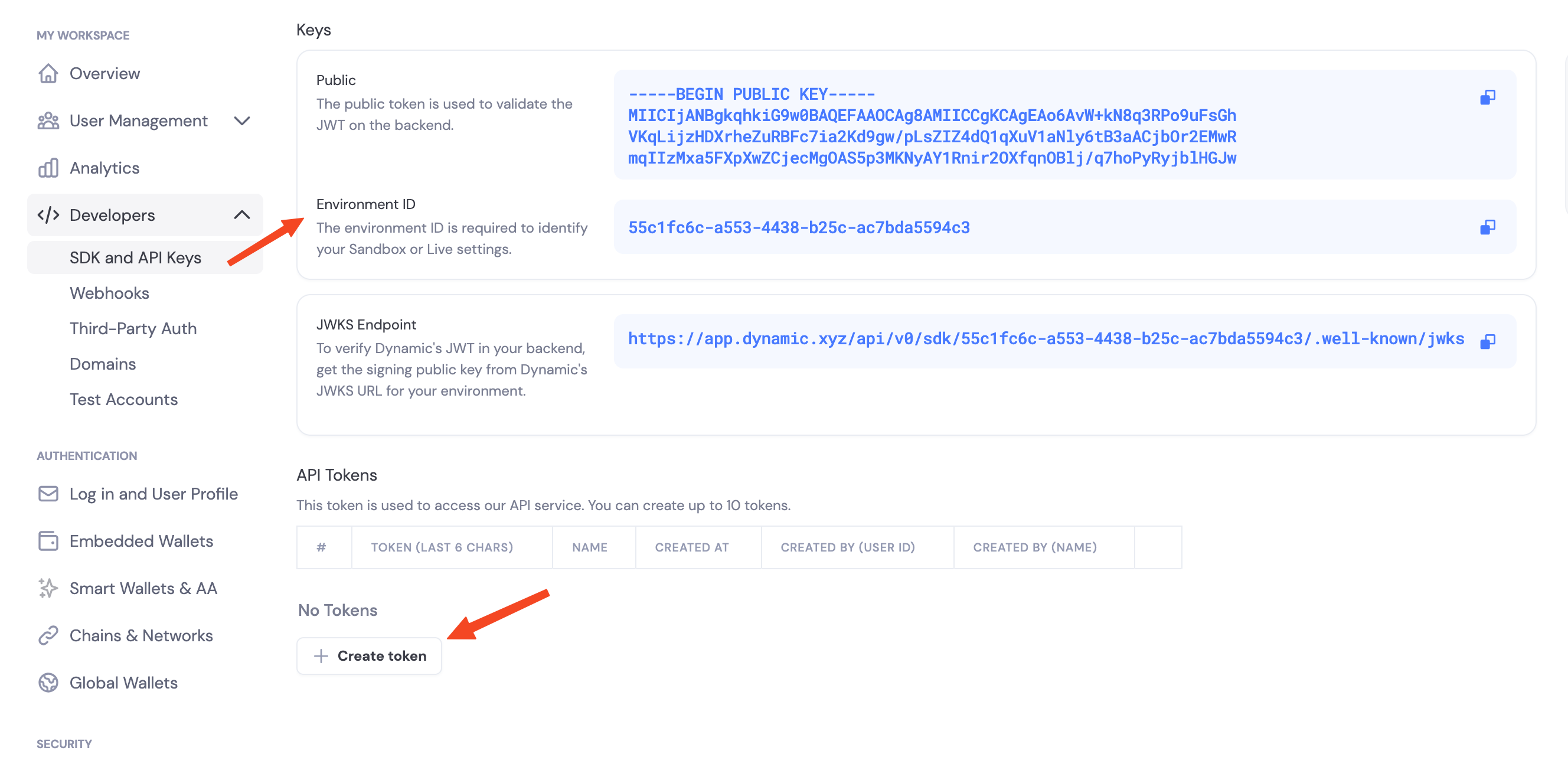
## Step 1: Get Your Dynamic API Credentials

1. Navigate to [Dynamic Dashboard](https://app.dynamic.xyz/dashboard/developer/api)
2. Copy your `Environment ID`
3. Create a new API token

<Frame>
  <img src="https://mintcdn.com/dynamic-docs-testing/UE-XnPYRwgMqTMGV/images/dashboard/dashboard-env-id-api-token.png?fit=max&auto=format&n=UE-XnPYRwgMqTMGV&q=85&s=859554c95305af1b97ea6677ab64260b" alt="Environment ID and API Token" width="2656" height="1304" data-path="images/dashboard/dashboard-env-id-api-token.png" />
</Frame>

## Step 2: Create User Lookup API Endpoint (existing users only)

<Warning>
  **Security**: The Dynamic API call must happen on your backend server, never from the client. The API token must be kept secure and never exposed to the frontend.
</Warning>

First create a lookup endpoint that only searches for existing users by email or phone. We'll rely on Dynamic's published `User` type instead of defining our own shape.

```typescript theme={"system"}
// pages/api/users/lookup.ts (Next.js API route)
// or app/api/users/lookup/route.ts (Next.js App Router)
import type { NextApiRequest, NextApiResponse } from "next";
import type { User as DynamicUser } from "@dynamic-labs/sdk-api";

interface UserLookupResponse {
  walletAddress: string;
  email?: string;
  phone?: string;
  userId?: string;
  isPregenerated: false;
}

export default async function handler(
  req: NextApiRequest,
  res: NextApiResponse<UserLookupResponse | { error: string }>
) {
  if (req.method !== "GET") {
    return res.status(405).json({ error: "Method not allowed" });
  }

  const { email, phone } = req.query;
  const environmentId = process.env.DYNAMIC_ENVIRONMENT_ID;
  const apiToken = process.env.DYNAMIC_AUTH_TOKEN;

  if (!environmentId || !apiToken) {
    return res.status(500).json({ error: "Server configuration error" });
  }

  if (!email && !phone) {
    return res.status(400).json({ error: "Email or phone is required" });
  }

  try {
    const queryParams = new URLSearchParams();

    if (email) {
      queryParams.set("filter[filterColumn]", "email");
      queryParams.set("filter[filterValue]", email as string);
    } else if (phone) {
      queryParams.set("filter[filterColumn]", "phoneNumber");
      queryParams.set("filter[filterValue]", phone as string);
    }

    const response = await fetch(
      `https://app.dynamicauth.com/api/v0/environments/${environmentId}/users?${queryParams.toString()}`,
      {
        method: "GET",
        headers: {
          Authorization: `Bearer ${apiToken}`,
          "Content-Type": "application/json",
        },
      }
    );

    if (!response.ok) {
      throw new Error(`Dynamic API error: ${response.statusText}`);
    }

    const data = await response.json();
    const users: DynamicUser[] = data.users || [];
    const foundUser = users[0];

    if (!foundUser) {
      return res.status(404).json({ error: "User not found" });
    }

    const evmWallet = foundUser.wallets?.find(
      (wallet) => wallet.chain === "eip155"
    );

    if (!evmWallet?.address) {
      return res.status(404).json({ error: "User has no EVM wallet" });
    }

    const emailCredential = foundUser.verifiedCredentials?.find(
      (vc) => vc.type === "email"
    );
    const phoneCredential = foundUser.verifiedCredentials?.find(
      (vc) => vc.type === "phone"
    );

    return res.status(200).json({
      walletAddress: evmWallet.address,
      email: emailCredential?.email || foundUser.email,
      phone: phoneCredential?.phone || foundUser.phone,
      userId: foundUser.userId,
      isPregenerated: false,
    });
  } catch (error: any) {
    console.error("Error looking up user:", error);
    res.status(500).json({ error: error.message || "Failed to lookup user" });
  }
}
```

### Environment Variables

Set up your environment variables:

```bash theme={"system"}
# .env.local (Next.js)
DYNAMIC_ENVIRONMENT_ID=your_environment_id_here
DYNAMIC_AUTH_TOKEN=your_api_token_here
```

## Step 3: Create Wallet Pregeneration Endpoint

Keep pregeneration in its own endpoint so it is clear, auditable, and can be called independently (for example, to pre-warm wallets in batches).

```typescript theme={"system"}
// pages/api/users/pregen.ts (Next.js API route)
// or app/api/users/pregen/route.ts (Next.js App Router)
import type { NextApiRequest, NextApiResponse } from "next";

interface PregenerationResponse {
  walletAddress: string;
  email?: string;
  phone?: string;
  userId?: string;
  isPregenerated: true;
}

export default async function handler(
  req: NextApiRequest,
  res: NextApiResponse<PregenerationResponse | { error: string }>
) {
  if (req.method !== "POST") {
    return res.status(405).json({ error: "Method not allowed" });
  }

  const { email, phone } = req.body || {};
  const environmentId = process.env.DYNAMIC_ENVIRONMENT_ID;
  const apiToken = process.env.DYNAMIC_AUTH_TOKEN;

  if (!environmentId || !apiToken) {
    return res.status(500).json({ error: "Server configuration error" });
  }

  if (!email && !phone) {
    return res.status(400).json({ error: "Email or phone is required" });
  }

  try {
    const identifier = email || phone;
    const identifierType = email ? "email" : "phone";

    const pregenResponse = await fetch(
      `https://app.dynamicauth.com/api/v0/environments/${environmentId}/waas/create`,
      {
        method: "POST",
        headers: {
          Authorization: `Bearer ${apiToken}`,
          "Content-Type": "application/json",
        },
        body: JSON.stringify({
          identifier: identifier as string,
          type: identifierType,
          chains: ["EVM"],
        }),
      }
    );

    if (!pregenResponse.ok) {
      const errorData = await pregenResponse.text();
      throw new Error(`Failed to pregenerate wallet: ${errorData}`);
    }

    const pregenWallet = await pregenResponse.json();
    const evmWallet = pregenWallet.wallets?.find(
      (wallet: any) => wallet.chain === "eip155"
    );

    if (!evmWallet?.address) {
      throw new Error("Pregenerated wallet missing EVM address");
    }

    return res.status(200).json({
      walletAddress: evmWallet.address,
      email: email as string | undefined,
      phone: phone as string | undefined,
      userId: undefined, // No user ID until the user signs up
      isPregenerated: true,
    });
  } catch (error: any) {
    console.error("Error pregenerating wallet:", error);
    res
      .status(500)
      .json({ error: error.message || "Failed to pregenerate wallet" });
  }
}
```

## Step 4: Create User Lookup Hook (React Query)

Create a custom hook that uses React Query to first try lookup, then fall back to pregeneration. Make sure your app is wrapped in a `QueryClientProvider`.

```tsx React theme={"system"}
// hooks/useRecipientLookup.ts
import { useState } from "react";
import { useMutation } from "@tanstack/react-query";

type IdentifierType = "email" | "phone";

interface RecipientResult {
  walletAddress: string;
  email?: string;
  phone?: string;
  userId?: string;
  isPregenerated: boolean;
  found: boolean;
}

interface ResolveInput {
  identifier: string;
  identifierType: IdentifierType;
}

const ensureResponse = async (response: Response) => {
  if (response.ok) return response.json();
  const errorData = await response.json().catch(() => ({}));
  const err = new Error(errorData.error || response.statusText);
  (err as any).status = response.status;
  throw err;
};

export const useRecipientLookup = () => {
  const [recipient, setRecipient] = useState<RecipientResult | null>(null);

  const lookupMutation = useMutation({
    mutationFn: async ({ identifier, identifierType }: ResolveInput) => {
      const searchParam =
        identifierType === "email"
          ? `email=${encodeURIComponent(identifier)}`
          : `phone=${encodeURIComponent(identifier)}`;
      const res = await fetch(`/api/users/lookup?${searchParam}`);
      const data = await ensureResponse(res);
      return { ...data, found: true };
    },
  });

  const pregenerateMutation = useMutation({
    mutationFn: async ({ identifier, identifierType }: ResolveInput) => {
      const res = await fetch("/api/users/pregen", {
        method: "POST",
        headers: { "Content-Type": "application/json" },
        body: JSON.stringify(
          identifierType === "email"
            ? { email: identifier }
            : { phone: identifier }
        ),
      });
      const data = await ensureResponse(res);
      return { ...data, found: true };
    },
  });

  const resolveRecipient = (payload: ResolveInput) => {
    setRecipient(null);
    lookupMutation.mutate(payload, {
      onSuccess: (data) => setRecipient(data),
      onError: (err: any) => {
        if (err?.status === 404) {
          pregenerateMutation.mutate(payload, {
            onSuccess: (data) => setRecipient(data),
          });
        }
      },
    });
  };

  return {
    resolveRecipient,
    recipient,
    isLoading: lookupMutation.isPending || pregenerateMutation.isPending,
    error:
      (lookupMutation.error as Error | undefined)?.message ||
      (pregenerateMutation.error as Error | undefined)?.message ||
      null,
    clearRecipient: () => setRecipient(null),
  };
};
```

## Step 5: Create Transfer Component

Now create the main transfer component that allows users to send USDC by email or phone. It reads the sender's EVM wallet from `useGetWalletAccounts`, gets a viem `WalletClient` via [`createWalletClientForWalletAccount`](/javascript/reference/evm/getting-viem-wallet-client), and writes the `transfer` call against the USDC contract.

```tsx React theme={"system"}
// components/SendUSDCByIdentifier.tsx
import { useState } from "react";
import { useGetWalletAccounts } from "@dynamic-labs-sdk/react-hooks";
import { isEvmWalletAccount } from "@dynamic-labs-sdk/evm";
import {
  createWalletClientForWalletAccount,
  createPublicClientFromNetworkData,
} from "@dynamic-labs-sdk/evm/viem";
import { getActiveNetworkData } from "@dynamic-labs-sdk/client";
import { parseUnits, erc20Abi } from "viem";
import { useRecipientLookup } from "../hooks/useRecipientLookup";

// USDC on Ethereum mainnet — swap for the address on your target chain.
const USDC_ADDRESS: `0x${string}` = "0xA0b86991c6218b36c1d19D4a2e9Eb0cE3606eB48";

const SendUSDCByIdentifier = () => {
  const { data: accounts = [] } = useGetWalletAccounts();
  const walletAccount = accounts.find(isEvmWalletAccount);

  const {
    resolveRecipient,
    recipient,
    isLoading: isLookingUp,
    error: lookupError,
    clearRecipient,
  } = useRecipientLookup();

  const [identifier, setIdentifier] = useState("");
  const [identifierType, setIdentifierType] = useState<"email" | "phone">(
    "email"
  );
  const [amount, setAmount] = useState("");
  const [isSending, setIsSending] = useState(false);
  const [txHash, setTxHash] = useState<string | null>(null);
  const [error, setError] = useState<string | null>(null);

  const handleLookup = async () => {
    if (!identifier.trim()) {
      setError("Please enter an email or phone number");
      return;
    }

    setError(null);
    setTxHash(null);

    if (identifierType === "email") {
      const emailRegex = /^[^\s@]+@[^\s@]+\.[^\s@]+$/;
      if (!emailRegex.test(identifier)) {
        setError("Please enter a valid email address");
        return;
      }
    } else {
      const phoneRegex = /^\+?[1-9]\d{1,14}$/;
      if (!phoneRegex.test(identifier.replace(/\s/g, ""))) {
        setError("Please enter a valid phone number");
        return;
      }
    }

    try {
      await resolveRecipient({ identifier, identifierType });
    } catch (err: any) {
      setError(err.message || "Unable to find or create wallet for this user");
    }
  };

  const handleSend = async () => {
    if (!walletAccount) {
      setError("Connect an EVM wallet first");
      return;
    }

    if (!recipient || !recipient.found) {
      setError("Please find a recipient first");
      return;
    }

    if (!amount || parseFloat(amount) <= 0) {
      setError("Please enter a valid amount");
      return;
    }

    setIsSending(true);
    setError(null);

    try {
      const walletClient = await createWalletClientForWalletAccount({ walletAccount });

      const hash = await walletClient.writeContract({
        address: USDC_ADDRESS,
        abi: erc20Abi,
        functionName: "transfer",
        args: [recipient.walletAddress as `0x${string}`, parseUnits(amount, 6)],
      });

      setTxHash(hash);

      const { networkData } = await getActiveNetworkData({ walletAccount });
      const publicClient = createPublicClientFromNetworkData({ networkData });
      await publicClient.waitForTransactionReceipt({ hash });

      // Reset form
      setIdentifier("");
      setAmount("");
      clearRecipient();
    } catch (err: any) {
      console.error("Failed to send USDC:", err);
      if (err.message?.includes("insufficient funds")) {
        setError("Insufficient USDC balance");
      } else if (err.message?.includes("User rejected")) {
        setError("Transaction was cancelled");
      } else {
        setError(err.message || "Failed to send USDC");
      }
    } finally {
      setIsSending(false);
    }
  };

  return (
    <div style={{ maxWidth: "500px", margin: "0 auto", padding: "20px" }}>
      <h2>Send USDC</h2>

      <div style={{ marginBottom: "20px" }}>
        <label style={{ display: "block", marginBottom: "8px" }}>
          Send to:
        </label>
        <div style={{ display: "flex", gap: "10px", marginBottom: "10px" }}>
          <select
            value={identifierType}
            onChange={(e) => {
              setIdentifierType(e.target.value as "email" | "phone");
              setIdentifier("");
              clearRecipient();
            }}
            style={{ padding: "8px" }}
          >
            <option value="email">Email</option>
            <option value="phone">Phone</option>
          </select>
          <input
            type={identifierType === "email" ? "email" : "tel"}
            value={identifier}
            onChange={(e) => {
              setIdentifier(e.target.value);
              clearRecipient();
            }}
            placeholder={
              identifierType === "email"
                ? "user@example.com"
                : "+1234567890"
            }
            style={{ flex: 1, padding: "8px" }}
            onKeyPress={(e) => {
              if (e.key === "Enter") {
                handleLookup();
              }
            }}
          />
          <button
            onClick={handleLookup}
            disabled={isLookingUp || !identifier.trim()}
            style={{ padding: "8px 16px" }}
          >
            {isLookingUp ? "Looking up..." : "Find"}
          </button>
        </div>

        {recipient && recipient.found && (
          <div
            style={{
              padding: "12px",
              backgroundColor: recipient.isPregenerated ? "#fff4e6" : "#f0f9ff",
              borderRadius: "8px",
              marginTop: "10px",
            }}
          >
            <p style={{ margin: 0, fontWeight: "bold" }}>
              {recipient.isPregenerated
                ? "✓ Wallet created for:"
                : "✓ User found:"}{" "}
              {recipient.email || recipient.phone}
            </p>
            <p style={{ margin: "4px 0 0 0", fontSize: "12px", color: "#666" }}>
              Wallet: {recipient.walletAddress.substring(0, 8)}...
              {recipient.walletAddress.substring(
                recipient.walletAddress.length - 6
              )}
            </p>
            {recipient.isPregenerated && (
              <p
                style={{
                  margin: "4px 0 0 0",
                  fontSize: "11px",
                  color: "#856404",
                  fontStyle: "italic",
                }}
              >
                They'll receive this wallet when they sign up with this{" "}
                {recipient.email ? "email" : "phone number"}
              </p>
            )}
          </div>
        )}
      </div>

      {recipient && recipient.found && (
        <>
          <div style={{ marginBottom: "20px" }}>
            <label style={{ display: "block", marginBottom: "8px" }}>
              Amount (USDC):
            </label>
            <input
              type="number"
              value={amount}
              onChange={(e) => setAmount(e.target.value)}
              placeholder="0.00"
              min="0"
              step="0.01"
              style={{ width: "100%", padding: "8px" }}
            />
          </div>

          <button
            onClick={handleSend}
            disabled={isSending || !amount || parseFloat(amount) <= 0}
            style={{
              width: "100%",
              padding: "12px",
              backgroundColor: "#4779FE",
              color: "white",
              border: "none",
              borderRadius: "8px",
              fontSize: "16px",
              cursor: isSending ? "not-allowed" : "pointer",
            }}
          >
            {isSending ? "Sending..." : `Send ${amount || "0"} USDC`}
          </button>
        </>
      )}

      {(error || lookupError) && (
        <div
          style={{
            marginTop: "16px",
            padding: "12px",
            backgroundColor: "#fee",
            color: "#c00",
            borderRadius: "8px",
          }}
        >
          {error || lookupError}
        </div>
      )}

      {txHash && (
        <div
          style={{
            marginTop: "16px",
            padding: "12px",
            backgroundColor: "#efe",
            color: "#060",
            borderRadius: "8px",
          }}
        >
          <p style={{ margin: 0, fontWeight: "bold" }}>✓ Transaction sent!</p>
          <p style={{ margin: "4px 0 0 0", fontSize: "12px" }}>
            Hash: {txHash.substring(0, 16)}...
            {txHash.substring(txHash.length - 8)}
          </p>
          <a
            href={`https://etherscan.io/tx/${txHash}`}
            target="_blank"
            rel="noopener noreferrer"
            style={{ fontSize: "12px", color: "#4779FE" }}
          >
            View on Etherscan
          </a>
        </div>
      )}
    </div>
  );
};

export default SendUSDCByIdentifier;
```

## How Recipients Claim Their Wallets

When you send USDC to a friend who doesn't have a wallet yet:

1. **Pregeneration**: A wallet is automatically created for them with the email/phone you provided
2. **Funds Arrive**: The USDC is sent to that wallet address immediately
3. **Sign Up**: When your friend signs up with Dynamic using the same email or phone number
4. **Automatic Claim**: They automatically receive their pregenerated wallet with the funds already in it

No additional steps are required — the wallet claiming happens automatically during authentication. The pregeneration call is a backend REST API ([`POST /environments/:id/waas/create`](/api-reference/wallets/create-waas-wallet)), so the flow is identical regardless of which client SDK the recipient eventually signs in with.

## Important Considerations

### Security

1. **API Token Protection**: **Critical**: Never expose your Dynamic API token in client-side code. All Dynamic API calls must happen on your backend server. The frontend should only call your backend API endpoints.
2. **Rate Limiting**: Implement rate limiting on lookup endpoints to prevent abuse
3. **Authentication**: Consider requiring authentication for lookup endpoints to prevent unauthorized access
4. **Validation**: Always validate email/phone formats and wallet addresses on both frontend and backend
5. **Backend Security**: Keep your backend API token secure using environment variables and never commit it to version control

### Performance

1. **Rate limits (Dynamic)**: `/environments/:environmentId/users` follows developer limits of 1500 requests/min per IP and 3000 requests/min per environment; `/environments/:environmentId/waas/create` (pregeneration) is limited to 300 requests/min per IP. See [rate limits](/overview/rate-limits).
2. **Caching**: Cache user lookups to reduce API calls and stay under limits
3. **Filtering**: The API supports filtering - check the [API reference](/api-reference/users/get-all-users-for-an-environment) for available filter parameters

### User Experience

1. **Error Handling**: Provide clear error messages for common issues
2. **Loading States**: Show loading indicators during lookup and transfer
3. **Confirmation**: Always show the recipient's identifier before sending
4. **Transaction Status**: Display transaction hashes and links to block explorers

## Best Practices

1. **Error Handling**: Handle cases where users don't have EVM wallets or pregeneration fails
2. **Multiple Wallets**: If a user has multiple EVM wallets, consider letting them choose or use the primary wallet
3. **Pregeneration**: Always pregenerate wallets for new recipients so they can receive funds immediately
4. **Notifications**: Consider sending email/SMS notifications to recipients when they receive USDC (especially for pregenerated wallets)
5. **Caching**: Cache user lookups to improve performance and reduce API calls
6. **Network**: Remember that USDC contract addresses differ by network. Update the `usdcAddress` in your component based on the network.
7. **User Communication**: Inform recipients that they'll need to sign up with the same email/phone to claim their funds

## Related Documentation

* [Sending USDC](/recipes/stablecoins/sending-usdc)
* [Stablecoins Quick Start](/recipes/stablecoins/quick-start)
* [React Quickstart (JS SDK)](/javascript/reference/react-quickstart)
* [`createWalletClientForWalletAccount`](/javascript/reference/evm/getting-viem-wallet-client)
* [User session management (JS SDK)](/javascript/user-session-management)
* [Embedded Wallets Overview](/overview/wallets/embedded-wallets/mpc/overview)
* [Dynamic API Reference — Get All Users](/api-reference/users/get-all-users-for-an-environment)
* [Create WaaS Wallet API](/api-reference/wallets/create-waas-wallet)
