> ## Documentation Index
> Fetch the complete documentation index at: https://www.dynamic.xyz/docs/llms.txt
> Use this file to discover all available pages before exploring further.
# Rust SDK Quickstart
> Create server-side embedded wallets and sign on EVM and Solana with the Dynamic Rust SDK.
**The Rust SDK is in beta.** The API surface is still settling — minor releases (0.0.x) may include breaking changes until we ship 1.0. Pin to an exact version in your `Cargo.toml` (e.g. `= "0.0.3"`) so a `cargo update` doesn't move you onto a new shape. Not recommended for production traffic yet; great for prototypes, internal services, and design feedback.
Found a rough edge? Email [support@dynamic.xyz](mailto:support@dynamic.xyz) or open an issue on [github.com/dynamic-labs/dynamic-waas-sdk](https://github.com/dynamic-labs/dynamic-waas-sdk).
## Prerequisites
* **Rust 1.90+** — install via [rustup](https://rustup.rs/)
* **Dynamic Account** — set up your project and get credentials from the [Dynamic Dashboard](https://app.dynamic.xyz/dashboard/overview)
* **C toolchain** — `cc` + linker. On Debian/Ubuntu: `sudo apt install build-essential`. macOS Xcode CLT is sufficient.
The Rust SDK runs on your server so you can create **embedded wallets**, sign messages, and export keys across EVM and Solana without putting full keys on the client. Signing uses Multi-Party Computation (MPC): your server and Dynamic each hold part of the key material so neither side alone can sign.
## Install
Add the crates you need to your `Cargo.toml`:
```toml theme={"system"}
[dependencies]
dynamic-waas-sdk = "=0.0.3"
dynamic-waas-sdk-evm = "=0.0.3" # EVM chains
dynamic-waas-sdk-svm = "=0.0.3" # Solana
tokio = { version = "1", features = ["full"] }
```
Or via the CLI:
```bash theme={"system"}
cargo add dynamic-waas-sdk@=0.0.3
cargo add dynamic-waas-sdk-evm@=0.0.3
cargo add dynamic-waas-sdk-svm@=0.0.3
```
No extra registry config required — the prebuilt MPC static libraries ship inside the crate and `cargo build` resolves everything from crates.io.
## Get Your Credentials
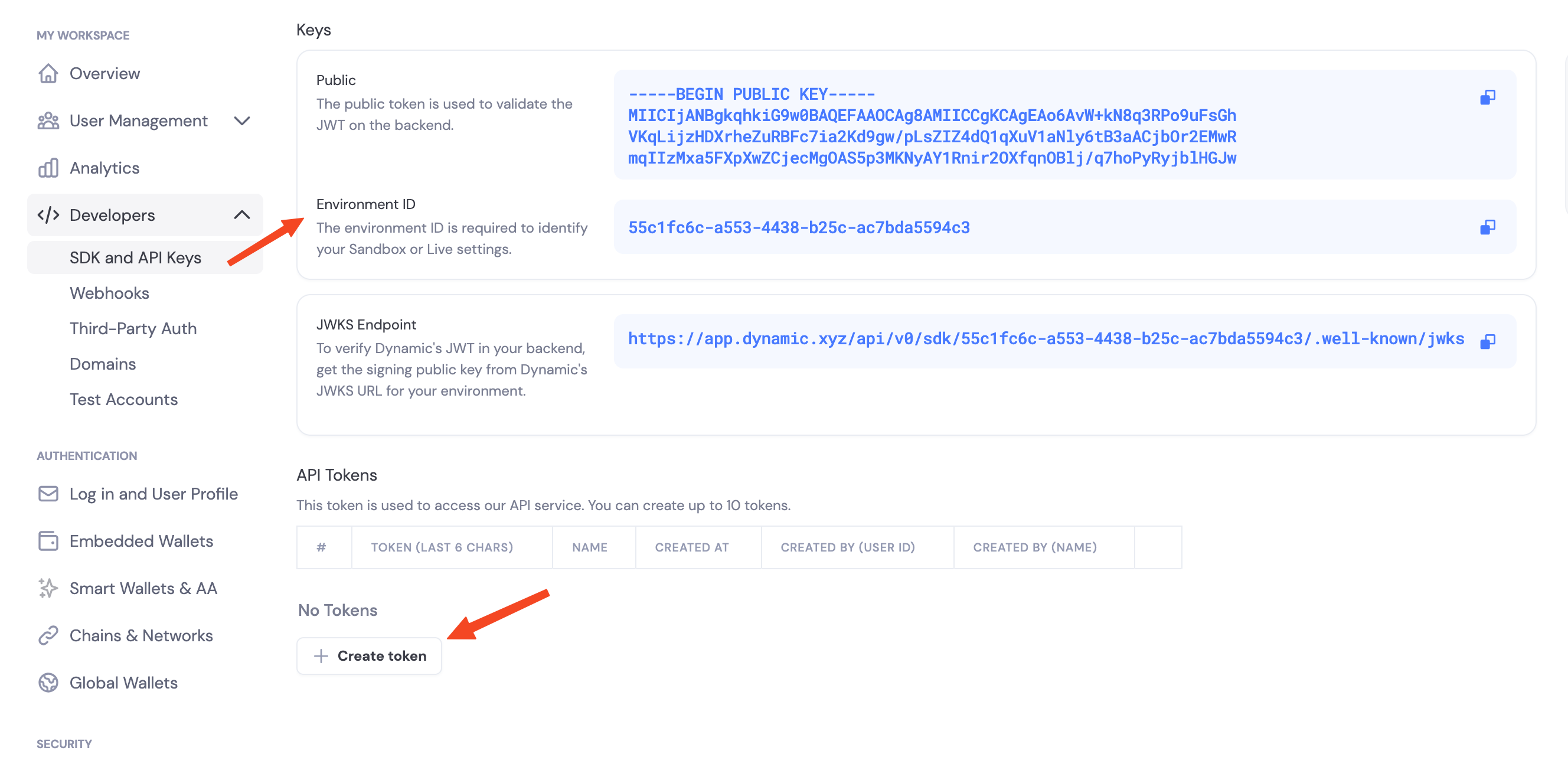
Navigate to the [Dynamic Dashboard](https://app.dynamic.xyz/dashboard/developer/api) and:
1. Copy your `Environment ID`
2. Create a new API token
 ## Enable Features in Dashboard
Before you can use wallet features, enable them in your Dynamic dashboard:
1. Go to your [Dynamic Dashboard](https://app.dynamic.xyz/dashboard/overview)
2. Select your project
3. Go to **Wallets** and enable embedded wallets
4. Go to **Chains** and enable the networks you want to support (Ethereum, Solana, etc.)
## Environment Variables
```bash theme={"system"}
# .env
export DYNAMIC_ENV_ID=your_environment_id_here
export DYNAMIC_API_TOKEN=your_api_token_here
```
## Initialize the Client
```rust theme={"system"}
use dynamic_waas_sdk::{DynamicWalletClient, DynamicWalletClientOpts};
let env_id = std::env::var("DYNAMIC_ENV_ID")?;
let api_token = std::env::var("DYNAMIC_API_TOKEN")?;
let mut client = DynamicWalletClient::new(
DynamicWalletClientOpts::new(env_id),
)?;
client.authenticate_api_token(&api_token).await?;
```
`DynamicWalletClient` is the base server client. For chain-specific operations (create wallet, sign), wrap it in `DynamicEvmWalletClient` or `DynamicSvmWalletClient` — both are thin wrappers that borrow the base client:
```rust theme={"system"}
use dynamic_waas_sdk_evm::DynamicEvmWalletClient;
use dynamic_waas_sdk_svm::DynamicSvmWalletClient;
let evm = DynamicEvmWalletClient::new(&client);
let svm = DynamicSvmWalletClient::new(&client);
```
## Stateless contract
The Rust SDK is **stateless** — it does not hold wallet state between calls. `create_wallet_account()` returns two pieces of state you must persist:
* `WalletProperties` — non-sensitive identity + backup-pointer info. Cache it in Redis / Postgres. Pass it to every subsequent sign / export operation.
* `Vec` — sensitive MPC key material. Store in a secrets vault (HSM, KMS-wrapped column, Secret Manager).
See [Storage Best Practices](/rust/storage-best-practices) for the recommended cache + vault split.
The Rust type is called `WalletProperties`. It's the same concept as the Node SDK's `WalletMetadata` — same fields (`wallet_id`, `account_address`, `chain_name`, `derivation_path`, `external_server_key_shares_backup_info`).
## Key share backup: `back_up_to_dynamic`
Every `create_wallet_account` call accepts a `back_up_to_dynamic: bool` flag. **You always vault the returned `Vec` yourself** — the chain clients in 0.0.3 require it on every sign / export call. The flag only controls whether Dynamic *also* keeps an encrypted copy as a disaster-recovery backup.
* **`true` (recommended)** — the SDK encrypts your share with `password` (AES-256-GCM) and uploads the encrypted blob to Dynamic. If you ever lose your vaulted copy, recover it via `run_recover_key_shares` + the same password.
* **`false`** — no copy on Dynamic. Losing the share means losing the wallet.
**`password` is required when `back_up_to_dynamic: true`** — the SDK rejects the call with `Error::InvalidArgument` if you pass `None`. It never leaves your server; it's used locally to wrap (and later unwrap) the share. When `back_up_to_dynamic: false`, `password` is optional.
See [Create EVM Wallet — Choose Your Backup Mode](/rust/evm/create-wallet#step-2-choose-your-backup-mode) for the full comparison table.
## Threshold signature schemes
When you configure signing, you choose how key shares combine to authorize a signature:
* **`TWO_OF_TWO`** — Requires your server and Dynamic's infrastructure to sign together.
* **`TWO_OF_THREE`** — Requires two of three shares to sign.
## Pointing at preprod or sandbox
The SDK defaults to production. To target a different environment, pass `base_api_url(...)` on `DynamicWalletClientOpts`:
```rust theme={"system"}
let opts = DynamicWalletClientOpts::new(env_id)
.base_api_url("https://app.dynamic-preprod.xyz");
```
## SDK capabilities (v0.0.3)
* **Embedded wallets** — Create and use wallets from your server (EVM, SVM).
* **Signing** — EIP-191 messages on EVM, raw-bytes Ed25519 messages on SVM.
* **Key export** — Export raw private keys for migration / disaster recovery.
* **Delegated access** — Per-wallet API key flow mirroring `@dynamic-labs-wallet/node`, including the webhook decrypt helper.
Transaction signing, typed data, imports, password rotation, refresh / reshare, BTC and TON are not yet exposed in 0.0.3 — they ride in a later release.
## Reference Demo
A runnable end-to-end demo lives at [`dynamic-labs/dynamic-waas-rust-demo`](https://github.com/dynamic-labs/dynamic-waas-rust-demo) — full lifecycle (auth → create → sign → recover → export) for both EVM and SVM, consuming the published crates. Good shape reference for what a customer integration looks like.
## Next Steps
### EVM Support
* [Create EVM Wallets](/rust/evm/create-wallet) — Create Ethereum wallets
* [Sign EVM Messages](/rust/evm/sign-messages) — Sign Ethereum messages (EIP-191)
* [Export EVM Private Key](/rust/evm/export-private-key)
* [Delegated Access](/rust/evm/delegated-access) — Per-wallet API key signing
### Solana Support
* [Create SVM Wallets](/rust/svm/create-wallet)
* [Sign SVM Messages](/rust/svm/sign-messages)
* [Export SVM Private Key](/rust/svm/export-private-key)
* [Delegated Access](/rust/svm/delegated-access)
### Full API Reference
For the full type-level reference, see [docs.rs/dynamic-waas-sdk](https://docs.rs/dynamic-waas-sdk).
## Enable Features in Dashboard
Before you can use wallet features, enable them in your Dynamic dashboard:
1. Go to your [Dynamic Dashboard](https://app.dynamic.xyz/dashboard/overview)
2. Select your project
3. Go to **Wallets** and enable embedded wallets
4. Go to **Chains** and enable the networks you want to support (Ethereum, Solana, etc.)
## Environment Variables
```bash theme={"system"}
# .env
export DYNAMIC_ENV_ID=your_environment_id_here
export DYNAMIC_API_TOKEN=your_api_token_here
```
## Initialize the Client
```rust theme={"system"}
use dynamic_waas_sdk::{DynamicWalletClient, DynamicWalletClientOpts};
let env_id = std::env::var("DYNAMIC_ENV_ID")?;
let api_token = std::env::var("DYNAMIC_API_TOKEN")?;
let mut client = DynamicWalletClient::new(
DynamicWalletClientOpts::new(env_id),
)?;
client.authenticate_api_token(&api_token).await?;
```
`DynamicWalletClient` is the base server client. For chain-specific operations (create wallet, sign), wrap it in `DynamicEvmWalletClient` or `DynamicSvmWalletClient` — both are thin wrappers that borrow the base client:
```rust theme={"system"}
use dynamic_waas_sdk_evm::DynamicEvmWalletClient;
use dynamic_waas_sdk_svm::DynamicSvmWalletClient;
let evm = DynamicEvmWalletClient::new(&client);
let svm = DynamicSvmWalletClient::new(&client);
```
## Stateless contract
The Rust SDK is **stateless** — it does not hold wallet state between calls. `create_wallet_account()` returns two pieces of state you must persist:
* `WalletProperties` — non-sensitive identity + backup-pointer info. Cache it in Redis / Postgres. Pass it to every subsequent sign / export operation.
* `Vec` — sensitive MPC key material. Store in a secrets vault (HSM, KMS-wrapped column, Secret Manager).
See [Storage Best Practices](/rust/storage-best-practices) for the recommended cache + vault split.
The Rust type is called `WalletProperties`. It's the same concept as the Node SDK's `WalletMetadata` — same fields (`wallet_id`, `account_address`, `chain_name`, `derivation_path`, `external_server_key_shares_backup_info`).
## Key share backup: `back_up_to_dynamic`
Every `create_wallet_account` call accepts a `back_up_to_dynamic: bool` flag. **You always vault the returned `Vec` yourself** — the chain clients in 0.0.3 require it on every sign / export call. The flag only controls whether Dynamic *also* keeps an encrypted copy as a disaster-recovery backup.
* **`true` (recommended)** — the SDK encrypts your share with `password` (AES-256-GCM) and uploads the encrypted blob to Dynamic. If you ever lose your vaulted copy, recover it via `run_recover_key_shares` + the same password.
* **`false`** — no copy on Dynamic. Losing the share means losing the wallet.
**`password` is required when `back_up_to_dynamic: true`** — the SDK rejects the call with `Error::InvalidArgument` if you pass `None`. It never leaves your server; it's used locally to wrap (and later unwrap) the share. When `back_up_to_dynamic: false`, `password` is optional.
See [Create EVM Wallet — Choose Your Backup Mode](/rust/evm/create-wallet#step-2-choose-your-backup-mode) for the full comparison table.
## Threshold signature schemes
When you configure signing, you choose how key shares combine to authorize a signature:
* **`TWO_OF_TWO`** — Requires your server and Dynamic's infrastructure to sign together.
* **`TWO_OF_THREE`** — Requires two of three shares to sign.
## Pointing at preprod or sandbox
The SDK defaults to production. To target a different environment, pass `base_api_url(...)` on `DynamicWalletClientOpts`:
```rust theme={"system"}
let opts = DynamicWalletClientOpts::new(env_id)
.base_api_url("https://app.dynamic-preprod.xyz");
```
## SDK capabilities (v0.0.3)
* **Embedded wallets** — Create and use wallets from your server (EVM, SVM).
* **Signing** — EIP-191 messages on EVM, raw-bytes Ed25519 messages on SVM.
* **Key export** — Export raw private keys for migration / disaster recovery.
* **Delegated access** — Per-wallet API key flow mirroring `@dynamic-labs-wallet/node`, including the webhook decrypt helper.
Transaction signing, typed data, imports, password rotation, refresh / reshare, BTC and TON are not yet exposed in 0.0.3 — they ride in a later release.
## Reference Demo
A runnable end-to-end demo lives at [`dynamic-labs/dynamic-waas-rust-demo`](https://github.com/dynamic-labs/dynamic-waas-rust-demo) — full lifecycle (auth → create → sign → recover → export) for both EVM and SVM, consuming the published crates. Good shape reference for what a customer integration looks like.
## Next Steps
### EVM Support
* [Create EVM Wallets](/rust/evm/create-wallet) — Create Ethereum wallets
* [Sign EVM Messages](/rust/evm/sign-messages) — Sign Ethereum messages (EIP-191)
* [Export EVM Private Key](/rust/evm/export-private-key)
* [Delegated Access](/rust/evm/delegated-access) — Per-wallet API key signing
### Solana Support
* [Create SVM Wallets](/rust/svm/create-wallet)
* [Sign SVM Messages](/rust/svm/sign-messages)
* [Export SVM Private Key](/rust/svm/export-private-key)
* [Delegated Access](/rust/svm/delegated-access)
### Full API Reference
For the full type-level reference, see [docs.rs/dynamic-waas-sdk](https://docs.rs/dynamic-waas-sdk).