
Overview

Aave is a lending protocol where users supply stablecoins to earn interest from borrowers, or borrow assets against their existing balance. This guide walks through integrating Aave V3 into a Next.js app with Dynamic embedded wallets. For the final code, see the GitHub repository.

How it works

Users supply a stablecoin to earn yield — deposit USDC, earn USDC. Interest paid by borrowers flows back to suppliers proportionally. Borrowers must maintain enough collateral to keep their position healthy; if it falls below a minimum ratio, the position can be liquidated. APY is variable and adjusts based on market demand.

Setup

Project setup

Follow the React Quickstart using the Custom setup path: Ethereum (EVM) with Wagmi and viem. Scaffold a Next.js app with create-next-app and mirror the provider wiring from the quickstart or the GitHub repository.
In the Dynamic dashboard, enable Ethereum under Chains & Networks, enable Embedded wallets under Wallets, and add your app’s origin under Security → Allowed Origins.

Install the Aave SDK

npm install @aave/react
For more details, see the Aave React SDK docs.

Environment variables

.env.local
NEXT_PUBLIC_DYNAMIC_ENVIRONMENT_ID=your-environment-id-here
Your environment ID is in the Dynamic dashboard under Developer Settings → SDK & API Keys.

Create the Aave client

src/lib/aave.ts
import { AaveClient } from "@aave/react";

export const client = AaveClient.create();

Configure providers

Add AaveProvider alongside the existing Dynamic and Wagmi providers:
src/lib/providers.tsx
"use client";

import { DynamicContextProvider } from "@dynamic-labs/sdk-react-core";
import { EthereumWalletConnectors } from "@dynamic-labs/ethereum";
import { WagmiProvider } from "wagmi";
import { QueryClient, QueryClientProvider } from "@tanstack/react-query";
import { DynamicWagmiConnector } from "@dynamic-labs/wagmi-connector";
import { config } from "@/lib/wagmi";
import { AaveProvider } from "@aave/react";
import { client } from "./aave";

export default function Providers({ children }: { children: React.ReactNode }) {
  const queryClient = new QueryClient();

  return (
    <DynamicContextProvider
      theme="auto"
      settings={{
        environmentId: process.env.NEXT_PUBLIC_DYNAMIC_ENVIRONMENT_ID!,
        walletConnectors: [EthereumWalletConnectors],
      }}
    >
      <WagmiProvider config={config}>
        <AaveProvider client={client}>
          <QueryClientProvider client={queryClient}>
            <DynamicWagmiConnector>{children}</DynamicWagmiConnector>
          </QueryClientProvider>
        </AaveProvider>
      </WagmiProvider>
    </DynamicContextProvider>
  );
}

Enable transaction simulation

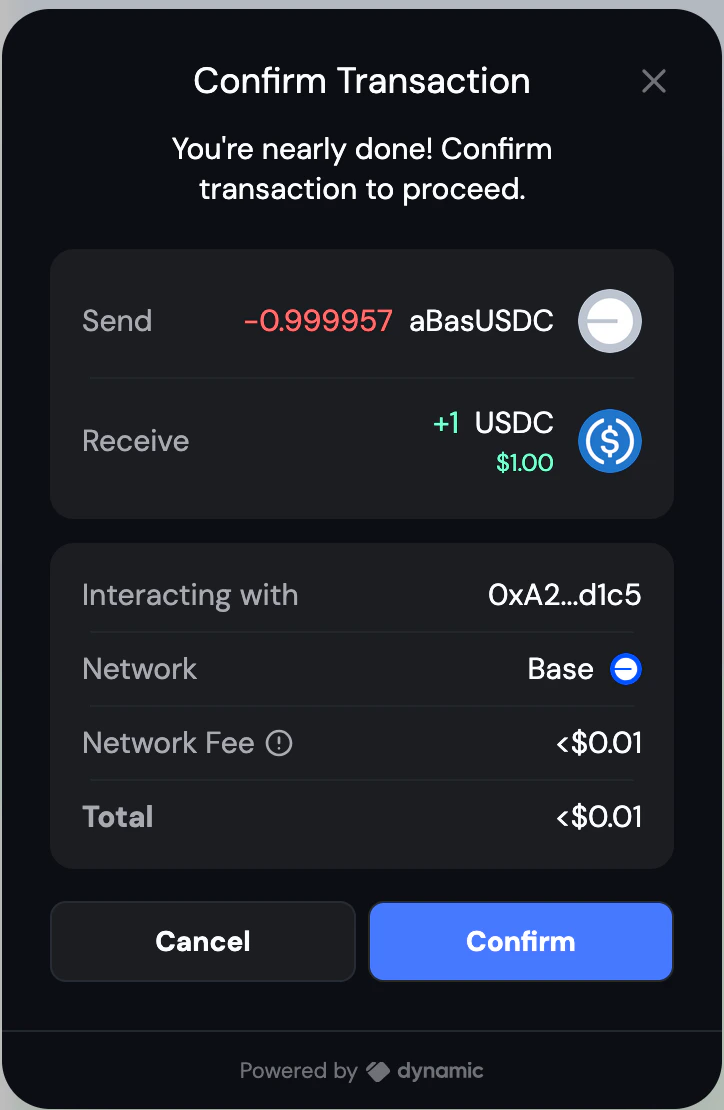
Dynamic’s embedded wallets include built-in transaction previews. To enable, go to Developer Settings → Embedded Wallets → Dynamic in the dashboard and toggle on Show Confirmation UI and Transaction Simulation. Users will see a breakdown of assets transferred, estimated fees, and the contract address before confirming any Aave transaction.
Get the wallet client

All Aave operations require a WalletClient from viem. Obtain it from Dynamic’s primaryWallet:
import { useEffect, useState } from "react";
import { WalletClient } from "viem";
import { useDynamicContext } from "@dynamic-labs/sdk-react-core";
import { isEthereumWallet } from "@dynamic-labs/ethereum";

const { primaryWallet } = useDynamicContext();
const [walletClient, setWalletClient] = useState<WalletClient | null>(null);

useEffect(() => {
  if (primaryWallet && isEthereumWallet(primaryWallet)) {
    primaryWallet.getWalletClient().then(setWalletClient);
  }
}, [primaryWallet]);
Pass walletClient and the active chain ID into useTransactionOperations.

Core operations

The Aave SDK uses a plan-based pattern. Each operation (useSupply, useBorrow, etc.) returns a function that resolves to a transaction plan. The plan tells you what kind of transaction to send — a direct transaction, one that first needs a token approval, or a failure due to insufficient balance. useSendTransaction handles submitting the plan to the wallet. Create src/lib/useTransactionOperations.ts:
src/lib/useTransactionOperations.ts
import { useSendTransaction } from "@aave/react/viem";
import { WalletClient, createPublicClient, http, parseAbiItem } from "viem";
import { base } from "viem/chains";
import {
  bigDecimal,
  chainId,
  evmAddress,
  useBorrow,
  useRepay,
  useSupply,
  useWithdraw,
} from "@aave/react";

export function useTransactionOperations(
  walletClient: WalletClient | null,
  selectedChainId: number
) {
  const [supply, supplying] = useSupply();
  const [borrow, borrowing] = useBorrow();
  const [repay, repaying] = useRepay();
  const [withdraw, withdrawing] = useWithdraw();
  const [sendTransaction, sending] = useSendTransaction(walletClient || undefined);

  const isOperating =
    supplying.loading ||
    borrowing.loading ||
    repaying.loading ||
    withdrawing.loading ||
    sending.loading;

  const operationError =
    supplying.error ||
    borrowing.error ||
    repaying.error ||
    withdrawing.error ||
    sending.error;

  const executeSupply = async (
    marketAddress: string,
    currencyAddress: string,
    amount: string
  ) => {
    if (!walletClient?.account?.address) return;

    const result = await supply({
      market: evmAddress(marketAddress),
      amount: {
        erc20: {
          currency: evmAddress(currencyAddress),
          value: bigDecimal(parseFloat(amount)),
        },
      },
      sender: evmAddress(walletClient.account.address),
      chainId: chainId(selectedChainId),
    }).andThen((plan) => {
      switch (plan.__typename) {
        case "TransactionRequest":
          return sendTransaction(plan);
        case "ApprovalRequired":
          // Sends the approval first, then the supply transaction
          return sendTransaction(plan.approval).andThen(() =>
            sendTransaction(plan.originalTransaction)
          );
        case "InsufficientBalanceError":
          throw new Error(`Insufficient balance: ${plan.required.value} required.`);
        default:
          throw new Error("Unknown transaction plan type");
      }
    });

    if (result.isErr()) throw result.error;
    return result.value;
  };

  const executeBorrow = async (
    marketAddress: string,
    currencyAddress: string,
    amount: string
  ) => {
    if (!walletClient?.account?.address) return;

    const result = await borrow({
      market: evmAddress(marketAddress),
      amount: {
        erc20: {
          currency: evmAddress(currencyAddress),
          value: bigDecimal(parseFloat(amount)),
        },
      },
      sender: evmAddress(walletClient.account.address),
      chainId: chainId(selectedChainId),
    }).andThen((plan) => {
      switch (plan.__typename) {
        case "TransactionRequest":
          return sendTransaction(plan);
        case "ApprovalRequired":
          return sendTransaction(plan.approval).andThen(() =>
            sendTransaction(plan.originalTransaction)
          );
        case "InsufficientBalanceError":
          throw new Error(`Insufficient balance: ${plan.required.value} required.`);
        default:
          throw new Error("Unknown transaction plan type");
      }
    });

    if (result.isErr()) throw result.error;
    return result.value;
  };

  const executeRepay = async (
    marketAddress: string,
    currencyAddress: string,
    amount: string | "max"
  ) => {
    if (!walletClient?.account?.address) return;

    const result = await repay({
      market: evmAddress(marketAddress),
      amount: {
        erc20: {
          currency: evmAddress(currencyAddress),
          value:
            amount === "max"
              ? { max: true }
              : { exact: bigDecimal(parseFloat(amount)) },
        },
      },
      sender: evmAddress(walletClient.account.address),
      chainId: chainId(selectedChainId),
    }).andThen((plan) => {
      switch (plan.__typename) {
        case "TransactionRequest":
          return sendTransaction(plan);
        case "ApprovalRequired":
          return sendTransaction(plan.approval).andThen(() =>
            sendTransaction(plan.originalTransaction)
          );
        case "InsufficientBalanceError":
          throw new Error(`Insufficient balance: ${plan.required.value} required.`);
        default:
          throw new Error("Unknown transaction plan type");
      }
    });

    if (result.isErr()) throw result.error;
    return result.value;
  };

  const executeWithdraw = async (
    marketAddress: string,
    currencyAddress: string,
    amount: string
  ) => {
    if (!walletClient?.account?.address) return;

    const result = await withdraw({
      market: evmAddress(marketAddress),
      amount: {
        erc20: {
          currency: evmAddress(currencyAddress),
          value: { exact: bigDecimal(parseFloat(amount)) },
        },
      },
      sender: evmAddress(walletClient.account.address),
      chainId: chainId(selectedChainId),
    }).andThen((plan) => {
      switch (plan.__typename) {
        case "TransactionRequest":
          return sendTransaction(plan);
        case "ApprovalRequired":
          return sendTransaction(plan.approval).andThen(() =>
            sendTransaction(plan.originalTransaction)
          );
        case "InsufficientBalanceError":
          throw new Error(`Insufficient balance: ${plan.required.value} required.`);
        default:
          throw new Error("Unknown transaction plan type");
      }
    });

    if (result.isErr()) throw result.error;
    return result.value;
  };

  return {
    isOperating,
    operationError,
    executeSupply,
    executeBorrow,
    executeRepay,
    executeWithdraw,
  };
}
Note that ApprovalRequired plans are handled automatically inside each function — the hook sends the approval transaction first, then the original transaction, with no extra steps needed in your UI.

Reading market and position data

Use these hooks from @aave/react to fetch available markets and the user’s positions:
import {
  useAaveMarkets,
  useUserSupplies,
  useUserBorrows,
  chainId as aaveChainId,
  evmAddress,
} from "@aave/react";
import { useChainId } from "wagmi";

const chainId = useChainId(); // active chain from the connected wallet

// Available markets on the active chain
const { data: markets, loading: marketsLoading } = useAaveMarkets({
  chainIds: [aaveChainId(chainId)],
  user: primaryWallet?.address ? evmAddress(primaryWallet.address) : undefined,
});

// User's active supply positions
const { data: userSupplies } = useUserSupplies({
  markets: markets?.map((m) => ({ chainId: m.chain.chainId, address: m.address })) || [],
  user: primaryWallet?.address ? evmAddress(primaryWallet.address) : undefined,
});

// User's active borrow positions
const { data: userBorrows } = useUserBorrows({
  markets: markets?.map((m) => ({ chainId: m.chain.chainId, address: m.address })) || [],
  user: primaryWallet?.address ? evmAddress(primaryWallet.address) : undefined,
});
Each market exposes supplyAPY, borrowAPY, totalSupply, and the address and currency needed to call the operations. Supply and borrow positions include the asset amount and market address.

Wiring it together

Here is how the wallet client, operations hook, and data hooks connect in a component:
src/components/MarketsInterface.tsx
"use client";

import {
  chainId as aaveChainId,
  evmAddress,
  useAaveMarkets,
  useUserBorrows,
  useUserSupplies,
} from "@aave/react";
import { isEthereumWallet } from "@dynamic-labs/ethereum";
import { useDynamicContext } from "@dynamic-labs/sdk-react-core";
import { useEffect, useState } from "react";
import { WalletClient } from "viem";
import { useChainId } from "wagmi";
import { useQueryClient } from "@tanstack/react-query";
import { useTransactionOperations } from "../lib/useTransactionOperations";

export function MarketsInterface() {
  const { primaryWallet } = useDynamicContext();
  const chainId = useChainId();
  const queryClient = useQueryClient();
  const [walletClient, setWalletClient] = useState<WalletClient | null>(null);
  const [lastTransaction, setLastTransaction] = useState<{
    type: string;
    hash: string;
    timestamp: number;
  } | null>(null);

  useEffect(() => {
    if (primaryWallet && isEthereumWallet(primaryWallet)) {
      primaryWallet.getWalletClient().then(setWalletClient);
    }
  }, [primaryWallet]);

  // Force-refresh market data when the user switches chains
  useEffect(() => {
    if (chainId) {
      const timeoutId = setTimeout(() => queryClient.invalidateQueries(), 100);
      return () => clearTimeout(timeoutId);
    }
  }, [chainId, queryClient]);

  const { isOperating, executeSupply, executeBorrow, executeRepay, executeWithdraw } =
    useTransactionOperations(walletClient, chainId);

  const { data: markets, loading: marketsLoading } = useAaveMarkets({
    chainIds: [aaveChainId(chainId)],
    user: primaryWallet?.address ? evmAddress(primaryWallet.address) : undefined,
  });

  const { data: userSupplies } = useUserSupplies({
    markets: markets?.map((m) => ({ chainId: m.chain.chainId, address: m.address })) || [],
    user: primaryWallet?.address ? evmAddress(primaryWallet.address) : undefined,
  });

  const { data: userBorrows } = useUserBorrows({
    markets: markets?.map((m) => ({ chainId: m.chain.chainId, address: m.address })) || [],
    user: primaryWallet?.address ? evmAddress(primaryWallet.address) : undefined,
  });

  const handleSupply = async (marketAddress: string, currencyAddress: string, amount: string) => {
    const hash = await executeSupply(marketAddress, currencyAddress, amount);
    if (hash) setLastTransaction({ type: "Supply", hash, timestamp: Date.now() });
  };

  const handleBorrow = async (marketAddress: string, currencyAddress: string, amount: string) => {
    const hash = await executeBorrow(marketAddress, currencyAddress, amount);
    if (hash) setLastTransaction({ type: "Borrow", hash, timestamp: Date.now() });
  };

  const handleRepay = async (marketAddress: string, currencyAddress: string, amount: string | "max") => {
    const hash = await executeRepay(marketAddress, currencyAddress, amount);
    if (hash) setLastTransaction({ type: "Repay", hash, timestamp: Date.now() });
  };

  const handleWithdraw = async (marketAddress: string, currencyAddress: string, amount: string) => {
    const hash = await executeWithdraw(marketAddress, currencyAddress, amount);
    if (hash) setLastTransaction({ type: "Withdraw", hash, timestamp: Date.now() });
  };

  // markets, userSupplies, userBorrows, isOperating, lastTransaction,
  // and the handle* functions are all available to render your UI.
  // Each market has: market.address, market.currency.address, market.currency.symbol,
  // market.supplyAPY, market.borrowAPY, market.totalSupply
}

Run the app

npm run dev
Add http://localhost:3000 to your allowed origins in the Dynamic dashboard under Developer Settings → CORS Origins.

Full source code

GitHub repository →

Additional resources