

Prerequisites
- JDK 21 LTS or higher (install via Adoptium or your distribution’s package manager)
- Dynamic Account: set up your project and get credentials from the Dynamic Developer Console
- A supported
(os, arch)host. v1.2.0-beta ships native binaries forlinux-x86_64andosx-aarch_64. The other classifiers (linux-aarch_64,osx-x86_64,windows-x86_64) are not yet supported and will throwUnsatisfiedLinkErrorat runtime; contact your Dynamic representative if you need one of those platforms.
Install
1. Install the artifacts into your local Maven repo
After downloadingdynamic-waas-sdk-java-1.2.0-beta.zip:
Prefer not to copy into your shared
~/.m2? Add a file-based repository to your pom.xml instead:2. Add the chain modules you need to your pom.xml
Both pull in the core + MPC + native modules transitively:
3. Add the os-maven-plugin build extension
The MPC native binary ships in classifier-suffixed JARs (...-osx-aarch_64.jar, ...-linux-x86_64.jar, etc.). Add os-maven-plugin so ${os.detected.classifier} resolves to the right one at build time:
Alternative: pin the classifier explicitly. If you can’t add the build extension (for example, you’re producing portable CI artifacts where the build host’s OS differs from the runtime target), depend on
dynamic-waas-sdk-mpc-natives directly with a hard-coded classifier:osdetector-gradle-plugin, which exposes osdetector.classifier.
Get Your Credentials
Navigate to the Dynamic Developer Console and:- Copy your
Environment ID - Create a new API token
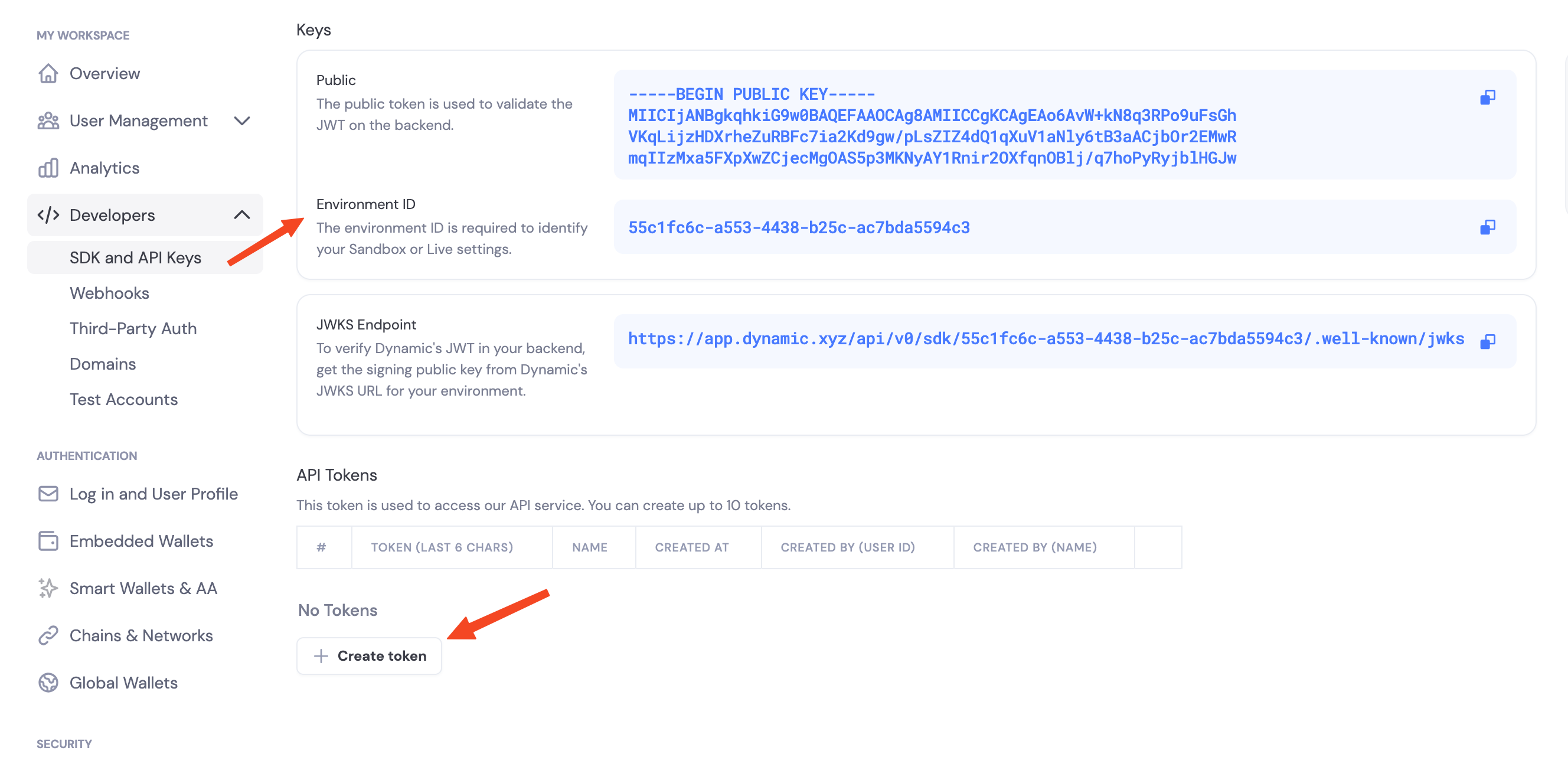
Enable Features in Dashboard
Before you can use wallet features, enable them in your Dynamic developer console:- Go to your Dynamic Developer Console
- Select your project
- Go to Wallets and enable embedded wallets
- Go to Chains and enable the networks you want to support (Ethereum, Solana, etc.)
Environment Variables
authenticateApiToken.
Initialize the Client
The Java SDK is chain-first: constructDynamicEvmWalletClient for Ethereum / EVM chains and DynamicSvmWalletClient for Solana. Both are AutoCloseable and hold a pooled HTTP client + native MPC handles. Construct once at application startup and reuse across requests; only close() at shutdown.
try-with-resources (try (var client = ...) { ... }) works for short-lived scripts and tests, but in a request handler it closes the client at the end of every request, defeating the connection-pool reuse and reinitializing the native MPC layer each call.CompletableFuture<T>. Use .join() for blocking call sites, .thenCompose(...) to compose asynchronously.
Stateless contract
The Java SDK is stateless from day 1: it does not hold wallet state between calls.createWalletAccount() returns a KeygenResult carrying two pieces of state you must persist:
WalletProperties: non-sensitive identity + backup-pointer info. Cache it in Redis / Postgres. Pass it to every subsequent sign / export operation.List<ServerKeyShare>: sensitive MPC key material. Store in a secrets vault (HSM, KMS-wrapped column, AWS Secrets Manager, etc.).
WalletProperties is the same concept as the Node SDK’s WalletMetadata, with the same fields (walletId, accountAddress, chainName, derivationPath, externalServerKeySharesBackupInfo). WalletProperties.toJson() / fromJson() use snake_case so it round-trips cleanly with the Python and Rust SDKs.Threshold signature schemes
When you configure signing, you choose how key shares combine to authorize a signature:TWO_OF_TWO(default): requires your server and Dynamic’s infrastructure to sign together.TWO_OF_THREE: requires two of three shares to sign. Tolerates one party being offline.
Pointing at preprod or sandbox
The SDK defaults to production. To target a different environment, passbaseApiUrl(...) on DynamicWalletClientOpts:
SDK capabilities
- Embedded wallets: create and use MPC wallets from your server (EVM + Solana)
- EVM signing: EIP-191 messages, EIP-712 typed data, EIP-1559 transaction signing + broadcast, off-chain signature verification
- EVM gas sponsorship:
sponsorTransactionplus status polling (getSponsoredTransactionStatus,waitForSponsoredTransaction) - SVM signing: Ed25519 messages, Solana transaction signing + broadcast, gas sponsorship, local address derivation
- Key import: bring an external private key into MPC custody (EVM + Solana)
- Key export: export raw private keys for migration / disaster recovery
- Backup & password checks:
backupKeyShares/recoverKeySharesfor Dynamic-stored key-share backups, plus localverifyPassword - Delegated access: per-wallet API key flow with
RSA-OAEP-SHA256 + AES-256-GCMwebhook decryption, mirroring Node SDK v1 / Python / Rust
Logging
The SDK uses JDK Platform Logging (System.Logger). Customers using SLF4J / Logback can route SDK logs by adding the slf4j-jdk-platform-logging adapter to their classpath.
Next Steps
EVM Support
- Create EVM Wallets: create Ethereum wallets
- Sign EVM Messages: EIP-191 personal_sign + off-chain verification
- Sign Typed Data (EIP-712)
- Sign EVM Transactions: EIP-1559 transaction signing
- Send EVM Transactions: sign + broadcast in one call
- Sponsor EVM Transactions: gas sponsorship for EVM wallets
- Export EVM Private Key
- EVM Delegated Access
Solana Support
- Create SVM Wallets
- Sign SVM Messages: Ed25519 raw-bytes signing
- Sign SVM Transactions
- Send SVM Transactions
- Sponsor Transactions: gas sponsorship
- Export SVM Private Key
- SVM Delegated Access
Cross-chain & lifecycle
- Import a Private Key: bring an external key into MPC