

What We’re Building
A React (Next.js) app that connects Dynamic’s MPC wallets to Circle Gateway infrastructure, allowing users to:- Deposit USDC into Circle Gateway across multiple domains
- Transfer USDC cross-chain between Sepolia, Base Sepolia, and Arc Testnet
- View USDC balances across all domains in a unified interface
- Sign EIP-712 messages for secure cross-chain attestations
Key Components
- Dynamic MPC Wallets - Embedded, non-custodial wallets with seamless auth
- Circle Gateway - Cross-chain infrastructure for USDC transfers between domains
- EIP-712 Signing - Secure typed data signing for attestation messages
Supported Networks
This guide demonstrates Circle Gateway integration with Circle Arc testnet, along with Sepolia (Domain 0) and Base Sepolia (Domain 6). Circle Arc is a new Layer-1 blockchain network designed as an Economic Operating System for the internet, featuring predictable dollar-based fees, sub-second finality, and EVM compatibility.How It Works
Cross-Chain Transfer Flow
Circle Gateway uses a burn-and-mint mechanism for cross-chain USDC transfers:- Deposit - Users deposit USDC into the Gateway Wallet contract on the source chain
- Burn Intent - When transferring, the app constructs a burn intent specifying the source domain, destination domain, amount, and recipient
- EIP-712 Signing - The burn intent is signed using EIP-712 typed data signing, which provides cryptographic proof of the user’s intent
- Attestation - The signed burn intent is submitted to Circle Gateway API, which validates the signature and returns an attestation
- Mint - The app switches to the destination chain and calls the Gateway Minter contract with the attestation to mint USDC
EIP-712 Typed Data
EIP-712 provides a standard way to sign structured data. The burn intent includes:- Transfer Specification - Source and destination domains, contracts, tokens, and amounts
- Burn Intent - Maximum block height, maximum fee, and the transfer spec
- Domain Separator - Ensures signatures are chain-specific and cannot be replayed
Building the Application
Project setup
Follow the React Quickstart and use the Custom setup path: Ethereum (EVM) with Wagmi and viem. This recipe’s example uses Next.js—scaffold withcreate-next-app and apply the same packages and provider wiring as in the quickstart, or mirror the layout in the GitHub repository linked above.
Dashboard: Under Chains & Networks, enable the testnets this guide uses (for example Sepolia and Base Sepolia) and any other EVM networks you need. Under Sign-in Methods and Wallets, enable what your flow needs (including Embedded wallets). Under Security → Allowed Origins, add the origin where the app runs (for example
http://localhost:3000).Configure Dynamic Environment
Create a.env.local file with your Dynamic environment ID:
.env.local
Add Chain Configuration
Createsrc/lib/chains.ts to define the Circle Gateway domain IDs and contract addresses. This file contains all the chain-specific configuration needed for the Gateway integration.
src/lib/chains.ts
Update Wagmi Configuration
Updatesrc/lib/wagmi.ts to include all three chains. This configures wagmi with the RPC endpoints for each chain, enabling the app to interact with Sepolia, Base Sepolia, and Arc Testnet networks.
src/lib/wagmi.ts
Create Gateway Utilities
Createsrc/lib/gateway.ts to handle Circle Gateway API calls and EIP-712 signing. This file contains all the API communication logic for interacting with the Circle Gateway service. It provides functions to build burn intents, create EIP-712 typed data structures for signing, and handle address conversions required for cross-chain transfers.
The GatewayAPI object provides methods for making HTTP requests to the Circle Gateway API, while the burnIntent and burnIntentTypedData functions construct the structured data needed for EIP-712 message signing, which is required for secure cross-chain attestations.
src/lib/gateway.ts
Build Main Gateway Component
Createsrc/components/GatewayApp.tsx for the main interface. This component serves as the central hub for the Gateway integration, displaying USDC balances across all three domains and providing access to deposit and transfer functionality.
The component:
- Fetches balances - Retrieves USDC balances from Circle Gateway API for all supported domains
- Displays unified view - Shows balances across Sepolia, Base Sepolia, and Arc Testnet in a single interface
- Manages state - Handles loading states and error handling for API calls
- Integrates forms - Includes deposit and transfer forms for user interactions
src/components/GatewayApp.tsx
Create Deposit Form
Createsrc/components/DepositForm.tsx for depositing USDC. This component handles the two-step deposit process required by Circle Gateway:
- Approve Gateway Wallet - Grants the Gateway Wallet contract permission to spend the user’s USDC
- Deposit to Gateway - Transfers USDC into the Gateway Wallet contract on the selected chain
src/components/DepositForm.tsx
Create Transfer Form
src/components/TransferForm.tsx
Update Main Page
Updatesrc/app/page.tsx to use the GatewayApp component. This is the entry point for the application that renders the main Gateway interface.
src/app/page.tsx
Enable Transaction Simulation
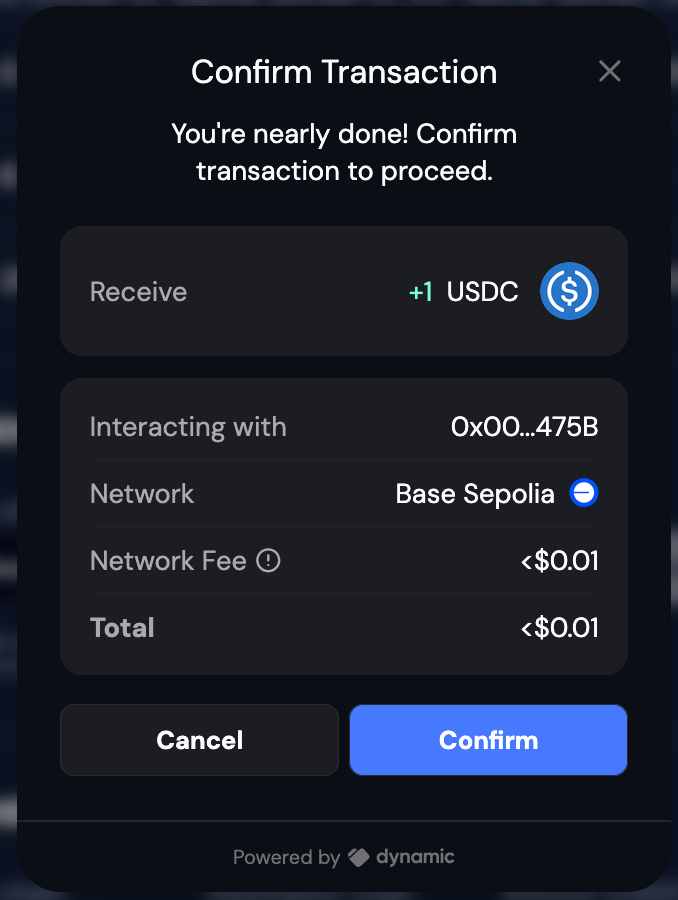
Dynamic’s transaction simulation shows detailed transaction previews before execution. To enable:- Go to your Dynamic developer console
- Navigate to Developer Settings → Embedded Wallets → Dynamic
- Enable “Show Confirmation UI” and “Transaction Simulation” toggles

Configure CORS
Addhttp://localhost:3000 to CORS origins in your Dynamic developer console under Developer Settings > CORS Origins.
Run the Application
Start the development server:http://localhost:3000.