

Enterprise feature
Please contact us in Slack or via email (dynamic@fireblocks.com) to enable. Sandbox environments can configure and test external auth without enterprise access; the requirement applies to live environments.Overview
If you have your own authentication system or use other auth providers outside Dynamic (e.g. Auth0, Firebase Auth, Supabase Auth), you can continue using those services while taking advantage of Dynamic’s wallets, user management, and SDK features. You do this by exchanging your JWT for a Dynamic session. Dynamic verifies your token, creates (or matches) a user record, and returns its standard sign-in artifacts (JWT and user object).It is recommended to issue a Dynamic specific JWT token from your auth provider, separate from your applications normal access token that can not be used to access resources on your server.
Architecture / Flow
How authentication is performed (Client / end-user ↔ Dynamic)
With Bring Your Own Auth, your authentication system handles the initial login. The Dynamic SDK then exchanges your JWT for a Dynamic-issued session. At a high level:- Your auth system authenticates the user and issues a JWT.
- Your app passes that JWT to the Dynamic SDK.
- Dynamic verifies the authenticity of the JWT by fetching the public key from a JWKS endpoint you provide and verifying the JWT signature.
- Dynamic validates the
iss(issuer) claim matches your configured value, requiressub(subject/user ID) and akidheader so the signing key can be resolved, and rejects the JWT if any check fails.expis validated when present, and only RS256 or ES256 signatures are accepted. - Once verified, Dynamic creates a verified credential of type
externalUser; itspublicIdentifieris set to the JWT’ssub. - Dynamic issues its own JWT and session. The SDK stores it and the user is authenticated in Dynamic.
email in your JWT. If the email has been verified, set "emailVerified": true so Dynamic creates an email verified credential for the user.
Workflow
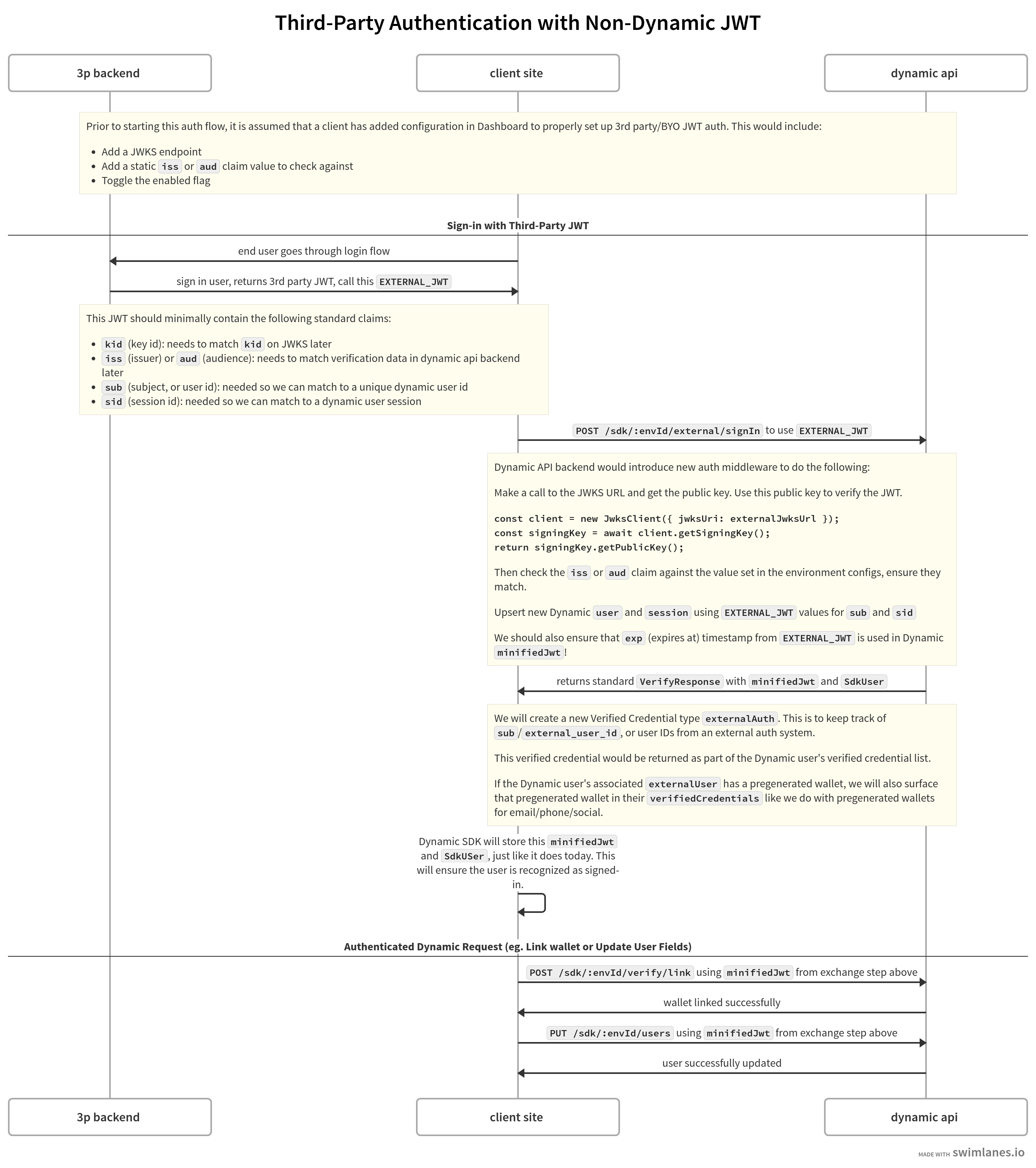
Configuration
- Visit the External Authentication page in your Dynamic Console.

- Provide values for the following fields:

Field descriptions
Field descriptions
- iss (required): Standard JWT claim for the “issuer” of the JWT. This should be the entity that issued the token. Typically a URL or a valid constant string.
- jwksUrl (required): A publicly accessible URL that returns the JWT signer’s public key in the standard JWKS format. Used to verify the signatures of your JWTs.
- aud (optional): Standard JWT claim for the “audience” of the JWT. The intended recipient of the token. Typically a URL or a valid constant string.
- cookieName (optional): For clients that use cookie-based authentication for third-party auth and who have no access to the raw JWT on the frontend, specify the cookie name where the JWT is stored.
- assumeEmailVerified (optional, default false): When enabled, a missing
emailVerifiedclaim on your JWT is treated astrue, so your users do not need to include the claim explicitly. An explicitfalsevalue in the JWT is always respected.
- Enable the feature using the toggle when ready.

- You can also test a JWT against your saved settings; the Dynamic Console returns any errors.

Using it
After configuration, pass your JWT to your SDK’s external auth method to sign users in or link them to Dynamic. Each SDK has its own implementation guide:- JavaScript, React & React Native
- Flutter
- Swift
- Kotlin
- Unity
- Server-side and agent sign-in: Sign In with an External JWT (Node)